Product Recognition | |
|---|
Certification Number | ZC10-17085751 |
|---|
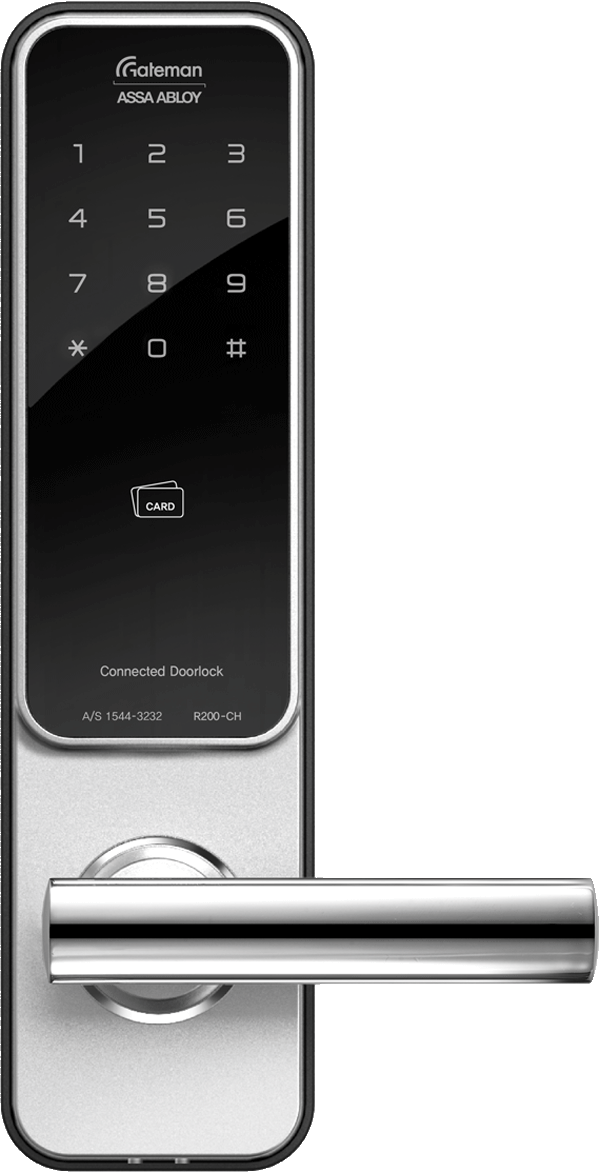
Name | R200-CH |
|---|
Short Description | Digital Doorlock with RF connection built in and optional Z-Wave connection available |
|---|
Long Description | Digital Doorlock by Gateman
Manufacturer: iRevo, ASSA ABLOY
Basic Feature:
- Usual doorlock features as locking and opening digitally
Remote Feature:
- RF connection by remote controller(certified by iRevo)
- Z-Wave connection with major telcomm platform providers(LGU+)
- Bluetooth connection with Gateman Smart Living service
Other detail functions can be found in Gateman website
- www.egateman.co.kr |
|---|
Brand | GATEMAN |
|---|
Product Identifier | R200-CH |
|---|
OEM Version | HW: 32 FW: 32.16:16.16 |
|---|
Hardware Platform | ZM5202 |
|---|
Z-Wave Version | 6.71.01 |
|---|
Library Type | SLAVE_ENHANCED_232 |
|---|
Device Type | Door Lock - Keypad |
|---|
Role Type | ROLE_TYPE_SLAVE_SLEEPING_LISTENING |
|---|
Manufacturer ID | 0x0212 |
|---|
Product Type ID | 0xC601 |
|---|
Product ID | 0x0001 |
|---|
User Icon | 0x0300 |
|---|
Installer Icon | 0x0300 |
|---|
Frequency Plans | KR: 920.90MHz, 921.70MHz, 923.10MHz |
|---|
Categories | Locks, Security Add-Ons |
|---|
Countries / Regions | Republic of Korea |
|---|
Supported Command Classes | Identifier | Name | Key | Version |
|---|
COMMAND_CLASS_POWERLEVEL | Powerlevel | 0x73 | 1 | COMMAND_CLASS_USER_CODE | User Code | 0x63 | 1 | COMMAND_CLASS_DOOR_LOCK_V2 | Door Lock V2 | 0x62 | 2 | COMMAND_CLASS_ALARM | Alarm | 0x71 | 1 | COMMAND_CLASS_BATTERY | Battery | 0x80 | 1 | COMMAND_CLASS_SECURITY | Security S0 | 0x98 | 1 | COMMAND_CLASS_TRANSPORT_SERVICE_V2 | Transport Service V2 | 0x55 | 2 | COMMAND_CLASS_VERSION_V2 | Version V2 | 0x86 | 2 | COMMAND_CLASS_DEVICE_RESET_LOCALLY | Device Reset Locally | 0x5A | 1 | COMMAND_CLASS_ZWAVEPLUS_INFO_V2 | Z-Wave Plus Info V2 | 0x5E | 2 | COMMAND_CLASS_ASSOCIATION_V2 | Association V2 | 0x85 | 2 | COMMAND_CLASS_ASSOCIATION_GRP_INFO | Association Group Info | 0x59 | 1 | COMMAND_CLASS_SECURITY_2 | Security S2 | 0x9F | 1 | COMMAND_CLASS_SUPERVISION | Supervision | 0x6C | 1 | COMMAND_CLASS_MANUFACTURER_SPECIFIC_V2 | Manufacturer Specific V2 | 0x72 | 2 |
|
|---|
S2 Classes | S2_ACCESS_CONTROL |
|---|
Documents | Category | Description | File |
|---|
Manual_Primary_Lang | Product or Owner's Manual | |
|
|---|
Features | Feature | Values |
|---|
Color | | Battery Quantity | | Communications Connections | Value |
|---|
Bluetooth | Manufacturer Proprietary |
| Door Lock Type | | Gateway Has Preferred Partners | | Battery Type | | Supported Notification Types | Value |
|---|
Access Control | Home Security | Power Management | Emergency Alarm |
|
|
|---|
Association Groups | Group Number | Maximum Nodes Supported | End Point ID | Description |
|---|
1 | 5 | 0 | Z-Wave Plus Lifeline |
|
|---|
Texts | ID | Description | Value |
|---|
2 | Exclusion | To exclude:
1. Touch keypad with palm
2. Enter User code(Normal Mode only. Enter Master code if operating Master Mode.)
3. Press 'R' button [Registration] from the inside of battery cover.
4. Press 9,#,3,# on the keypad (by sequence)
5. Wait until 'Ding dong dang' melody play than press 'R' button | 1 | Inclusion | To include:
1. Touch keypad with palm
2. Enter User code(Normal Mode only. Enter Master code if operating Master Mode.)
3. Press 'R' button [Registration] from the inside of battery cover.
4. Press 9,#,1,# on the keypad (by sequence)
5. Wait until 'Ding dong dang' melody play than press 'R' button | 5 | Factory Reset | To reset to factory defaults:
※ Use this procedure only in the event that the network primary controller is missing or otherwise inoperable. (User code or master code remains the same. Only network settings reset to factory defaults.)
1. Touch keypad with palm
2. Enter User code(Normal Mode only. Enter Master code if operating Master Mode.)
3. Press 'R' button [Registration] from the inside of battery cover.
4. Press 9,#,9,# on the keypad (by sequence)
5. Wait until 'Ding dong dang' melody play than press 'R' button | 4 | Device Wake-Up | The lock is always in 'Wake up status'.
However, touch with palm to begin and end action. |
|
|---|
Supported Notification Types | Notification Type | Event / State |
|---|
Access Control | (Refer to parameters): State idle | Home Security | (Refer to parameters): State idle | Power Management | (Refer to parameters): State idle | Emergency Alarm | (Refer to parameters): State idle |
|
|---|
Supports NWI | Yes |
|---|
Supports Explorer Frames | Yes |
|---|
Is Flirs | Yes |
|---|