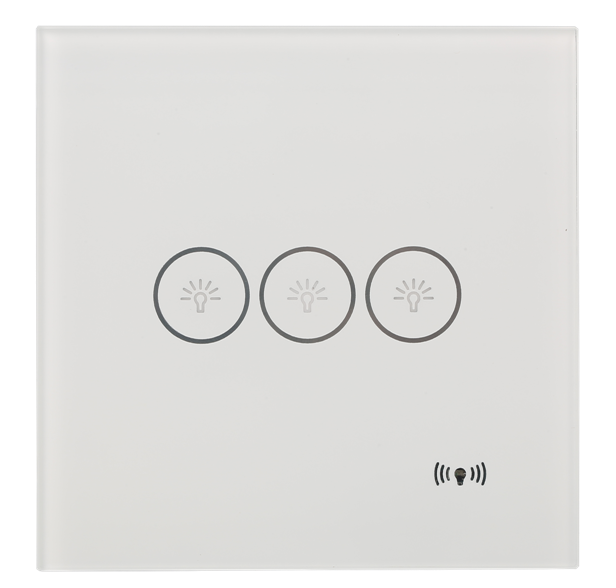
Product Recognition | |
|---|
Certification Number | ZC10-17115828 |
|---|
Name | 3CH Touch Wall Switch |
|---|
Short Description | The product is designed to operate with neutral wire control three channel loads individually. Zero-cross detect function to support a large load of less than 800 Watt per channel. |
|---|
Long Description | The product is designed to operate with neutral wire control three channel loads individually. Zero-cross detect function to support a large load of less than 800 Watt per channel.
Each channel supports associated control another multi-channel endpoint to setup multi-control switch.
An individual led indicates inclusion/exclusion processing status.
Standard 86 size box with 25mm depth of embedded only. |
|---|
Brand | Jintaobao |
|---|
Product Identifier | JTB-3011-03 |
|---|
OEM Version | HW: 33 FW: 1.01 |
|---|
Hardware Platform | ZM5202 |
|---|
Z-Wave Version | 6.51.09 |
|---|
Library Type | SLAVE_ROUTING |
|---|
Device Type | On/Off Power Switch |
|---|
Role Type | ROLE_TYPE_SLAVE_ALWAYS_ON |
|---|
Manufacturer ID | 0x015A |
|---|
Product Type ID | 0x3011 |
|---|
Product ID | 0x0003 |
|---|
User Icon | 0x0700 |
|---|
Installer Icon | 0x0700 |
|---|
Frequency Plans | EU: 869.85MHz, 868.40MHz |
|---|
Categories | All Lighting Devices, On/Off Switches/Devices |
|---|
Countries / Regions | European Union |
|---|
Supported Command Classes | Identifier | Name | Key | Version |
|---|
COMMAND_CLASS_POWERLEVEL | Powerlevel | 0x73 | 1 | COMMAND_CLASS_MULTI_CHANNEL_ASSOCIATION_V3 | Multi-Channel Association V3 | 0x8E | 3 | COMMAND_CLASS_SWITCH_ALL | Switch All | 0x27 | 1 | COMMAND_CLASS_SWITCH_BINARY | Switch Binary | 0x25 | 1 | COMMAND_CLASS_BASIC | Basic | 0x20 | 1 | COMMAND_CLASS_VERSION_V2 | Version V2 | 0x86 | 2 | COMMAND_CLASS_DEVICE_RESET_LOCALLY | Device Reset Locally | 0x5A | 1 | COMMAND_CLASS_ZWAVEPLUS_INFO_V2 | Z-Wave Plus Info V2 | 0x5E | 2 | COMMAND_CLASS_ASSOCIATION_V2 | Association V2 | 0x85 | 2 | COMMAND_CLASS_ASSOCIATION_GRP_INFO | Association Group Info | 0x59 | 1 | COMMAND_CLASS_MULTI_CHANNEL_V4 | Multi-Channel V4 | 0x60 | 4 | COMMAND_CLASS_MANUFACTURER_SPECIFIC_V2 | Manufacturer Specific V2 | 0x72 | 2 |
|
|---|
Controlled Command Classes | Identifier | Name | Key | Version |
|---|
COMMAND_CLASS_BASIC | Basic | 0x20 | 1 |
|
|---|
Documents | Category | Description | File |
|---|
Manual_Primary_Lang | Product or Owner's Manual | |
|
|---|
Features | Feature | Values |
|---|
Switch Load Capacity Current | | Electric Load Type | Value |
|---|
Incandescent | Fluorescent | MLV (Magnetic) | ELV (Electronic) | LED | Inductive (e.g. Motor) |
| Switch Load Capacity Volt-Ampere | | Switch Load Capacity Watts | | Loads Controlled | | Neutral Wire Required | |
|
|---|
Association Groups | Group Number | Maximum Nodes Supported | End Point ID | Description |
|---|
2 | 1 | 0 | Association Group 2 is assigned to send Basic Set On frame to associated devices corresponding while channel 1 switch turn on. | 5 | 1 | 0 | Association Group 5 is assigned to send Basic Set Off frame to associated devices corresponding while channel 2 switch turn off. | 6 | 1 | 0 | Association Group 6 is assigned to send Basic Set On frame to associated devices corresponding while channel 3 switch turn on. | 7 | 1 | 0 | Association Group 7 is assigned to send Basic Set Off frame to associated devices corresponding while channel 3 switch turn off. | 3 | 1 | 0 | Association Group 3 is assigned to send Basic Set Off frame to associated devices corresponding while channel 1 switch turn off. | 4 | 1 | 0 | Association Group 4 is assigned to send Basic Set On frame to associated devices corresponding while channel 2 switch turn on. | 1 | 1 | 0 | Z-Wave Plus Lifeline, assigned to send switch lifeline status to associated devices. |
|
|---|
Texts | ID | Description | Value |
|---|
6 | Additional Special Features | Association Group 2,4,6 is assigned to send Basic Set On frame to associated devices corresponding while channel 1,2,3 switch turn on, it can easily setup multi-control another switch turn on together.
Meanwhile, association Group 3,4,7 is assigned to send Basic Set Off frame to associated devices corresponding while channel 1,2,3 switch turn off. | 1 | Inclusion | Start master controller add device mode as instruction, press and hold the channel 1 touch icon (located on leftmost) for 2 second, RF icon LED on right bottom flash
indicator inclusion processing until included or 60 seconds timeout no detect any master controller. | 2 | Exclusion | Start master controller remove device mode as instruction, press and hold the channel 1 touch icon (located on leftmost) for 2 second, RF icon LED on right bottom flash indicator inclusion processing until included or 15 seconds timeout no detect any master controller.
LED flash slowly indicated has no included any controller. | 5 | Factory Reset | The factory default settings are restored when the device is removed from the network.
Please use this procedure only when the network primary controller is missing or otherwise inoperable. |
|
|---|
Supports NWI | Yes |
|---|
Supports Explorer Frames | Yes |
|---|