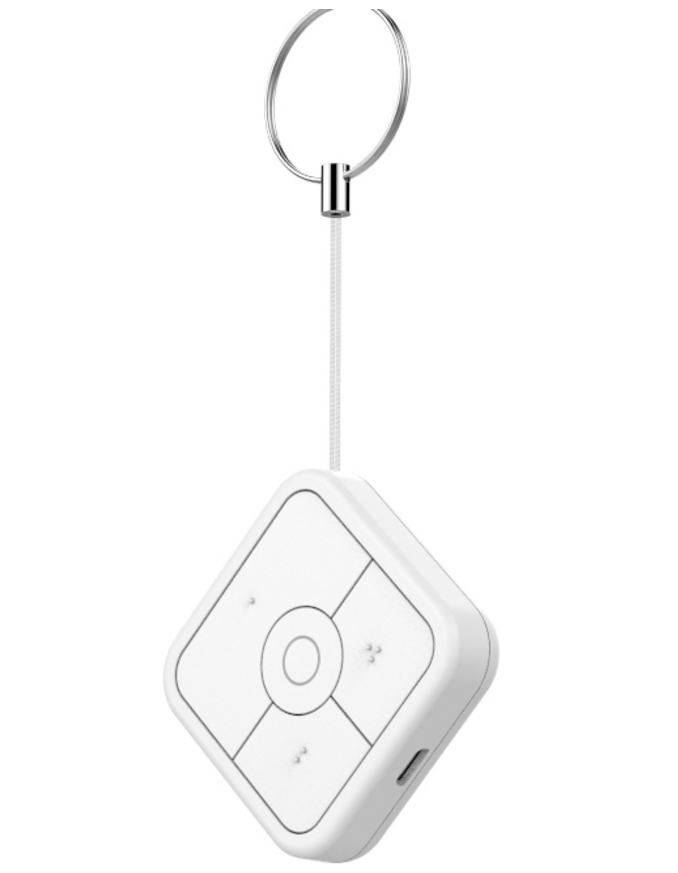
Product Recognition | |
|---|
Certification Number | ZC10-19036409 |
|---|
Name | NanoMote Quad |
|---|
Short Description | NanoMote Quad is a wireless, portable and rechargeable product. |
|---|
Long Description | NanoMote Quad is a wireless, portable and rechargeable product. On one hand, it can be used to control separate Z-Wave device, such as a smart Plug, smart Dimmer, Bulb, etc. through Z-Wave Gateway. On the other hand, it can also be used to program a scene by Gateway app which groups many smart nodes such as Plugs, Bulbs, and Siren... The scene may refer to sleep scene, movie scene and entertainment scene, etc. as you created. |
|---|
Brand | Aeotec |
|---|
Product Identifier | ZWA003-F |
|---|
OEM Version | HW: 1 FW: 1.02 |
|---|
Hardware Platform | ZM5101 |
|---|
Z-Wave Version | 6.71.01 |
|---|
Library Type | SLAVE_ENHANCED_232 |
|---|
Device Type | Wall Controller |
|---|
Role Type | ROLE_TYPE_SLAVE_PORTABLE |
|---|
Manufacturer ID | 0x0371 |
|---|
Product Type ID | 0x0902 |
|---|
Product ID | 0x0003 |
|---|
User Icon | 0x1600 |
|---|
Installer Icon | 0x1600 |
|---|
Frequency Plans | IN: 865.20MHz |
|---|
Categories | All Controllers, Handheld Controller |
|---|
Countries / Regions | India |
|---|
Supported Command Classes | Identifier | Name | Key | Version |
|---|
COMMAND_CLASS_POWERLEVEL | Powerlevel | 0x73 | 1 | COMMAND_CLASS_BATTERY | Battery | 0x80 | 1 | COMMAND_CLASS_CONFIGURATION | Configuration | 0x70 | 1 | COMMAND_CLASS_SECURITY | Security S0 | 0x98 | 1 | COMMAND_CLASS_TRANSPORT_SERVICE_V2 | Transport Service V2 | 0x55 | 2 | COMMAND_CLASS_VERSION_V2 | Version V2 | 0x86 | 2 | COMMAND_CLASS_WAKE_UP_V2 | Wake Up V2 | 0x84 | 2 | COMMAND_CLASS_DEVICE_RESET_LOCALLY | Device Reset Locally | 0x5A | 1 | COMMAND_CLASS_ZWAVEPLUS_INFO_V2 | Z-Wave Plus Info V2 | 0x5E | 2 | COMMAND_CLASS_ASSOCIATION_V2 | Association V2 | 0x85 | 2 | COMMAND_CLASS_ASSOCIATION_GRP_INFO | Association Group Info | 0x59 | 1 | COMMAND_CLASS_SECURITY_2 | Security S2 | 0x9F | 1 | COMMAND_CLASS_CENTRAL_SCENE_V3 | Central Scene V3 | 0x5B | 3 | COMMAND_CLASS_SUPERVISION | Supervision | 0x6C | 1 | COMMAND_CLASS_FIRMWARE_UPDATE_MD_V3 | Firmware Update Meta-Data V3 | 0x7A | 3 | COMMAND_CLASS_MANUFACTURER_SPECIFIC_V2 | Manufacturer Specific V2 | 0x72 | 2 |
|
|---|
Controlled Command Classes | Identifier | Name | Key | Version |
|---|
COMMAND_CLASS_BATTERY | Battery | 0x80 | 1 | COMMAND_CLASS_BASIC | Basic | 0x20 | 1 | COMMAND_CLASS_SWITCH_MULTILEVEL_V2 | Switch Multilevel V2 | 0x26 | 2 |
|
|---|
S2 Classes | S2_UNAUTHENTICATED |
|---|
Documents | Category | Description | File |
|---|
Manual_Primary_Lang | Product or Owner's Manual | |
|
|---|
Features | Feature | Values |
|---|
Firmware Updatable | Value |
|---|
Updatable by Consumer via Internet |
| Z-Wave Scene Type | Value |
|---|
Scene & Central Scene |
| Battery Quantity | | Battery Type | |
|
|---|
Association Groups | Group Number | Maximum Nodes Supported | End Point ID | Description |
|---|
8 | 5 | 0 | On/Off control for Button 4.
It allows NanoMote Quad sends basic set command when the button 4 is triggered. | 7 | 5 | 0 | Dimming control for Button 3.
It allows NanoMote Quad sends switch multilevel set, multilevel start level change and multilevel stop level change command when the button 3 is triggered.
| 6 | 5 | 0 | On/Off control for Button 3.
It allows NanoMote Quad sends basic set command when the button 3 is triggered.
| 9 | 5 | 0 | Dimming control for Button 4.
It allows NanoMote Quad sends switch multilevel set, multilevel start level change and multilevel stop level change command when the button 4 is triggered. | 1 | 5 | 0 | Lifeline group.
In this group, it allows NanoMote Quad sends central scene notification command and battery report command when any button is triggered. | 2 | 5 | 0 | On/Off control for Button 1.
It allows NanoMote Quad sends basic set command when the button 1 is triggered. | 3 | 5 | 0 | Dimming control for Button 1.
It allows NanoMote Quad sends switch multilevel set, multilevel start level change and multilevel stop level change command when the button 1 is triggered. | 4 | 5 | 0 | On/Off control for Button 2.
It allows NanoMote Quad sends basic set command when the button 2 is triggered. | 5 | 5 | 0 | Dimming control for Button 2.
It allows NanoMote Quad sends switch multilevel set, multilevel start level change and multilevel stop level change command when the button 2 is triggered. |
|
|---|
Configuration Parameters | Parameter Number | Name | Description | Format | Size | Min Value | Max Value | Default Value | Parameter Values |
|---|
43 | Enable/disable the buzzer alarm when battery is running low. | Enable/disable the buzzer alarm when battery is running low. | 0 | 1 | 0 | 0 | 0 | From | To | Description |
|---|
0 | 0 | Disable. | 1 | 1 | Enable. |
| 41 | Enable send central scene notification | Enable send central scene notification. | 0 | 1 | 0 | 0 | 1 | From | To | Description |
|---|
0 | 0 | Disable | 1 | 1 | Enable |
| 42 | Setting the duration value of the command switch multilevel | Setting the duration value of the command switch multilevel. | 0 | 1 | 0 | 0 | -1 | From | To | Description |
|---|
-128 | 127 | Available settings -128 to 127 |
|
|
|---|
Texts | ID | Description | Value |
|---|
5 | Factory Reset | Press and hold the button for 20 seconds, the LED light will be solid on in red. Then release the button, the LED light will be stay in red for 2 seconds, during this 2 seconds, please click the button once, it will start to restore factory default. At the same time, the LED light will be solid on in colorful for 15 seconds. Then Sending Device Reset locally notification to the controller.
NOTE:
Use this procedure only in the event that the network primary controller is missing or otherwise inoperable. | 23 | Controller Inclusion | NanoMote Quad can be included and operated in any Z-Wave network with other Z-Wave certified devices from other manufacturers and/or other applications. All non-battery operated nodes within the network will act as repeaters regardless of vendor to increase reliability of the network.
1. Insert the LIR2450 battery.
2. Place the device within the direct range of your Z-Wave controller.
3. Set the main controller’s adding mode (see the controller’s manual).
4. Double click the button quickly, the LED indicator should blink fast.
5. Wait for the adding process to end.
6. Successful adding will be confirmed by the Z-Wave controller’s message. | 24 | Controller Exclusion | To remove the NanoMote Quad from the Z-Wave network:
1.Insert the LIR2450 battery.
2.Place the device within the direct range of your Z-Wave controller.
3.Set the main controller remove mode (see the controller’s manual).
4.Double click the button quickly, the LED indicator should blink fast.
5.Wait for the removing process to end.
6.Successful adding will be confirmed by the Z-Wave controller’s message. | 4 | Device Wake-Up | Pressing and holding button for 5 seconds and then release so the NanoMote Quad will wake up itself and send wake-up notification out to Z-Wave Controller. After that, it can be operated to update parameters, OTA, and detect battery level etc. |
|
|---|
Supports NWI | Yes |
|---|
Supports Explorer Frames | Yes |
|---|
Radio Range Z-Wave (m) | 40 |
|---|