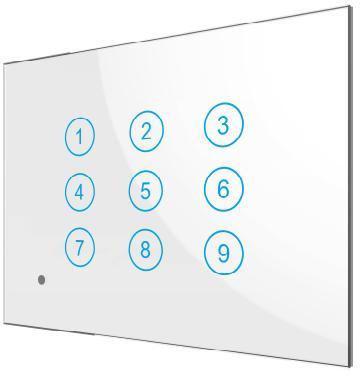
| Product Recognition | |
|---|
| Certification Number | ZC10-19086705 |
|---|
| Name | Smart Switch Box |
|---|
| Short Description | The smart switch box is a Z-Wave TM enabled wireless device fully compatible with any Z-Wave TM enabled networks. Inclusion of this unit on other manufacturer’s Wireless Controller menu allows remote operation of the unit and connected load. Remote control of Dimmer/Relay modules are possible with other manufacturer’s wireless Controller as well. |
|---|
| Long Description | The smart switch box is a Z-Wave TM enabled wireless device fully compatible with any Z-Wave TM enabled networks. This device is a security enabled Z-Wave Plus product that uses encrypted Z-Wave Plus messages to communicate to other security enabled Z-Wave Plus products. Z-Wave TM enabled devices displaying the Z-Wave TM logo can also be used with this device regardless of the manufacturer, and this device can also be used in other manufacturer’s Z-Wave TM enabled networks. This device must be used in conjunction with a Security Enabled Z-Wave Controller in order to fully utilize all functions. Inclusion of this unit on other manufacturer’s Wireless Controller menu allows remote operation of the unit and connected load. Remote control of Dimmer/Relay modules are possible with other manufacturer’s wireless Controller as well. PAN26 is designed to act as a repeater. Repeaters will re-transmit the RF signal to ensure that the signal is received by its intended destination by routing the signal around obstacles and radio dead spots. Its functionality and supported command classes are identical when included as a secure and non-secure device. |
|---|
| Brand | Philio |
|---|
| Product Identifier | PAN26-1 |
|---|
| OEM Version | HW: 1 FW: 1.20:01.10 |
|---|
| Hardware Platform | SD3502 |
|---|
| Z-Wave Version | 6.81.03 |
|---|
| Library Type | SLAVE_ENHANCED_232 |
|---|
| Device Type | On/Off Power Switch |
|---|
| Role Type | ROLE_TYPE_SLAVE_ALWAYS_ON |
|---|
| Manufacturer ID | 0x013C |
|---|
| Product Type ID | 0x0001 |
|---|
| Product ID | 0x0073 |
|---|
| User Icon | 0x0700 |
|---|
| Installer Icon | 0x0700 |
|---|
| Frequency Plans | EU: 869.85MHz, 868.40MHz |
|---|
| Categories | All Lighting Devices, On/Off Switches/Devices |
|---|
| Countries / Regions | European Union |
|---|
| Supported Command Classes | | Identifier | Name | Key | Version |
|---|
| COMMAND_CLASS_SWITCH_MULTILEVEL | Switch Multilevel | 0x26 | 1 | | COMMAND_CLASS_FIRMWARE_UPDATE_MD_V4 | Firmware Update Meta-Data V4 | 0x7A | 4 | | COMMAND_CLASS_POWERLEVEL | Powerlevel | 0x73 | 1 | | COMMAND_CLASS_MULTI_CHANNEL_ASSOCIATION_V3 | Multi-Channel Association V3 | 0x8E | 3 | | COMMAND_CLASS_SWITCH_BINARY | Switch Binary | 0x25 | 1 | | COMMAND_CLASS_BASIC | Basic | 0x20 | 1 | | COMMAND_CLASS_SECURITY | Security S0 | 0x98 | 1 | | COMMAND_CLASS_TRANSPORT_SERVICE_V2 | Transport Service V2 | 0x55 | 2 | | COMMAND_CLASS_DEVICE_RESET_LOCALLY | Device Reset Locally | 0x5A | 1 | | COMMAND_CLASS_ZWAVEPLUS_INFO_V2 | Z-Wave Plus Info V2 | 0x5E | 2 | | COMMAND_CLASS_ASSOCIATION_V2 | Association V2 | 0x85 | 2 | | COMMAND_CLASS_ASSOCIATION_GRP_INFO | Association Group Info | 0x59 | 1 | | COMMAND_CLASS_MULTI_CHANNEL_V4 | Multi-Channel V4 | 0x60 | 4 | | COMMAND_CLASS_SECURITY_2 | Security S2 | 0x9F | 1 | | COMMAND_CLASS_VERSION_V3 | Version V3 | 0x86 | 3 | | COMMAND_CLASS_CENTRAL_SCENE_V3 | Central Scene V3 | 0x5B | 3 | | COMMAND_CLASS_SUPERVISION | Supervision | 0x6C | 1 | | COMMAND_CLASS_MANUFACTURER_SPECIFIC_V2 | Manufacturer Specific V2 | 0x72 | 2 |
|
|---|
| Controlled Command Classes | | Identifier | Name | Key | Version |
|---|
| COMMAND_CLASS_SWITCH_MULTILEVEL | Switch Multilevel | 0x26 | 1 | | COMMAND_CLASS_SWITCH_BINARY | Switch Binary | 0x25 | 1 | | COMMAND_CLASS_BASIC | Basic | 0x20 | 1 |
|
|---|
| S2 Classes | S2_UNAUTHENTICATED |
|---|
| Documents | |
|---|
| Features | | Feature | Values |
|---|
| Firmware Updatable | | Value |
|---|
| Updatable by Consumer by RF |
| | Loads Controlled | | | Switch Type | | Value |
|---|
| Push Button with Indicator |
| | Z-Wave Scene Type | |
|
|---|
| Association Groups | | Group Number | Maximum Nodes Supported | End Point ID | Description |
|---|
| 1 | 2 | 0 | Group1 is Lifeline support DEVICE_RESET_LOCALLY_NOTIFICATION and CENTRAL_SCENE_NOTIFICATION. | | 2 | 2 | 0 | Group2 which correspond to relay module 1 support COMMAND_CLASS_SWITCH_BINARY. The relay module 1 correspond to endpoint 1.
| | 3 | 2 | 0 | Group3 which correspond to smart button ② support COMMAND_CLASS_CENTRAL_SCENE. The smart button ② correspond to endpoint 2. | | 4 | 2 | 0 | Group4 which correspond to dimmer module 3 support COMMAND_CLASS_SWITCH_MULTILEVEL. The dimmer module 3 correspond to endpoint 3. | | 5 | 2 | 0 | Group5 which correspond to smart button ④ support COMMAND_CLASS_CENTRAL_SCENE. The smart button ④ correspond to endpoint 4. | | 6 | 2 | 0 | Group6 which correspond to smart button ⑥ support COMMAND_CLASS_CENTRAL_SCENE. The smart button ⑥ correspond to endpoint 5. | | 7 | 2 | 0 | Group7 which correspond to relay module 2 support COMMAND_CLASS_SWITCH_BINARY. The relay module 2 correspond to endpoint 6. | | 8 | 2 | 0 | Group8 which correspond to smart button ⑧ support COMMAND_CLASS_CENTRAL_SCENE. The smart button ⑧ correspond to endpoint 7. | | 9 | 2 | 0 | Group9 which correspond to dimmer module 4 support COMMAND_CLASS_SWITCH_MULTILEVEL. The dimmer module 4 correspond to endpoint 8. |
|
|---|
| Texts | | ID | Description | Value |
|---|
| 1 | Inclusion | 1.Set your Z-Wave controller into inclusion mode by following the instructions provided by the controller manufacturer.
2. Press the middle button (button ⑤) three times within 2 seconds intervals and device will enter inclusion mode.
3. Node ID is included. | | 2 | Exclusion | 1.Set your Z-Wave controller into exclusion mode by following the instructions provided by the controller manufacturer.
2. Press the middle button (button ⑤) three times within 2 seconds intervals and device will enter exclusion mode.
3. Node ID is excluded. | | 5 | Factory Reset | 1.Press the middle button (button ⑤) four times and hold the button on the 4th time for about 3~10 seconds, then release button.
2.IDs will get excluded and all settings will be reset. |
|
|---|
| Supports NWI | Yes |
|---|
| Supports Explorer Frames | Yes |
|---|
| Supports SmartStart | Yes |
|---|