Product Recognition | |
|---|
Certification Number | ZC12-22010331 |
|---|
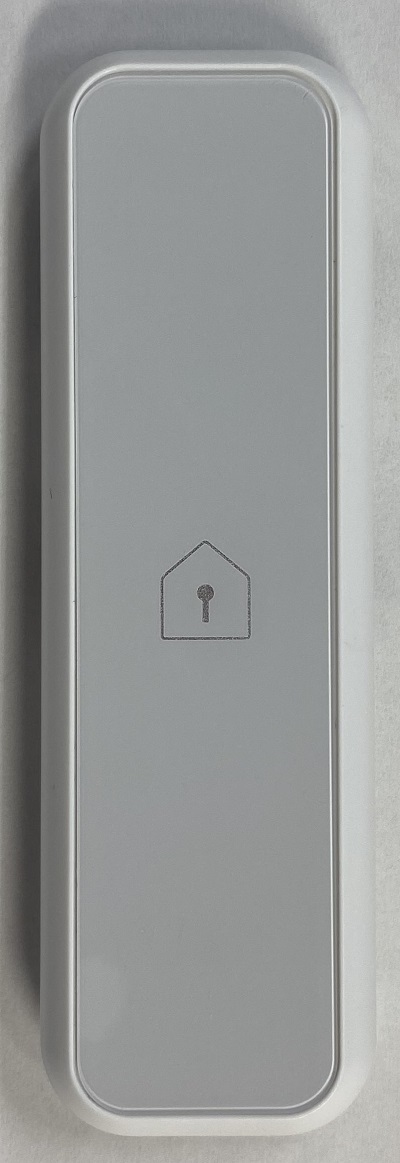
Name | Window Sensor |
|---|
Short Description | This product is detects and notifies the opening or closing of a door or window. |
|---|
Long Description | This product is "FGT-0001" that detects the opening and closing of doors and windows that support Z-Wave Plus™ as standard. Detects changes in the state of the place where the product is installed and notifies the controller. |
|---|
Brand | MITSUMI |
|---|
Product Identifier | FGT-0001 |
|---|
Product Line | "FGT-xxxx" Series |
|---|
OEM Version | HW: 1 FW: 7.14:01.00 |
|---|
Hardware Platform | ZGM130 |
|---|
Z-Wave Version | 7.14.3 |
|---|
Library Type | SLAVE_ENHANCED_232 |
|---|
Device Type | Notification Sensor |
|---|
Role Type | ROLE_TYPE_SLAVE_SLEEPING_REPORTING |
|---|
Manufacturer ID | 0x0112 |
|---|
Product Type ID | 0x0015 |
|---|
Product ID | 0x0001 |
|---|
User Icon | 0x0C06 |
|---|
Installer Icon | 0x0C06 |
|---|
Frequency Plans | JP: 922.50MHz, 923.90MHz, 926.30MHz |
|---|
Categories | Sensors |
|---|
Countries / Regions | Japan |
|---|
Supported Command Classes | Identifier | Name | Key | Version |
|---|
COMMAND_CLASS_CONFIGURATION_V4 | Configuration V4 | 0x70 | 4 | COMMAND_CLASS_POWERLEVEL | Powerlevel | 0x73 | 1 | COMMAND_CLASS_ASSOCIATION_GRP_INFO_V3 | Association Group Information (AGI) V3 | 0x59 | 3 | COMMAND_CLASS_INDICATOR_V3 | Indicator V3 | 0x87 | 3 | COMMAND_CLASS_BATTERY | Battery | 0x80 | 1 | COMMAND_CLASS_FIRMWARE_UPDATE_MD_V5 | Firmware Update Meta Data V5 | 0x7A | 5 | COMMAND_CLASS_MULTI_CHANNEL_ASSOCIATION_V3 | Multi Channel Association V3 | 0x8E | 3 | COMMAND_CLASS_SECURITY_2 | Security 2 | 0x9F | 1 | COMMAND_CLASS_TRANSPORT_SERVICE_V2 | Transport Service V2 | 0x55 | 2 | COMMAND_CLASS_WAKE_UP_V2 | Wake Up V2 | 0x84 | 2 | COMMAND_CLASS_DEVICE_RESET_LOCALLY | Device Reset Locally | 0x5A | 1 | COMMAND_CLASS_ZWAVEPLUS_INFO_V2 | Z-Wave Plus Info V2 | 0x5E | 2 | COMMAND_CLASS_ASSOCIATION_V2 | Association V2 | 0x85 | 2 | COMMAND_CLASS_NOTIFICATION_V8 | Notification V8 | 0x71 | 8 | COMMAND_CLASS_BASIC_V2 | Basic V2 | 0x20 | 2 | COMMAND_CLASS_VERSION_V3 | Version V3 | 0x86 | 3 | COMMAND_CLASS_SUPERVISION | Supervision | 0x6C | 1 | COMMAND_CLASS_MANUFACTURER_SPECIFIC_V2 | Manufacturer Specific V2 | 0x72 | 2 |
|
|---|
S2 Classes | S2_UNAUTHENTICATED, S2_AUTHENTICATED |
|---|
Documents | Category | Description | File |
|---|
Manual_Primary_Lang | Product Manual in Japanese | | Manual_English | Product Manual in English | |
|
|---|
Association Groups | Group Number | Maximum Nodes Supported | End Point ID | Group Name | Description |
|---|
1 | 5 | 0 | Lifeline | Association Group 1 (Lifeline) |
|
|---|
Configuration Parameters | Parameter Number | Name | Description | Format | Size | Min Value | Max Value | Default Value | Parameter Values |
|---|
1 | Periodic check interval | Periodic check interval | 2 | 2 | 1 | 1440 | 120 | From | To | Description |
|---|
1 | 1440 | periodic notification interval for the sensor |
| 3 | Magnetic sensor judgement | Magnetic sensor judgement | 2 | 1 | 0 | 1 | 0 | From | To | Description |
|---|
0 | 1 | judgment type of the magnetic sensor |
|
|
|---|
Texts | ID | Description | Value |
|---|
8 | Where to find S2 DSK on product | You can check the DSK and QR code on the label by removing the bottom cover of this product. | 1 | Classic Inclusion | 1 Set the controller in "Add (Inclusion)" mode.
(For the operation procedure, see the instruction manual of the controller.)
2 Push the Operation switch once. The LED blinks green and the registration operation start.
* If the LED does not brink green, remove the battery, check the insertion direction, and insert it again
* If that doesn't work, try inserting a new battery.
(The included battery is a sample. Battery life may be shorter than regular batteries on the market.)
3 Check the connection using a controller or a dedicated application. | 2 | Classic Exclusion | 1 Remove the Bottom cover.
2 Set the controller in "Remove (Exclusion)" mode.
(For the operation procedure, see the instruction manual of the controller.)
3 Push the Operation switch once. The LED blinks red and the remove operation start.
4 LED turns off when removed. Check the disconnection using a controller or a dedicated application. | 4 | Wake-Up Procedure | Attach the magnet onto the window glass, and the sensor onto the window sash.
※ Allow a space of 10 mm from the top of this product. | 5 | Factory Reset Procedure | Please use this procedure only in the event that the primary controller is lost. All the settings and the controller information are cleared to return to the factory default.
1 Remove the Bottom cover.
2 Press and hold the Operation SW for about 10 seconds. The LED light up when initialization begins.
3 Push the Operation switch once and release it immediately. The reset is complete when the LED brink
green. Push and release the Operation switch again to turn off the LED. |
|
|---|
Supported Notification Types | Notification Type | Event / State |
|---|
Access Control | Door state: Window/door is open | Access Control | Door state: Window/door is closed |
|
|---|
Supports NWI | Yes |
|---|
Supports Explorer Frames | Yes |
|---|
Supports SmartStart | Yes |
|---|
Radio Range Z-Wave (m) | 40 |
|---|