Product Recognition | |
|---|
Certification Number | ZC12-22010333 |
|---|
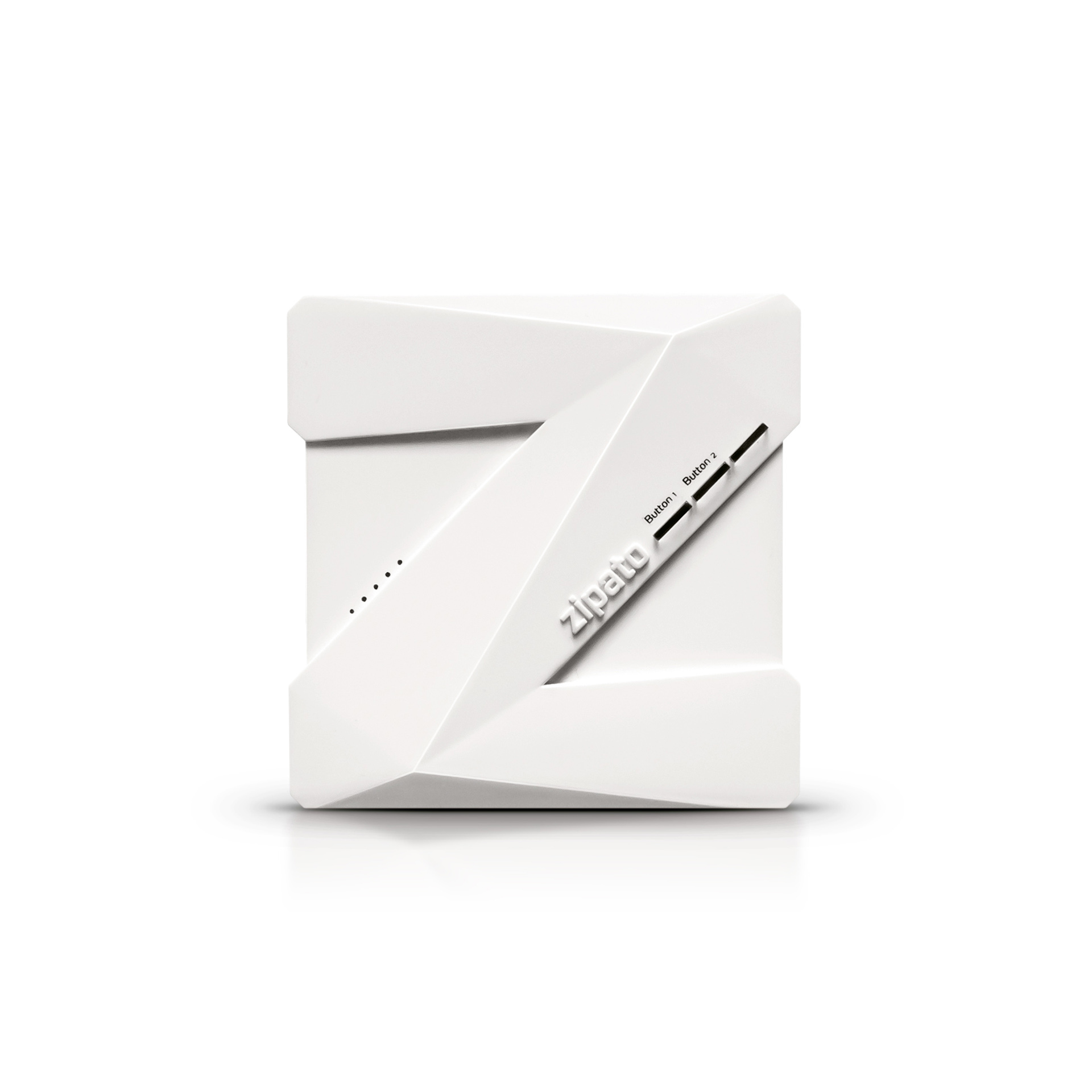
Name | Zipabox 2 |
|---|
Short Description | Home automation controller that allows you to connect various sensors and other automation devices for a variety of purposes, such as security, surveillance, elderly care, comfort, and energy efficiency. |
|---|
Long Description | Enjoy the benefits of a connected smart home with the Zipabox2. This next-generation controller connects seamlessly to a vast array of smart devices so you can profit from energy savings, protect your home, and control who has access. Its modular nature enables you to extend its functionality with support for most existing home automation protocols such as Z-Wave™. |
|---|
Brand | Zipato |
|---|
Product Identifier | zb2.zweu |
|---|
Product Line | Zipato |
|---|
OEM Version | HW: 1 FW: 7.15:07.13:02.03 |
|---|
Hardware Platform | EFR32Z |
|---|
Z-Wave Version | 7.15.2 |
|---|
Library Type | CONTROLLER_BRIDGE |
|---|
Device Type | Gateway |
|---|
Role Type | ROLE_TYPE_CONTROLLER_CENTRAL_STATIC |
|---|
Manufacturer ID | 0x0131 |
|---|
Product Type ID | 0x0001 |
|---|
Product ID | 0x0002 |
|---|
User Icon | 0x0500 |
|---|
Installer Icon | 0x0500 |
|---|
Frequency Plans | EU: 869.85MHz, 868.40MHz |
|---|
Categories | All Controllers, Gateway Controller |
|---|
Countries / Regions | European Union |
|---|
Supported Command Classes | Identifier | Name | Key | Version |
|---|
COMMAND_CLASS_NETWORK_MANAGEMENT_INSTALLATION_MAINTENANCE_V2 | Network Management Installation and Maintenance V2 | 0x67 | 2 | COMMAND_CLASS_POWERLEVEL | Powerlevel | 0x73 | 1 | COMMAND_CLASS_INCLUSION_CONTROLLER | Inclusion Controller | 0x74 | 1 | COMMAND_CLASS_ASSOCIATION_GRP_INFO_V3 | Association Group Information (AGI) V3 | 0x59 | 3 | COMMAND_CLASS_ASSOCIATION_V3 | Association V3 | | 0 | COMMAND_CLASS_MULTI_CHANNEL_ASSOCIATION_V4 | Multi-Channel Association V4 | | 0 | COMMAND_CLASS_INDICATOR_V3 | Indicator V3 | 0x87 | 3 | COMMAND_CLASS_APPLICATION_STATUS | Application Status | 0x22 | 1 | COMMAND_CLASS_TIME | Time | 0x8A | 1 | COMMAND_CLASS_FIRMWARE_UPDATE_MD_V5 | Firmware Update Meta Data V5 | 0x7A | 5 | COMMAND_CLASS_SECURITY_2 | Security 2 | 0x9F | 1 | COMMAND_CLASS_CRC_16_ENCAP | CRC-16 Encapsulation | 0x56 | 1 | COMMAND_CLASS_MULTI_CMD | Multi Command | 0x8F | 1 | COMMAND_CLASS_SECURITY | Security 0 | 0x98 | 1 | COMMAND_CLASS_TRANSPORT_SERVICE_V2 | Transport Service V2 | 0x55 | 2 | COMMAND_CLASS_DEVICE_RESET_LOCALLY | Device Reset Locally | 0x5A | 1 | COMMAND_CLASS_ZWAVEPLUS_INFO_V2 | Z-Wave Plus Info V2 | 0x5E | 2 | COMMAND_CLASS_NETWORK_MANAGEMENT_INCLUSION_V3 | Network Management Inclusion V3 | 0x34 | 3 | COMMAND_CLASS_NETWORK_MANAGEMENT_PROXY_V3 | Network Management Proxy V3 | 0x52 | 3 | COMMAND_CLASS_NETWORK_MANAGEMENT_BASIC_V2 | Network Management Basic Node V2 | 0x4D | 2 | COMMAND_CLASS_VERSION_V3 | Version V3 | 0x86 | 3 | COMMAND_CLASS_SUPERVISION | Supervision | 0x6C | 1 | COMMAND_CLASS_MANUFACTURER_SPECIFIC_V2 | Manufacturer Specific V2 | 0x72 | 2 |
|
|---|
Controlled Command Classes | Identifier | Name | Key | Version |
|---|
COMMAND_CLASS_NETWORK_MANAGEMENT_INSTALLATION_MAINTENANCE_V2 | Network Management Installation and Maintenance V2 | 0x67 | 2 | COMMAND_CLASS_ASSOCIATION_GRP_INFO_V3 | Association Group Information (AGI) V3 | 0x59 | 3 | COMMAND_CLASS_ASSOCIATION_V3 | Association V3 | | 0 | COMMAND_CLASS_MULTI_CHANNEL_ASSOCIATION_V4 | Multi-Channel Association V4 | | 0 | COMMAND_CLASS_INDICATOR_V3 | Indicator V3 | 0x87 | 3 | COMMAND_CLASS_FIRMWARE_UPDATE_MD_V5 | Firmware Update Meta Data V5 | 0x7A | 5 | COMMAND_CLASS_SECURITY_2 | Security 2 | 0x9F | 1 | COMMAND_CLASS_CRC_16_ENCAP | CRC-16 Encapsulation | 0x56 | 1 | COMMAND_CLASS_SECURITY | Security 0 | 0x98 | 1 | COMMAND_CLASS_MULTI_CHANNEL_V4 | Multi Channel V4 | 0x60 | 4 | COMMAND_CLASS_SENSOR_MULTILEVEL_V11 | Multilevel Sensor V11 | 0x31 | 11 | COMMAND_CLASS_ANTITHEFT_UNLOCK | Anti-theft Unlock | 0x7E | 1 | COMMAND_CLASS_SWITCH_BINARY_V2 | Binary Switch V2 | 0x25 | 2 | COMMAND_CLASS_WAKE_UP_V2 | Wake Up V2 | 0x84 | 2 | COMMAND_CLASS_ZWAVEPLUS_INFO_V2 | Z-Wave Plus Info V2 | 0x5E | 2 | COMMAND_CLASS_NETWORK_MANAGEMENT_INCLUSION_V3 | Network Management Inclusion V3 | 0x34 | 3 | COMMAND_CLASS_NOTIFICATION_V8 | Notification V8 | 0x71 | 8 | COMMAND_CLASS_BASIC_V2 | Basic V2 | 0x20 | 2 | COMMAND_CLASS_NETWORK_MANAGEMENT_PROXY_V3 | Network Management Proxy V3 | 0x52 | 3 | COMMAND_CLASS_NETWORK_MANAGEMENT_BASIC_V2 | Network Management Basic Node V2 | 0x4D | 2 | COMMAND_CLASS_METER_V5 | Meter V5 | 0x32 | 5 | COMMAND_CLASS_VERSION_V3 | Version V3 | 0x86 | 3 | COMMAND_CLASS_CENTRAL_SCENE_V3 | Central Scene V3 | 0x5B | 3 | COMMAND_CLASS_MANUFACTURER_SPECIFIC_V2 | Manufacturer Specific V2 | 0x72 | 2 |
|
|---|
S2 Classes | S2_UNAUTHENTICATED, S2_AUTHENTICATED, S2_ACCESS_CONTROL |
|---|
Documents | Category | Description | File |
|---|
Adv_Manual | Advanced Information Product Manual | | Manual_Primary_Lang | Product Manual | | Installer_Guide | Installation Guide | |
|
|---|
Features | Feature | Values |
|---|
Z-Wave Scene Type | | Color | | Communications Connections | Value |
|---|
Ethernet (Wired) | Ethernet (Wireless/WiFi) |
| Communications Protocol | Value |
|---|
Manufacturer Proprietary Protocol |
| Firmware Updatable | Value |
|---|
Updatable by Consumer via Internet |
|
|
|---|
Association Groups | Group Number | Maximum Nodes Supported | End Point ID | Group Name | Description |
|---|
1 | 1 | 0 | Lifeline | Z-Wave Plus Lifeline Group |
|
|---|
Texts | ID | Description | Value |
|---|
24 | Controller Classic Exclusion | * Navigate to Z-Wave network management tools
* Click the “REMOVE NODE” button and follow onscreen instructions. | 3 | Controller Learn Mode | Controller Learn Mode is disabled | 10 | Controller Replication | Controller Learn Mode is disabled | 25 | Controller Provisioning List | * Navigate to Z-Wave network management tools
* Click the “GET CODE” button and follow onscreen instructions. | 5 | Factory Reset Procedure | * Navigate to Z-Wave network management tools
* Click the “Z-WAVE RESET” button and follow onscreen instructions. | 9 | Capability Rediscovery | * Navigate to Z-Wave node management tools
* Click the “CONFIGURE NODE” button and follow onscreen instructions. | 11 | Controller SmartStart Inclusion | * Navigate to Z-Wave network management tools
* Click the “ADD CODE” button and follow onscreen instructions. | 23 | Controller Classic Inclusion | * Navigate to Z-Wave network management tools
* Click the “ADD NODE” button and follow onscreen instructions. | 8 | Where to find S2 DSK on product | The controller does not support Learn Mode |
|
|---|
Supported / Controlled Meter Types | Meter Type | Rate Type | Description |
|---|
Electric meter | Import | Electric Meter Consumption | Electric meter | Export | Electric Meter Production | Gas meter | Import | Gas Meter Consumption | Gas meter | Export | Gas Meter Production | Water meter | Import | Water Meter Consumption | Water meter | Export | Water Meter Production | Heating meter | Import | Heating Meter Consumption | Heating meter | Export | Heating Meter Production | Cooling meter | Import | Cooling Meter Consumption | Cooling meter | Export | Cooling Meter Production |
|
|---|
Supports NWI | Yes |
|---|
Supports Explorer Frames | Yes |
|---|
Supports SmartStart | Yes |
|---|
Radio Range Z-Wave (m) | 40 |
|---|