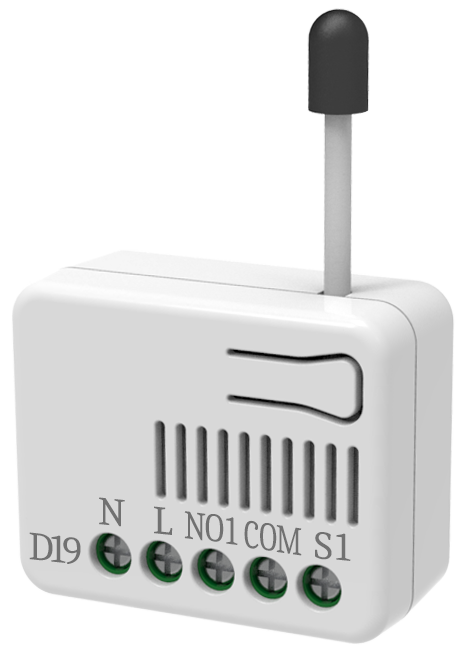
Product Recognition | |
|---|
Certification Number | ZC14-22030074 |
|---|
Name | In Wall Micro Dimmer |
|---|
Short Description | PAD19 is a 2/3 Wire dimmer.
It can only needs to connect two wires, single wire (L) and load (NO1),or three wires, two wire (L、N) and load (NO1) |
|---|
Long Description | It can only needs to connect two wires, single wire (L) and load (NO1),or three wires, two wire (L、N) and load (NO1).
This device is a security enabled Z-Wave Plus™ product that uses encrypted Z-Wave Plus™ messages to communicate to other security enabled Z-Wave Plus™ products.
Z-Wave™ enabled devices displaying the Z-Wave™ logo can also be used with this device regardless of the manufacturer, and this device can also be used in other manufacturer’s Z-Wave™ enabled networks.
All mains operated nodes within the network will act as repeaters regardless of vendor to increase reliability of the network.
The product supports an Over the Air (OTA) feature for the products firmware upgrade |
|---|
Brand | Philio |
|---|
Product Identifier | PAD19-ANZ |
|---|
Product Line | Philio Z-Wave Products |
|---|
OEM Version | HW: 01 FW: 01.03:01.02 |
|---|
Hardware Platform | ZGM130S037HGN2 / ZGM130S037HGN1 |
|---|
Z-Wave Version | 7.16.3 |
|---|
Library Type | END_NODE_ENHANCED_232 |
|---|
Device Type | Multilevel Switch DT |
|---|
Role Type | ROLE_TYPE_SLAVE_ALWAYS_ON |
|---|
Manufacturer ID | 0x013C |
|---|
Product Type ID | 0x0005 |
|---|
Product ID | 0x008A |
|---|
User Icon | 0x0600 |
|---|
Installer Icon | 0x0600 |
|---|
Frequency Plans | ANZ: 919.80MHz, 921.40MHz |
|---|
Categories | All Lighting Devices, Dimming Lighting Devices |
|---|
Countries / Regions | Australia, Brazil, Chile, Dominican Republic, El Salvador, Indonesia, Malaysia, New Zealand, Paraguay, Peru, Uruguay, Venezuela, Vietnam |
|---|
Supported Command Classes | Identifier | Name | Key | Version |
|---|
COMMAND_CLASS_BASIC_V2 | Basic V2 | 0x20 | 2 | COMMAND_CLASS_CONFIGURATION_V4 | Configuration V4 | 0x70 | 4 | COMMAND_CLASS_SWITCH_MULTILEVEL_V4 | Multilevel Switch V4 | 0x26 | 4 | COMMAND_CLASS_NOTIFICATION_V8 | Notification V8 | 0x71 | 8 | COMMAND_CLASS_ASSOCIATION_V2 | Association V2 | 0x85 | 2 | COMMAND_CLASS_ASSOCIATION_GRP_INFO_V3 | Association Group Information (AGI) V3 | 0x59 | 3 | COMMAND_CLASS_DEVICE_RESET_LOCALLY | Device Reset Locally | 0x5A | 1 | COMMAND_CLASS_FIRMWARE_UPDATE_MD_V5 | Firmware Update Meta Data V5 | 0x7A | 5 | COMMAND_CLASS_INDICATOR_V3 | Indicator V3 | 0x87 | 3 | COMMAND_CLASS_MANUFACTURER_SPECIFIC_V2 | Manufacturer Specific V2 | 0x72 | 2 | COMMAND_CLASS_MULTI_CHANNEL_ASSOCIATION_V3 | Multi Channel Association V3 | 0x8E | 3 | COMMAND_CLASS_VERSION_V3 | Version V3 | 0x86 | 3 | COMMAND_CLASS_ZWAVEPLUS_INFO_V2 | Z-Wave Plus Info V2 | 0x5E | 2 | COMMAND_CLASS_SECURITY | Security 0 | 0x98 | 1 | COMMAND_CLASS_SECURITY_2 | Security 2 | 0x9F | 1 | COMMAND_CLASS_SUPERVISION | Supervision | 0x6C | 1 | COMMAND_CLASS_TRANSPORT_SERVICE_V2 | Transport Service V2 | 0x55 | 2 | COMMAND_CLASS_POWERLEVEL | Powerlevel | 0x73 | 1 |
|
|---|
S2 Classes | S2_AUTHENTICATED, S2_UNAUTHENTICATED |
|---|
Documents | Category | File |
|---|
Manual_English | |
|
|---|
Features | Feature | Values |
|---|
Color | | Firmware Updatable | Value |
|---|
Updatable by Consumer by RF |
|
|
|---|
Association Groups | Group Number | Maximum Nodes Supported | End Point ID | Group Name | Profile |
|---|
1 | 5 | 0 | Lifeline | 0x0001 | 2 | 5 | 0 | ENDPOINT_ROOT | 0x0000 |
|
|---|
Configuration Parameters | Parameter Number | Name | Description | Format | Size | Min Value | Max Value | Default Value |
|---|
1 | Power-on recovery status set | To set dimmer level when AC power on. | 1 | 1 | 0 | 0 | 0x00 | 2 | RF report set | To set device send report to gateway | 1 | 1 | 0 | 0 | 0x01 | 3 | Maximum level | To set dimming level maximum value. | 1 | 1 | 0 | 0 | 0x63 | 4 | Minimum level | To set dimming level minimum value. | 1 | 1 | 0 | 0 | 0x00 | 5 | Basic duration set | To set dimming finished duration. | 1 | 1 | 0 | 0 | 0x02 |
|
|---|
Texts | ID | Description | Value |
|---|
8 | Where to find S2 DSK on product | 1. The product has a DSK string. Key in the first five digits to initiate the SmartStart process, or scan QR code.
2. SmartStart enabled products can be added into a Z-Wave™ network by scanning the Z-Wave™ QR Code on the product, with a controller providing SmartStart inclusion.No further action is required and the SmartStart product will be added automatically to the closest network within 10 minutes of being switched on. | 1 | Classic Inclusion | 1. Put your Z-Wave™ controller into inclusion mode by following the instructions provided by the controller manufacturer.
2. Press the include button three times within 3 seconds to enter inclusion mode. | 2 | Classic Exclusion | 1. Put your Z-Wave™ controller into exclusion mode by following the instructions provided by the controller manufacturer.
2. Press the include button three times within 3 seconds to enter exclusion mode.
3. Node ID will be excluded. | 5 | Factory Reset Procedure | 1. Press the include button four times within 3 seconds and hold on the button press without releasing.
2. Keep pressing the button for 3 seconds then LED will be off, release the button within 2 seconds.
3. Device has been reset. |
|
|---|
Supported Notification Types | Notification Type | Event / State |
|---|
Power Management | Over-load status: Over-load detected |
|
|---|
Supports NWI | Yes |
|---|
Supports Explorer Frames | Yes |
|---|
Supports SmartStart | Yes |
|---|
Radio Range Z-Wave (m) | 40 |
|---|