Product Recognition | |
|---|
Certification Number | ZC14-25040511 |
|---|
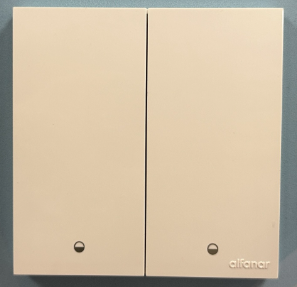
Name | MASA Smart Switch |
|---|
Short Description | MASA smart switches offer seamless control for incandescent, halogen, LED, and fluorescent lights, powered by advanced Z-Wave 800 technology for secure and efficient performance. |
|---|
Long Description | MASA smart switches offer advanced, reliable lighting control for modern homes. Compatible with incandescent, halogen, LED, and fluorescent lamps, they provide seamless operation through a physical push button or remote access via the Alfanar Smart Home app. Connect them to an Alfanar Z-Wave enabled gateway (or listed gateway) to unlock full remote control and smart automation.
Powered by Z-Wave 800-series technology, MASA switches operate on a secure mesh network with AES-128 encryption, ensuring safe and stable communication. With an indoor range of up to 30 meters, you can trust consistent performance throughout your home.
Designed with safety in mind, MASA switches include short circuit, input overvoltage, thermal, and surge protection, keeping your home and devices secure. Installation is simple with Smart Start technology, allowing quick and easy setup. Zero Crossing Detection further enhances performance by reducing electrical stress and extending the lifespan of connected lighting systems.
MASA smart switches deliver the perfect balance of innovation, security, and convenience – making them an essential upgrade for modern living. Experience smarter lighting control with technology designed to enhance your home. |
|---|
Brand | alfanar |
|---|
Product Identifier | SZWRBF201 |
|---|
Product Line | Smart Switch |
|---|
OEM Version | HW: 02 FW: 01.03:02.05 |
|---|
Hardware Platform | EFR23ZG28B |
|---|
Z-Wave Version | 7.22.0 |
|---|
Library Type | END_NODE_ENHANCED_232 |
|---|
Device Type | Binary Switch DT |
|---|
Role Type | ROLE_TYPE_END_NODE_ALWAYS_ON |
|---|
Manufacturer ID | 0x0469 |
|---|
Product Type ID | 0x0004 |
|---|
Product ID | 0x0002 |
|---|
User Icon | 0x0700 |
|---|
Installer Icon | 0x0700 |
|---|
Frequency Plans | EU: 869.85MHz, 868.40MHz |
|---|
Categories | On/Off Switches/Devices |
|---|
Countries / Regions | Saudi Arabia, United Arab Emirates |
|---|
Supported Command Classes | Identifier | Name | Key | Version |
|---|
COMMAND_CLASS_BASIC_V2 | Basic V2 | 0x20 | 2 | COMMAND_CLASS_SWITCH_BINARY_V2 | Binary Switch V2 | 0x25 | 2 | COMMAND_CLASS_CONFIGURATION_V4 | Configuration V4 | 0x70 | 4 | COMMAND_CLASS_NOTIFICATION_V8 | Notification V8 | 0x71 | 8 | COMMAND_CLASS_ASSOCIATION_V2 | Association V2 | 0x85 | 2 | COMMAND_CLASS_ASSOCIATION_GRP_INFO_V3 | Association Group Information (AGI) V3 | 0x59 | 3 | COMMAND_CLASS_DEVICE_RESET_LOCALLY | Device Reset Locally | 0x5A | 1 | COMMAND_CLASS_FIRMWARE_UPDATE_MD_V5 | Firmware Update Meta Data V5 | 0x7A | 5 | COMMAND_CLASS_INDICATOR_V3 | Indicator V3 | 0x87 | 3 | COMMAND_CLASS_MANUFACTURER_SPECIFIC_V2 | Manufacturer Specific V2 | 0x72 | 2 | COMMAND_CLASS_MULTI_CHANNEL_ASSOCIATION_V3 | Multi Channel Association V3 | 0x8E | 3 | COMMAND_CLASS_VERSION_V3 | Version V3 | 0x86 | 3 | COMMAND_CLASS_ZWAVEPLUS_INFO_V2 | Z-Wave Plus Info V2 | 0x5E | 2 | COMMAND_CLASS_MULTI_CHANNEL_V4 | Multi Channel V4 | 0x60 | 4 | COMMAND_CLASS_SECURITY | Security 0 | 0x98 | 1 | COMMAND_CLASS_SECURITY_2 | Security 2 | 0x9F | 1 | COMMAND_CLASS_SUPERVISION | Supervision | 0x6C | 1 | COMMAND_CLASS_TRANSPORT_SERVICE_V2 | Transport Service V2 | 0x55 | 2 | COMMAND_CLASS_POWERLEVEL | Powerlevel | 0x73 | 1 |
|
|---|
S2 Classes | S2_AUTHENTICATED, S2_UNAUTHENTICATED |
|---|
Documents | Category | File |
|---|
Manual_English | |
|
|---|
Features | Feature | Values |
|---|
Firmware Updatable | Value |
|---|
Updatable by Consumer by RF |
| Neutral Wire Required | | Switch Load Capacity Current | | Switch Load Capacity Volt-Ampere | | Switch Load Capacity Watts | Value |
|---|
800W/Gang Incandescent, 400W/Gang LED |
| Switch Type | |
|
|---|
Association Groups | Group Number | Maximum Nodes Supported | End Point ID | Group Name | Profile |
|---|
1 | 5 | 0 | Lifeline | 0x0001 | 1 | 0 | 1 | Lifeline | 0x0001 | 1 | 0 | 2 | Lifeline | 0x0001 | 1 | 0 | 3 | Lifeline | 0x0001 |
|
|---|
Configuration Parameters | Parameter Number | Name | Description | Format | Size | Min Value | Max Value | Default Value |
|---|
1 | AC zero-crossing detection | AC zero-crossing detection, set to 0 to disable | 1 | 1 | 0 | 0 | 0x01 | 2 | Over-Temp Protection Threshold | Over-Temp Protection Threshold in °C, set to 0 to disable | 0 | 4 | 0 | 0 | 0x00000064 | 3 | Over-Voltage Protection Threshold | Over-Voltage Protection Threshold in volt, set to 0 to disable | 0 | 4 | 0 | 0 | 0x0000010E | 4 | Restore state after power failure | Restore state after power failure, set to 1 to enable | 1 | 1 | 0 | 0 | 0x00 | 5 | Indicator LED Enable /Disable | Indicator LED Enable /Disable, set to 0 to disable | 1 | 1 | 0 | 0 | 0x01 | 6 | LED Indicator Mode | LED Indicator Mode, set to 1 to Locator | 1 | 1 | 0 | 0 | 0x00 | 7 | Factory Reset switch | Factory Reset switch, set to 0x55 to Restore factory setting | 1 | 1 | 0 | 0 | 0x00 | 8 | Disable Local Control | Disable Local Control, set to 1 to disable local control | 1 | 1 | 0 | 0 | 0x00 | 9 | Disable Remote control | Disable Remote control, set to 1 to disable remote control | 1 | 1 | 0 | 0 | 0x00 | 10 | Key Mode | Key Mode | 1 | 1 | 0 | 0 | 0x00 | 11 | Key1 Mode | Key1 Mode | 1 | 1 | 0 | 0 | 0x00 | 17 | On/Off State Duration For Key3 | On/Off State Duration For Key3 | 1 | 2 | 0 | 0 | 0x0000 |
|
|---|
Texts | ID | Description | Value |
|---|
8 | Where to find S2 DSK on product | In the LV isolate plate, the user simply needs to disassemble the Rocker to access the DSK. | 1 | Classic Inclusion | 1. Place the device within the direct range of your Z-Wave gateway.
2. Power ON the device.
3. Set the main gateway to (Security/Non-Security Mode) and enable the Add/Inclusion mode (refer to the gateway's manual for instructions).
4. Press push button for 3 consecutive clicks.
5. If adding Security S2 Authenticated mode, enter the DSK PIN or scan the Smart Start QR code (located on the as shown below image).
6. The indicator LED will blink (1 second ON & 1 second OFF simultaneously) until the inclusion process complete or timeout.
7. Successful inclusion will be confirmed by Z-Wave gateway. (Check update in the gateway APP). | 2 | Classic Exclusion | 1. Set the main Z-Wave Gateway into exclusion/remove mode (see the gateway’s manual).
2. Press push button for 3 consecutive clicks.
3. The indicator LED will begin blinking (1 second ON & 1 second OFF simultaneously) until the exclusion process to complete.
4. The Z-Wave gateway will confirm successful exclusion. | 5 | Factory Reset Procedure | Please follow this procedure only if the network’s primary controller is missing or non-operational. To perform a factory reset, press any button 10 times consecutively |
|
|---|
Supported Notification Types | Notification Type | Event / State |
|---|
Heat Alarm | (Refer to parameters): State idle | Heat Alarm | Heat sensor status: Overheat detected | Power Management | Over-voltage status: Over-voltage detected | Power Management | (Refer to parameters): State idle | System | Heartbeat |
|
|---|
Supports NWI | Yes |
|---|
Supports Explorer Frames | Yes |
|---|
Supports SmartStart | Yes |
|---|
Radio Range Z-Wave (m) | 40 |
|---|