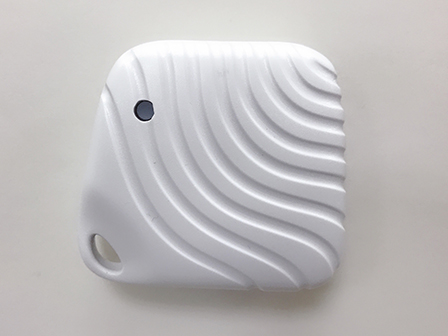
Product Recognition | |
|---|
Certification Number | ZC10-19086707 |
|---|
Name | Arrival Sensor |
|---|
Short Description | The Arrival Sensor assigns everyone an unique ID then the user could take care of the family to send any instant notification when they are coming home or leaving home, also the user could interact some specific scenarios with specific persons |
|---|
Description | The Arrival Sensor assigns everyone an unique ID then the user could take care of the family to send any instant notification when they are coming home or leaving home, also the user could interact some specific scenarios with specific persons. When the device is secure included into Z-Wave network, above communication will be encrypted. ARRIVAL SENSOR supports SECURITY S0 / SECURITY S2 UNAUTHENTICATED / SECURITY S2 AUTHENTICATED. |
|---|
Brand | Great Connection System Pte. Ltd. |
|---|
Identifier | ZA1501JP-5 |
|---|
OEM Version | HW: 5 FW: 25.05 |
|---|
Hardware Platform | ZM5101 |
|---|
Z-Wave Version | 6.81.03 |
|---|
Library Type | SLAVE_ENHANCED_232 |
|---|
Device Type | Notification Sensor |
|---|
Role Type | ROLE_TYPE_SLAVE_SLEEPING_REPORTING |
|---|
Manufacturer ID | 0x042A |
|---|
Product Type ID | 0x202A |
|---|
Product ID | 0x2A01 |
|---|
User Icon | 0x0C09 |
|---|
Installer Icon | 0x0C09 |
|---|
Frequency Plans | JP: 922.50MHz, 923.90MHz, 926.30MHz |
|---|
Categories | Sensors |
|---|
Countries / Regions | Japan |
|---|
Supported Command Classes | Identifier | Name | Key | Version |
|---|
COMMAND_CLASS_FIRMWARE_UPDATE_MD_V4 | Firmware Update Meta-Data V4 | 0x7A | 4 | COMMAND_CLASS_POWERLEVEL | Powerlevel | 0x73 | 1 | COMMAND_CLASS_BATTERY | Battery | 0x80 | 1 | COMMAND_CLASS_CONFIGURATION | Configuration | 0x70 | 1 | COMMAND_CLASS_SECURITY | Security S0 | 0x98 | 1 | COMMAND_CLASS_TRANSPORT_SERVICE_V2 | Transport Service V2 | 0x55 | 2 | COMMAND_CLASS_WAKE_UP_V2 | Wake Up V2 | 0x84 | 2 | COMMAND_CLASS_DEVICE_RESET_LOCALLY | Device Reset Locally | 0x5A | 1 | COMMAND_CLASS_ZWAVEPLUS_INFO_V2 | Z-Wave Plus Info V2 | 0x5E | 2 | COMMAND_CLASS_ASSOCIATION_V2 | Association V2 | 0x85 | 2 | COMMAND_CLASS_ASSOCIATION_GRP_INFO | Association Group Info | 0x59 | 1 | COMMAND_CLASS_NOTIFICATION_V8 | Notification V8 | 0x71 | 8 | COMMAND_CLASS_SECURITY_2 | Security S2 | 0x9F | 1 | COMMAND_CLASS_VERSION_V3 | Version V3 | 0x86 | 3 | COMMAND_CLASS_SUPERVISION | Supervision | 0x6C | 1 | COMMAND_CLASS_MANUFACTURER_SPECIFIC_V2 | Manufacturer Specific V2 | 0x72 | 2 |
|
|---|
S2 Classes | S2_UNAUTHENTICATED, S2_AUTHENTICATED |
|---|
Documents | Category | Description | File |
|---|
Manual_Primary_Lang | Product or Owner's Manual | |
|
|---|
Features | Feature | Values |
|---|
Sensors | Value |
|---|
Acceleration X-Axis | Acceleration Y-Axis | Acceleration Z-Axis |
| Firmware Updatable | Value |
|---|
Updatable by Consumer via Internet |
| Battery Quantity | | Color | | Battery Type | | Outdoor Use | | Supported Notification Types | |
|
|---|
Association Groups | Group Number | Maximum Nodes Supported | End Point ID | Description |
|---|
1 | 1 | 0 | * Group 1 = Lifeline |
|
|---|
Configuration Parameters | Parameter Number | Name | Description | Format | Size | Min Value | Max Value | Default Value | Parameter Values |
|---|
1 | The Synchronic Interval Time | Define the synchronic interval time between arrival sensor and the gateway, the basic interval time is 16 seconds and the default value is "2" (32seconds=2x16seconds) 1 ~ 255 (unsigned decimal) Seconds (default: 2 (=16seconds x 2)) | 0 | 1 | 0 | 0 | 2 | From | To | Description |
|---|
1 | 255 | from 16 seconds to 4080 seconds |
|
|
|---|
Texts | ID | Description | Value |
|---|
1 | Inclusion | For “Inclusion” in (adding to) a network: Put the Z-Wave™ Interface Controller into “inclusion” mode, and following its instruction to add the arrival sensor to your controller. To get in the “inclusion” mode, press the Program Switch of arrival sensor the device will send a signal to be included (or excluded) to/from the network; otherwise, arrival sensor will go to sleep after 30 seconds. | 2 | Exclusion | For “Exclusion” from (removing from) a network: Put the Z-Wave™ Interface Controller into “exclusion” mode, and following its instruction to remove the arrival sensor from your controller. Press the Program Switch of arrival sensor to be excluded.
Note: All user and network settings will be cleared and the device reset to factory defaults when the device is excluded. | 5 | Factory Reset | Factory Default Reset: Long press the program switch up to 10 seconds to send the “Device Reset Locally Notification” command and reset to the factory default.
(Remark: This is to be used only in the case of primary controller being inoperable or otherwise unavailable.) | 4 | Device Wake-Up | Wake Up Notification:
Press the program switch, arrival sensor will be “Wake Up Mode” for receiving all the command class from controller. The arrival sensor will go to sleep mode or it will wait 10 seconds then go sleep mode. It will proceed all the commands after sending the “Wake Up Notification” | 6 | Additional Special Features | Auto Wake Up, Battery Capacity Detection, Explorer Frame & OTA |
|
|---|
Supported Notification Types | Notification Type | Event / State |
|---|
Access Control | (Refer to parameters): State idle |
|
|---|
Supported Multilevel Sensors | Multilevel Sensor Type |
|---|
Acceleration X-axis | Acceleration Y-axis | Acceleration Z-axis |
|
|---|
Supports NWI | Yes |
|---|
Supports Explorer Frames | Yes |
|---|
Supports SmartStart | Yes |
|---|
Radio Range Z-Wave (m) | 40 |
|---|

.jpg)