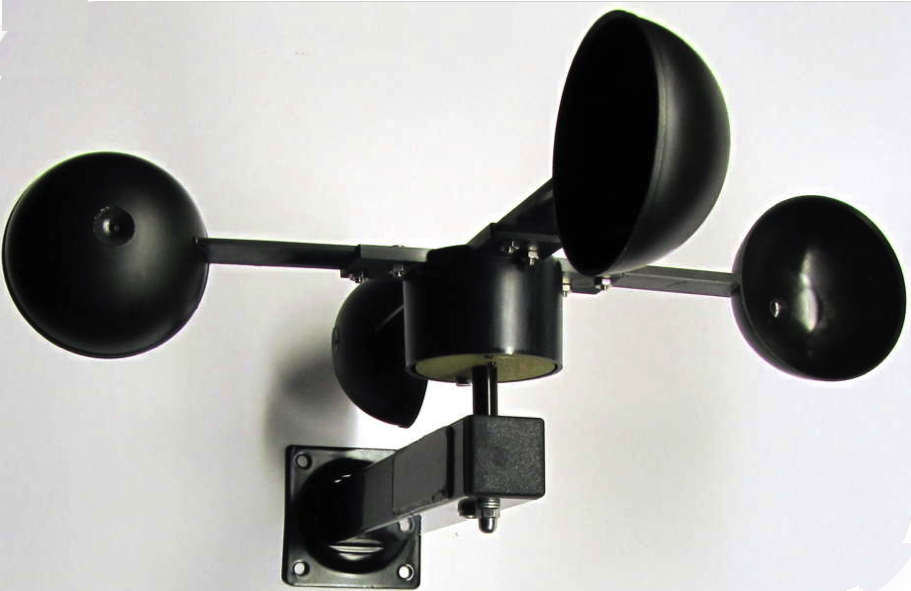
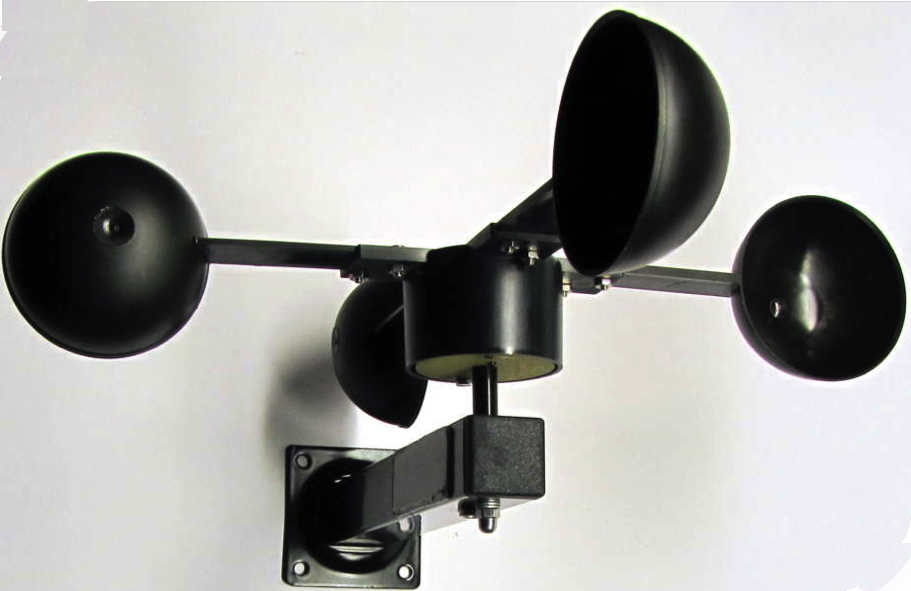
Product Recognition | |
|---|
Certification Number | ZC10-15080003 |
|---|
Name | Z-Weather |
|---|
Short Description | Z-Weather is a multi sensor device monitoring outside weather and environmental conditions. Z-Weather is powered by a solar cell and stores energy on an internal capacitor, enabling continuous operation, even with no wind for a couple of days. |
|---|
Long Description | Z-Weather is a multisensor device monitoring outside weather and environmental conditions. It continually measures the wind speed and can, for example, trigger closing of the awning and blinds if it is too windy. It also measures the amount of rotation, enabling calculation of the wind yield per day or per year. In addition, Z-Weather includes sensors for humidity, temperature, pressure and dew point, essentially providing the core sensors of a weather station.
Z-Weather is powered by a solar cell and stores energy on an internal capacitor, enabling continuous operation, even with no wind for a couple of days. It does not use any batteries and is completely maintenance free. Using the built-in solar cell it also measures the ambient light and the solar yield. This information can be used to turn on the outdoor light at dusk time and turn the light off in the morning.
Z-Weather‘s wind yield and solar yield metering can be used as a calculation base for planning a wind generator or a solar panel on the roof of a house. |
|---|
Brand | Z-Wave.Me |
|---|
Product Identifier | ZWeather |
|---|
OEM Version | 1.00 |
|---|
Hardware Platform | ZM5202 |
|---|
Z-Wave Version | 6.51.06 |
|---|
Library Type | SLAVE_ENHANCED_232 |
|---|
Device Type | Multilevel Sensor |
|---|
Role Type | ROLE_TYPE_SLAVE_SLEEPING_REPORTING |
|---|
Manufacturer ID | 0x0115 |
|---|
Product Type ID | 0x0100 |
|---|
Product ID | 0x0400 |
|---|
Frequency Plans | EU: 869.85MHz, 868.40MHz |
|---|
Categories | Sensors |
|---|
Countries / Regions | European Union |
|---|
Controlled Command Classes | Identifier | Name | Key | Version |
|---|
COMMAND_CLASS_MULTI_COMMAND | Multi-Command V1 | 0x8F | 0 | COMMAND_CLASS_BASIC | Basic | 0x20 | 1 |
|
|---|
Documents | Category | Description | File |
|---|
Manual_Primary_Lang | Product or Owner's Manual | |
|
|---|
Association Groups | Group Number | Maximum Nodes Supported | End Point ID | Description |
|---|
3 | 5 | 0 | It is getting bright.
Sends BASIC SET command in the morning when brightness reached trigger level (Default value: 37%)
| 4 | 5 | 0 | It is getting dark.
Sends BASIC SET command in the evening when brightness reached trigger level (Default value: 37%) | 1 | 5 | 0 | Lifeline. All readings are sent on a regular schedule. The schedule time is set automatically between 5 minutes and 5 hours depending on the available energy. Lifeline is also served after the button was pushed or in case of an unscheduled wakeup (wind speed, twilight). Serves one group member. | 2 | 5 | 0 | Too windy
If the threshold value for wind (Default value: 6m/s ) is exceeded, the basic set is sent to all group members. If the threshold value is exceeded for a long time, e.g. in case of storm for a couple of hours, the basic set value is sent repeatedly upon the scheduled wake up. Because in most cases the sun does not shine in case of storm, the repeated sending schedule may be between every one hour up to every five hours.
|
|
|---|
Configuration Parameters | |
|---|
Texts | ID | Description | Value |
|---|
5 | Factory Reset | Hold the button longer than 1.5 seconds and then release.
The LED blinks longer than when pressing the button once.
Z-Weather performs a factory reset and all configuration parameters are reset to their default values. Use this procedure only when the network primary controller is missing or otherwise inoperable. | 1 | Inclusion | Push the button 3 times within 1.5 seconds. If the LED is not blinking after releasing the button, Z-Weather has not enough energy and must be charged for several hours in bright sunlight. | 2 | Exclusion | Push the button 3 times within 1.5 seconds. | 4 | Device Wake-Up | Push the button 3 times within 1.5 seconds. The LED blinks once indicating that Z-Weather is. Z-Weather sends a Z-Wave Wakeup-Notification if has been added to the network. If Z-Weather has not yet been added to the network, no action is performed. |
|
|---|
Supports NWI | Yes |
|---|
Supports Explorer Frames | Yes |
|---|
Radio Range Z-Wave (m) | 40 |
|---|