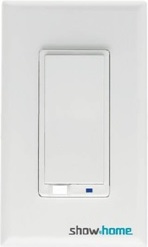
Product Recognition | |
|---|
Certification Number | ZC10-16065098 |
|---|
Name | In-Wall Smart Switch |
|---|
Short Description | In-wall Smart Switch |
|---|
Long Description | It is an In-wall type device controlled by Z-Wave controller and can be configured in Z-Wave sensor network, if Z-Wave certified controller features remote access, you can control lights at home from your mobile phone separately, and manual On/Off light by push button . |
|---|
Brand | show home |
|---|
Product Identifier | ZW30 |
|---|
OEM Version | HW: 1 FW: 20.15 |
|---|
Hardware Platform | ZM5202 |
|---|
Z-Wave Version | 6.51.06 |
|---|
Library Type | SLAVE_ROUTING |
|---|
Device Type | On/Off Power Switch |
|---|
Role Type | ROLE_TYPE_SLAVE_ALWAYS_ON |
|---|
Manufacturer ID | 0x015D |
|---|
Product Type ID | 0x0111 |
|---|
Product ID | 0x1E1C |
|---|
User Icon | 0x1D00 |
|---|
Installer Icon | 0x1D00 |
|---|
Frequency Plans | US: 916.00MHz, 908.40MHz |
|---|
Categories | All Lighting Devices, On/Off Switches/Devices |
|---|
Countries / Regions | United States of America |
|---|
Documents | Category | Description | File |
|---|
Manual_Primary_Lang | Product or Owner's Manual | |
|
|---|
Features | Feature | Values |
|---|
Color | | Electric Load Type | Value |
|---|
Incandescent | Fluorescent | LED |
| Firmware Updatable | Value |
|---|
Updatable by Professional/Technician |
| IP (Ingress Protection) Rated | | Switch Load Capacity Watts | | Neutral Wire Required | | Switch Type | Value |
|---|
Decorator Paddle Rocker |
|
|
|---|
Association Groups | Group Number | Maximum Nodes Supported | End Point ID | Description |
|---|
1 | 5 | 0 | Z-Wave Plus Lifeline |
|
|---|
Texts | ID | Description | Value |
|---|
1 | Inclusion | 1. Follow the instructions for your Z-Wave certified controller to include a device to the Z-Wave network.
2. Once the controller is ready to include your device, triple press the Up/Down push button to include it in the network.
3. Once your controller has confirmed that the device has been included, refresh the Z-Wave network to optimize performance.
4. The device is associated in the same group when it included in setting process. Now you can control your Z-Wave device according to groups, scenes, schedules and automation programmed. | 2 | Exclusion | 1. Follow the instructions for your Z-Wave certified controller to exclude a device from the Z-Wave network.
2. Once the controller is ready to Exclude your device, triple press the Up/Down push button to exclude from the network. | 5 | Factory Reset | Use controller to remove device from network will reset it to factory default
""Use this procedure only in the event that the network primary controller is missing or otherwise inoperable."" |
|
|---|
Supports NWI | Yes |
|---|
Supports Explorer Frames | Yes |
|---|
Radio Range Z-Wave (m) | 40 |
|---|