Product Recognition | |
|---|
Certification Number | ZC10-17015384 |
|---|
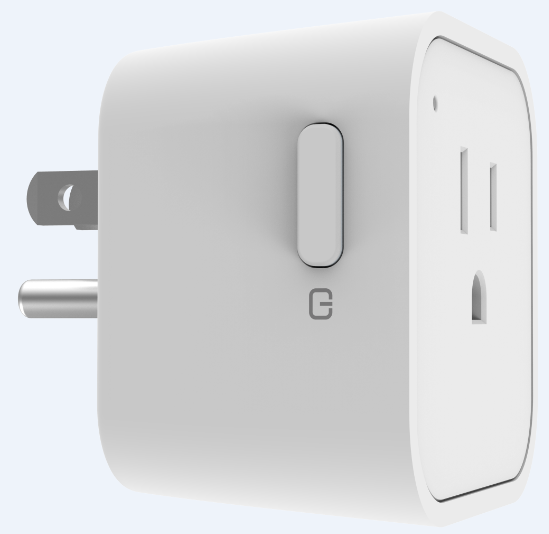
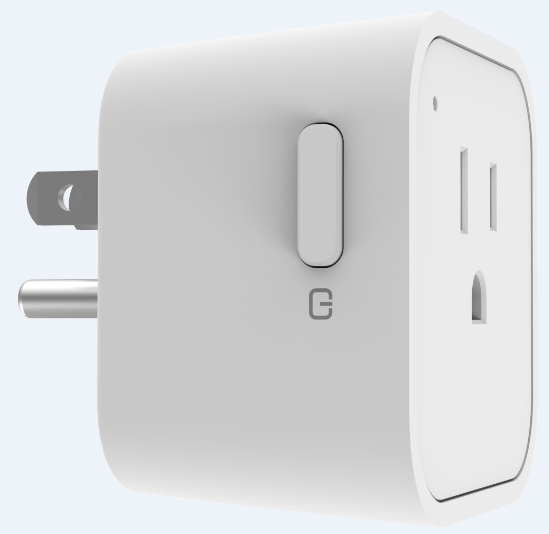
Name | SW-ESW01N |
|---|
Short Description | Maximum Load with 120V/15A
One-Touch Remote Control
Appliance Control (On/Off)
Support Over the Air firmware updates (OTA)
Offer Over Current Protection and Over Voltage Protection |
|---|
Long Description | SW-ESW01N is an electrical power measuring device, which is compatible with Z-Wave enabled devices with its embedded radio frequency (RF) technology. It can also be used with other devices with the Z-Wave logo regardless of the manufacturer.
Furthermore, SW-ESW01N can act as a signal repeater that will extend the wireless transmission range and increase the reliability of your network. With a Z-Wave compatible gateway and software program, you’ll be able to monitor and inform the energy usage of the connected appliance. |
|---|
Brand | Sercomm |
|---|
Product Identifier | SW-ESW01N |
|---|
OEM Version | HW: 3 FW: 2.01 |
|---|
Hardware Platform | ZM5101 |
|---|
Z-Wave Version | 6.51.07 |
|---|
Library Type | SLAVE_ENHANCED_232 |
|---|
Device Type | On/Off Power Switch |
|---|
Role Type | ROLE_TYPE_SLAVE_ALWAYS_ON |
|---|
Manufacturer ID | 0x0151 |
|---|
Product Type ID | 0x0201 |
|---|
Product ID | 0x0001 |
|---|
User Icon | 0x0700 |
|---|
Installer Icon | 0x0700 |
|---|
Frequency Plans | US: 916.00MHz, 908.40MHz |
|---|
Categories | Energy Meters, All Lighting Devices, On/Off Switches/Devices |
|---|
Countries / Regions | United States of America |
|---|
Supported Command Classes | Identifier | Name | Key | Version |
|---|
COMMAND_CLASS_POWERLEVEL | Powerlevel | 0x73 | 1 | COMMAND_CLASS_SWITCH_BINARY | Switch Binary | 0x25 | 1 | COMMAND_CLASS_BASIC | Basic | 0x20 | 1 | COMMAND_CLASS_CONFIGURATION | Configuration | 0x70 | 1 | COMMAND_CLASS_VERSION_V2 | Version V2 | 0x86 | 2 | COMMAND_CLASS_DEVICE_RESET_LOCALLY | Device Reset Locally | 0x5A | 1 | COMMAND_CLASS_ZWAVEPLUS_INFO_V2 | Z-Wave Plus Info V2 | 0x5E | 2 | COMMAND_CLASS_ASSOCIATION_V2 | Association V2 | 0x85 | 2 | COMMAND_CLASS_METER_V3 | Meter V3 | 0x32 | 3 | COMMAND_CLASS_ASSOCIATION_GRP_INFO | Association Group Info | 0x59 | 1 | COMMAND_CLASS_FIRMWARE_UPDATE_MD_V2 | Firmware Update Meta-Data V2 | 0x7A | 2 | COMMAND_CLASS_MANUFACTURER_SPECIFIC_V2 | Manufacturer Specific V2 | 0x72 | 2 | COMMAND_CLASS_NOTIFICATION_V4 | Notification V4 | 0x71 | 4 |
|
|---|
Documents | Category | Description | File |
|---|
Manual_Primary_Lang | Product or Owner's Manual | |
|
|---|
Features | Feature | Values |
|---|
Supported Meter Type | | Color | | Switch Load Capacity Volt-Ampere | Value |
|---|
100~120VAC/15A General Use |
|
|
|---|
Association Groups | Group Number | Maximum Nodes Supported | End Point ID | Description |
|---|
1 | 5 | 0 | Support grouping identifier = 1
Support one group with 5 nodes.
All triggering report will be sent to the associated nodes. |
|
|---|
Configuration Parameters | Parameter Number | Name | Description | Format | Size | Min Value | Max Value | Default Value | Parameter Values |
|---|
1 | Relay state when power up | Relay state when power up 0 : Last relay state (default setting) 1 : Relay on 2 : Relay off | 0 | 1 | 0 | 2 | 0 | From | To | Description |
|---|
0 | 2 | Relay state when power up |
| 2 | Auto report relay state | Auto report relay state 0 : Disable 1 : Enable (default setting) | 0 | 1 | 0 | 1 | 1 | From | To | Description |
|---|
0 | 1 | Auto report relay state |
|
|
|---|
Texts | ID | Description | Value |
|---|
5 | Factory Reset | 1. Press the On/Off button 4 times within two seconds and hold the 4th press until the LED lights up.
2. The LED will turn off after three seconds. The node ID will be cleared and all settings will be reset to factory defaults.
3. The device will be in auto add mode.
Note 1 :Relay state default off
Note 2: Please use this procedure only when the network primary controller is missing or otherwise inoperable. | 4 | Device Wake-Up | Not battery powered | 6 | Additional Special Features | Meter:
The device support below metering scale.
-0x00 Accumulate power consumption (kWh) (Meter Get Command of Version 1 default scale)
-0x02 Power consumption (W)
-0x04 AC load voltage (V)
-0x05 AC load current (A)
-0x06 Load power factor (PF)
Note: Default scale:kWH(Meter Get Command of Version 1) | 2 | Exclusion | 1. Set the Z-Wave controller to ""Remove (Exclusion)"" mode.
2. Press the On/Off button three times within two seconds.
3. The LED will be blinking for one second. (In the meanwhile, our device will send its NIF.)
Note 1: if the Remove process is successful, the node ID will be cleared and the device will be in auto add mode.
Note 2:Relay state default off | 1 | Inclusion | 1. Put the Z-Wave controller into ""Add (Inclusion)"" mode.
2. Power on the device.
3. The LED is blinking while scanning the network and. This process may
take up to 30 seconds. (In the meanwhile, our device will send its NIF.)
4. If the add process is successful, the LED will turn off and restore to relay state.
If the process failed, press the On/Off button once and the device will be in auto add mode again. |
|
|---|
Supported / Controlled Meter Types | Meter Type | Rate Type | Description |
|---|
Electric meter | Import | Electric Meter Consumption |
|
|---|
Supports NWI | Yes |
|---|
Supports Explorer Frames | Yes |
|---|