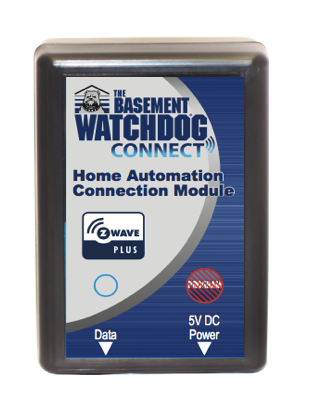
Product Recognition | |
|---|
Certification Number | ZC10-17025429 |
|---|
Name | Sump Pump Module |
|---|
Short Description | Z-Wave Interface for use with Basement Watchdog Battery Backup Sump Pump Systems |
|---|
Long Description | Connect your Basement Watchdog Battery Backup Sump Pump to your Z-Wave network and receive Sump Pump Alerts directly to your phone! From notifications when the backup system has turned on to problems with your pump motor or battery. You won't have to wonder any longer if your sump pump system is working properly. |
|---|
Brand | Basement Watchdog |
|---|
Product Identifier | SPM1 |
|---|
OEM Version | HW: 3 FW: 1.20 |
|---|
Hardware Platform | ZM5202 |
|---|
Z-Wave Version | 6.51.09 |
|---|
Library Type | SLAVE_ENHANCED_232 |
|---|
Device Type | Notification Sensor |
|---|
Role Type | ROLE_TYPE_SLAVE_ALWAYS_ON |
|---|
Manufacturer ID | 0x0084 |
|---|
Product Type ID | 0x0093 |
|---|
Product ID | 0x0114 |
|---|
User Icon | 0x0C05 |
|---|
Installer Icon | 0x0C05 |
|---|
Frequency Plans | US: 916.00MHz, 908.40MHz |
|---|
Categories | Water Valves & Irrigation |
|---|
Countries / Regions | United States of America |
|---|
Supported Command Classes | Identifier | Name | Key | Version |
|---|
COMMAND_CLASS_POWERLEVEL | Powerlevel | 0x73 | 1 | COMMAND_CLASS_VERSION_V2 | Version V2 | 0x86 | 2 | COMMAND_CLASS_DEVICE_RESET_LOCALLY | Device Reset Locally | 0x5A | 1 | COMMAND_CLASS_ZWAVEPLUS_INFO_V2 | Z-Wave Plus Info V2 | 0x5E | 2 | COMMAND_CLASS_ASSOCIATION_V2 | Association V2 | 0x85 | 2 | COMMAND_CLASS_ASSOCIATION_GRP_INFO | Association Group Info | 0x59 | 1 | COMMAND_CLASS_FIRMWARE_UPDATE_MD_V2 | Firmware Update Meta-Data V2 | 0x7A | 2 | COMMAND_CLASS_MANUFACTURER_SPECIFIC_V2 | Manufacturer Specific V2 | 0x72 | 2 | COMMAND_CLASS_NOTIFICATION_V4 | Notification V4 | 0x71 | 4 |
|
|---|
Documents | Category | Description | File |
|---|
Manual_Primary_Lang | Product or Owner's Manual | |
|
|---|
Features | Feature | Values |
|---|
Battery Type | | Firmware Updatable | Value |
|---|
Updatable by Consumer by RF |
| Battery Quantity | |
|
|---|
Association Groups | Group Number | Maximum Nodes Supported | End Point ID | Description |
|---|
1 | 5 | 0 | Z-Wave Plus Lifeline
• Device Reset Locally (via 3 quick presses of the program switch)
• Notifications
o AC Mains Disconnected
o Replace Battery Now
o System Hardware Failure
System Hardware Failure with manufacturer-proprietary failure code (codes detailed below) | 2 | 5 | 0 | • Notifications
o AC Mains Disconnected
o Replace Battery Now
o System Hardware Failure
System Hardware Failure with manufacturer-proprietary failure code (codes detailed below) |
|
|---|
Texts | ID | Description | Value |
|---|
1 | Inclusion | 1) Set up the inclusion mode at the controller; 2) Briefly press the switch once and the controller will indicate the unit has been included in the network. Also, the LED will blink when the inclusion completes. Inclusion and exclusion are always done at normal transmit power mode. This product can be included and operated in any Z-Wave network with other Z-Wave certified devices from other manufacturers and/or other applications. All non-battery operated nodes within the network will act as repeaters regardless of vendor to increase reliability of the network. | 2 | Exclusion | 1) Set up the exclusion mode at the controller; 2) Briefly press the switch once and then release. The controller will indicates the unit has been removed from the network. The LED will blink when the exclusion completes. | 4 | Device Wake-Up | 1 quick press of the program switch.
The SPM will send the Z-Wave TM Node information frame when the switch is briefly pressed. This is primarily used for inclusion as described above. | 5 | Factory Reset | The unit can be reset to factory default via 3 quick presses of the program switch. Please use this procedure only when the network primary controller is missing or otherwise inoperable. | 6 | Additional Special Features | The SPM is designed such that it can be installed in either a Retrofit or a factory-installed mode. In the Retrofit mode, the SPM is attached the cold contacts on the outside of the Sump Pump Controller’s enclosure |
|
|---|
Supports NWI | Yes |
|---|
Supports Explorer Frames | Yes |
|---|
Radio Range Z-Wave (m) | 40 |
|---|