Product Recognition | |
|---|
Certification Number | ZC10-16095222 |
|---|
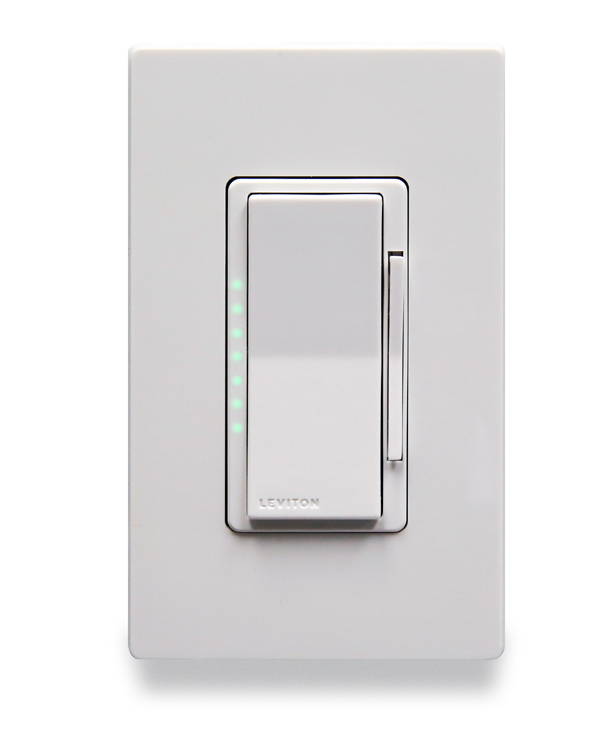
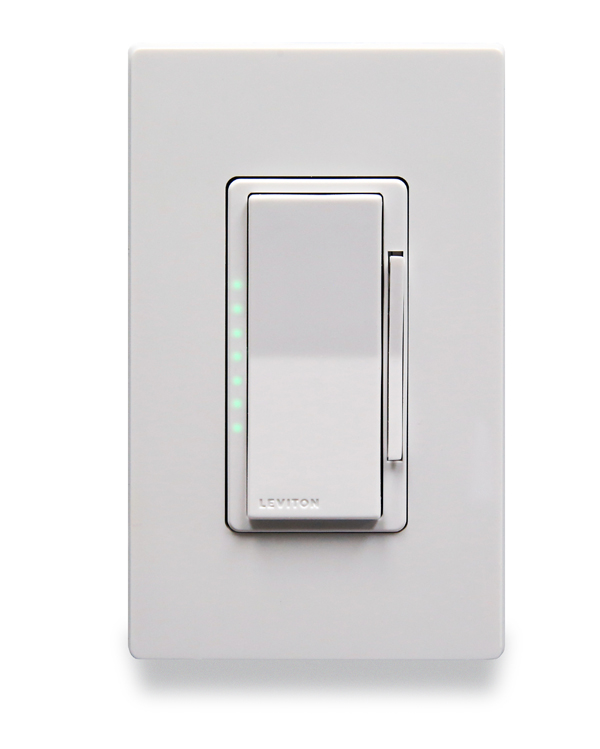
Name | 1000W Dimmer |
|---|
Short Description | 1000W Dimmer designed for most residential lighting applications to control LED, CFL, and incandescent bulbs utilizing Z-Wave Plus technology. |
|---|
Long Description | The wireless Leviton DZ1KD is a Z-Wave enabled dimmer designed for use for most residential lighting applications to control LED, CFL, and incandescent bulbs. The DZ1KD Dimmer is fully compatible with Z-Wave Plus certified controllers. Provides full range dimming with adjustable fade rates. Manufacturer Parameters allow custom configuration via Z-Wave commands. Offers manual control to turn lights on/off and set brightness level, with an LED feedback to display brightness level. Facilitates single pole or three-way multi-location applications. Rated for 450W LED and CFL dimmable bulbs and 1000W incandescent bulbs, requires neutral connection. These Z-Wave Plus devices support beaming, network wide inclusion, and over the air updates. White and Light Almond color faces included, Decora wallplate sold separately. |
|---|
Brand | Leviton |
|---|
Product Identifier | DZ1KD |
|---|
OEM Version | HW: 255 FW: 1.22 |
|---|
Hardware Platform | ZM5202 |
|---|
Z-Wave Version | 6.61.00 |
|---|
Library Type | SLAVE_ENHANCED_232 |
|---|
Device Type | Light Dimmer Switch |
|---|
Role Type | ROLE_TYPE_SLAVE_ALWAYS_ON |
|---|
Manufacturer ID | 0x001D |
|---|
Product Type ID | 0x3301 |
|---|
Product ID | 0x0001 |
|---|
User Icon | 0x0600 |
|---|
Installer Icon | 0x0600 |
|---|
Frequency Plans | US: 916.00MHz, 908.40MHz |
|---|
Categories | All Lighting Devices, Dimming Lighting Devices |
|---|
Countries / Regions | United States of America |
|---|
Supported Command Classes | Identifier | Name | Key | Version |
|---|
COMMAND_CLASS_FIRMWARE_UPDATE_MD_V4 | Firmware Update Meta-Data V4 | 0x7A | 4 | COMMAND_CLASS_SCENE_ACTUATOR_CONF | Scene Actuator Conf | 0x2C | 1 | COMMAND_CLASS_POWERLEVEL | Powerlevel | 0x73 | 1 | COMMAND_CLASS_SWITCH_ALL | Switch All | 0x27 | 1 | COMMAND_CLASS_CONFIGURATION | Configuration | 0x70 | 1 | COMMAND_CLASS_VERSION_V2 | Version V2 | 0x86 | 2 | COMMAND_CLASS_DEVICE_RESET_LOCALLY | Device Reset Locally | 0x5A | 1 | COMMAND_CLASS_ZWAVEPLUS_INFO_V2 | Z-Wave Plus Info V2 | 0x5E | 2 | COMMAND_CLASS_ASSOCIATION_V2 | Association V2 | 0x85 | 2 | COMMAND_CLASS_SWITCH_MULTILEVEL_V4 | Switch Multilevel V4 | 0x26 | 4 | COMMAND_CLASS_ASSOCIATION_GRP_INFO_V3 | Association Group Information V3 | 0x59 | 3 | COMMAND_CLASS_BASIC_V2 | Basic V2 | 0x20 | 2 | COMMAND_CLASS_SCENE_ACTIVATION | Scene Activation | 0x2B | 1 | COMMAND_CLASS_MANUFACTURER_SPECIFIC_V2 | Manufacturer Specific V2 | 0x72 | 2 |
|
|---|
Controlled Command Classes | Identifier | Name | Key | Version |
|---|
COMMAND_CLASS_HAIL | Hail | 0x82 | 1 |
|
|---|
Documents | Category | Description | File |
|---|
Manual_Primary_Lang | Product or Owner's Manual | |
|
|---|
Features | Feature | Values |
|---|
Color | | Electric Load Type | Value |
|---|
Incandescent | MLV (Magnetic) | LED | Dimmable LED | Inductive (e.g. Motor) |
| Firmware Updatable | Value |
|---|
Updatable by Consumer by RF |
| Switch Load Capacity Watts | | Neutral Wire Required | | Switch Type | Value |
|---|
Decorator Paddle Push with Indicator |
| Z-Wave Scene Type | |
|
|---|
Association Groups | Group Number | Maximum Nodes Supported | End Point ID | Description |
|---|
1 | 5 | 0 | • Z-Wave PlusTM Lifeline: A NOTIFICATION frame is sent to the nodesin this association group when a Lifeline event occurs.• All nodes in the association group |
|
|---|
Configuration Parameters | Parameter Number | Name | Description | Format | Size | Min Value | Max Value | Default Value | Parameter Values |
|---|
4 | Maximum Light Level | Maximum Light Level • Parameter No: 4, Length: 1 Byte • Valid Values = 0 to 100 (default 100) | 0 | 1 | 0 | 0 | 100 | From | To | Description |
|---|
0 | 100 | Valid Values |
| 5 | Preset Light Level | Preset Light Level • Parameter No: 5, Length: 1 Byte • Valid Values = 0 to 100 (default 0) - 0 = Memory Dim - Last dim state - 1 - 100 = Level | 0 | 1 | 0 | 0 | 0 | From | To | Description |
|---|
0 | 0 | Memory Dim (Last Dim State) | 1 | 100 | Level | 0 | 100 | Valid Values |
| 6 | LED Dim Level Indicator Timeout | LED Dim Level Indicator Timeout • Parameter No: 6, Length: 1 Byte • Valid Values = 0 to 255 (0xFF) (default 3) - 0 = Level Indicators Off - 1 - 254 (0x01 - 0xFE) = Level Indicator Timeout (seconds) - 255 (0xFF) = Levels Always On | 0 | 1 | 0 | 0 | 3 | From | To | Description |
|---|
0 | 0 | Level Indicators Off | 1 | 254 | Level Indicator Timeout (seconds) | 255 | 255 | Indicators Always On | 0 | 255 | Valid Values |
| 7 | Locator LED Status | Locator LED Status • Parameter No: 7, Length: 1 Byte • Valid Values = 0 to 255 (0xFF) (default 255 (0xFF)) - 0 = LED Off - 254 (0xFE) = Status Mode - 255 (0xFF) = Locator Mode | 0 | 1 | 0 | 0 | 255 | From | To | Description |
|---|
0 | 0 | LED Off | 254 | 254 | LED Status Mode (0xFE) | 255 | 255 | LED Locator Mode (0xFF) |
| 8 | Load Type | Load Type • Parameter No: 8, Length: 1 Byte • Valid Values = 0 to 3 (default 0) - 0 = Incandescent - 1 = LED - 2 = CFL - 3 = Mark 10 | 0 | 1 | 0 | 0 | 0 | From | To | Description |
|---|
0 | 3 | Load Type |
| 2 | Fade Off Time | Fade Off Time • Parameter No: 2, Length: 1 Byte • Valid Values = 0 to 253 (default 2) - 0 = Instant Off - 1 - 127 = Seconds: 1 - 127 seconds - 128 - 253 (0x80 - 0xFD) = Minutes: 1 - 126 minutes | 0 | 1 | 0 | 0 | 2 | From | To | Description |
|---|
128 | 253 | 1-126 Minutes | 0 | 253 | Valid Values | 1 | 127 | 1-127 Seconds | 0 | 0 | Instant Off |
| 1 | Fade On Time | Fade On Time • Parameter No: 1, Length: 1 Byte • Valid Values = 0 to 253 (default 2) - 0 = Instant On - 1 - 127 = Seconds: 1 - 127 seconds - 128 - 253 (0x80 - 0xFD) = Minutes: 1 - 126 minutes | 0 | 1 | 0 | 0 | 2 | From | To | Description |
|---|
0 | 253 | Valid Values | 0 | 0 | Instant On | 1 | 127 | 1-127 Seconds | 128 | 253 | 1-126 Minutes |
| 3 | Minimum Light Level | Minimum Light Level • Parameter No: 3, Length: 1 Byte • Valid Values = 0 to 100 (default 10) | 0 | 1 | 0 | 0 | 10 | From | To | Description |
|---|
0 | 100 | Valid Values |
|
|
|---|
Texts | ID | Description | Value |
|---|
2 | Exclusion | When removing a device from a Z-Wave® network best practice is to use the exclusion command found in the Z-Wave® controller.• Enter Programming Mode by holding the top of the paddle for 7 seconds, the Locator LED will blink amber.• Follow directions in the Z-Wave® controller to enter exclusion mode• Tap the top of the paddle one time. The Locator LED will quickly flash green.The Z-Wave® controller will exclude the Decora Smart™ device• The Z-Wave® controller will confirm successful exclusion from the network. | 1 | Inclusion | Leviton Decora Smart™ Z-Wave® devices support two methods of inclusion. When using a Z-Wave Plus® certified controller choose Network Wide Inclusion.Network Wide Inclusion:Network Wide Inclusion allows your device to be included into the network using devices already in the network to assist with communication. Work your way from the closest devices to the controller outward.• Enter Programming Mode by holding the top of the paddle for 7 seconds, the Locator LED will blink amber.• Tap the top of the paddle one time.The Locator LED will quickly flash green.• The Decora Smart™ Z-Wave® device is ready to learn into the Z-Wave® network.• Follow directions in the Z-Wave controller to complete the adding process.• Upon successful addition to network the LED will turn off and then blink green 3 times.• If the adding process is not successful the LED will flash red 3 times.Traditional Inclusion:For older controllers Traditional Inclusion is supported. Depending on the age of the controller the controller will need to be 3 to 35 feet from the device when including.• Enter Programming Mode by holding the top of the paddle for 7 seconds, the Locator LED will blink amber.• The Decora SmartTM Z-Wave® device is ready to add to the Z-Wave® network.• Follow directions in the Z-Wave® controller to enter learn mode.• Tap the top of the paddle one time. The Locator LED will quickly flash green. The Z-Wave® controller will begin to pair with the Decora Smart™ device.• Upon successful addition to the network the LED will turn off and then blink green 3 times.• If the adding process is not successful the LED will flash red 3 times. | 5 | Factory Reset | When removing a device from a network it is best practice to use the Exclusion process. In situations where a device needs to be returned to factory default follow the following steps. A reset should only be used when a controller is inoperable or missing.• Hold the top of the paddle for a total of 14 seconds.• After the first 7 seconds the LED turns amber.• The Locator LED will quickly flash red/amber after 14 seconds.• Release the top of the paddle and the device will reset. |
|
|---|
Supports NWI | Yes |
|---|
Supports Explorer Frames | Yes |
|---|
Radio Range Z-Wave (m) | 40 |
|---|