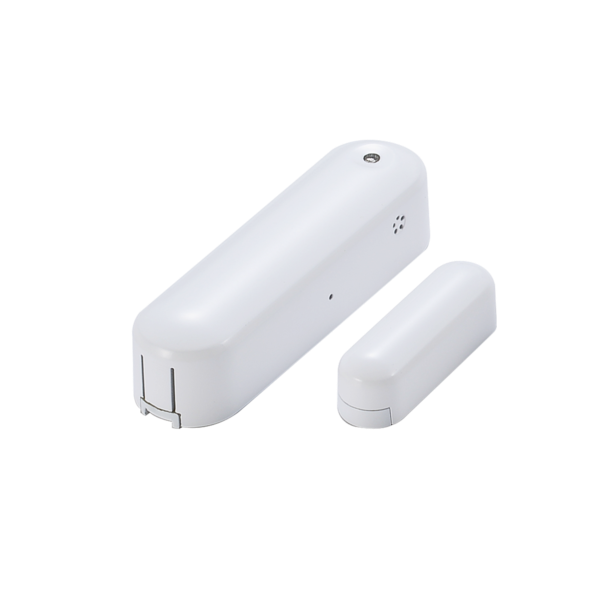
Product Recognition | |
|---|
Certification Number | ZC10-15110007 |
|---|
Name | 4 in 1 Door Sensor |
|---|
Short Description | Vision’s wireless 4 in 1 Door Sensor (door window contact sensor, humidity sensor, temperature sensor, and light sensor) of the home security device. This sensor is a Z-Wave™ enabled device (interoperable, two-way RF mesh networking technology) and is fully compatible with any Z-Wave™ enabled network and its security framework. |
|---|
Long Description | Vision’s wireless 4 in 1 Multi-Sensor (door window contact sensor, humidity sensor, temperature sensor, and light sensor) of the home security device. This sensor is a Z-Wave™ enabled device two-way (interoperable, RF mesh networking technology) and is fully compatible with any Z-Wave™ enabled network and its security framework. Every main powered Z-Wave enabled device acts as a signal repeater and multiple devices result in more possible transmission routes which helps eliminate “RF dead-spots”
This door sensor sends Z-Wave™ signal when door or window is opened and closed or humidity, temperature, luminous change. When the device is secure included into Z-Wave network, above communication will be encrypted. Security enabled_ Z-Wave controller must be used to fully utilize the product. |
|---|
Brand | Vision |
|---|
Product Identifier | ZD2301EU-5 |
|---|
OEM Version | 02 |
|---|
Hardware Platform | ZM5202 |
|---|
Z-Wave Version | 6.51.06 |
|---|
Library Type | SLAVE_ENHANCED_232 |
|---|
Device Type | Notification Sensor |
|---|
Role Type | ROLE_TYPE_SLAVE_SLEEPING_REPORTING |
|---|
Manufacturer ID | 0x0109 |
|---|
Product Type ID | 0x201F |
|---|
Product ID | 0x1F20 |
|---|
Frequency Plans | EU: 869.85MHz, 868.40MHz |
|---|
Categories | Sensors |
|---|
Countries / Regions | European Union |
|---|
Controlled Command Classes | Identifier | Name | Key | Version |
|---|
COMMAND_CLASS_BASIC | Basic | 0x20 | 1 |
|
|---|
Documents | Category | Description | File |
|---|
Manual_Primary_Lang | Product or Owner's Manual | |
|
|---|
Association Groups | Group Number | Maximum Nodes Supported | End Point ID | Description |
|---|
1 | 5 | 0 | Z-Wave Plus Lifeline
Lifeline group used command : Notification Report, Device Reset Locally. |
|
|---|
Texts | ID | Description | Value |
|---|
2 | Exclusion | 5. For “Exclusion” from (removing from) a network: Put the Z-Wave™ Interface Controller into “exclusion” mode, and following its instruction to delete the ZD2301 from your controller. Press the program switch of ZD2301 for 1 second at least to be excluded.
Note: All user and network settings will be cleared and the device reset to factory defaults when the device is excluded. | 1 | Inclusion | 4. For “Inclusion” in (adding to) a network: Put the Z-Wave™ Interface Controller into “inclusion” mode, and following its instruction to add the ZD2301 to your controller. To get in the “inclusion” mode, the distance between sensor and controller is suggested to be in one meter. Press the program switch of ZD2301 for sending the NIF. After sending NIF, Z-Wave will send the auto inclusion; otherwise, ZD2301 will go to sleep after 20 seconds. | 5 | Factory Reset | Factory Default Reset:
*Open the rear cover to send the Alarm Report and then press the program switch 10 times in 10 seconds, ZD2301 will send the “Device Reset Locally” command and reset to the factory default.
*Please use this procedure only in the event that the network primary controller is missing or otherwise inoperable. | 6 | Additional Special Features | 1. Temperature-If the present temperature is different with the sensor record and exceed the setting program, the sensor will report the present temperature. LED flash every minute to represent the temperature or wake up by press the Program SW.
Temperature LED Color
Under 15°C Green
15~23°C Blue
23~28°C Yellow
28~36°C Orange
Over 36°C Red
2. Humidity Report- If the present humidity is different with the sensor record and exceed the setting program, the sensor will report the present humidity.
3. Light Report- If the present illumination is different with the sensor record and exceed the setting program, the sensor will report the present illumination. | 4 | Device Wake-Up | Awake Mode:
Press the Program SW, the LED will flash one time and ZD2301 will send “Wake Up Notification” after 5 seconds. If ZD2301 received “Wake Up No More Information” command then the ZD2301 will go to sleep or it will wait 10 seconds then go to sleep. It will precede all the commands after sending the “Wake Up Notification” |
|
|---|
Supports NWI | Yes |
|---|
Supports Explorer Frames | Yes |
|---|
Radio Range Z-Wave (m) | 40 |
|---|