Product Recognition | |
|---|
Certification Number | ZC14-24070438 |
|---|
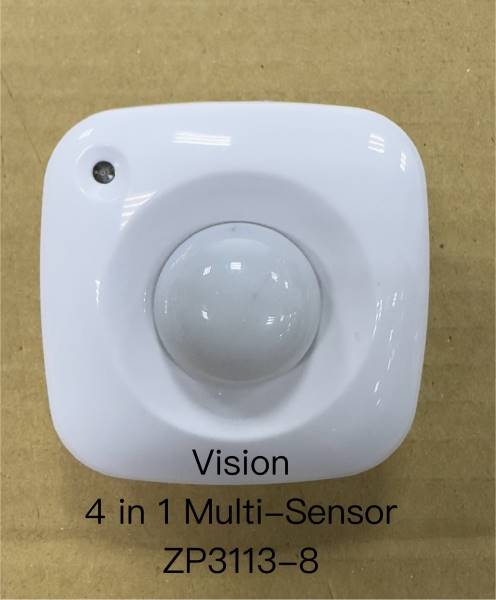
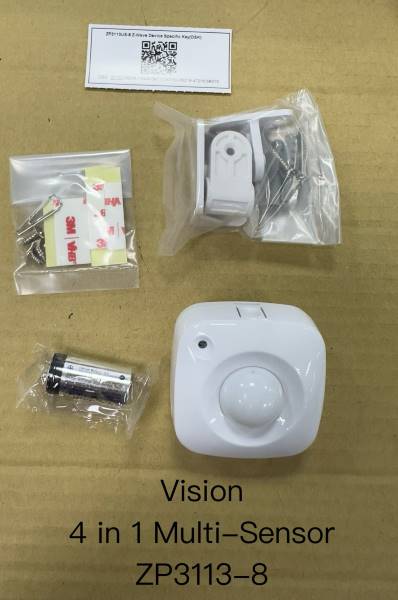
Name | 4 IN 1 PIR Sensor |
|---|
Short Description | (ZP3113-8) monitors movement, and send Z-Wave signal when movement is detected inside the building. |
|---|
Long Description | With Temperature, Humidity and Light sensor built inside, it will send the signal out when temperature, humidity or light changed. When the device is secure included into Z-Wave network, above communication will be encrypted. The motion sensor work by detecting changes in infrared radiation and movement within their coverage area. This signal can then be used to trigger an alarm or activate other devices. |
|---|
Brand | Vision |
|---|
Product Identifier | ZP3113US-8 |
|---|
Product Line | Home security |
|---|
OEM Version | HW: 01 FW: 10.18:02.01 |
|---|
Hardware Platform | EFR32ZG23B |
|---|
Z-Wave Version | 7.18.8 |
|---|
Library Type | END_NODE_ENHANCED_232 |
|---|
Device Type | Notification Sensor DT |
|---|
Role Type | ROLE_TYPE_END_NODE_SLEEPING_REPORTING |
|---|
Manufacturer ID | 0x0109 |
|---|
Product Type ID | 0x2021 |
|---|
Product ID | 0x2112 |
|---|
User Icon | 0x0C07 |
|---|
Installer Icon | 0x0C07 |
|---|
Frequency Plans | US: 916.00MHz, 908.40MHz, US_LR: 912.00MHz, 920.00MHz |
|---|
Categories | Sensors |
|---|
Countries / Regions | United States of America, Canada |
|---|
Supported Command Classes | Identifier | Name | Key | Version |
|---|
COMMAND_CLASS_ASSOCIATION_V2 | Association V2 | 0x85 | 2 | COMMAND_CLASS_ASSOCIATION_GRP_INFO_V3 | Association Group Information (AGI) V3 | 0x59 | 3 | COMMAND_CLASS_DEVICE_RESET_LOCALLY | Device Reset Locally | 0x5A | 1 | COMMAND_CLASS_FIRMWARE_UPDATE_MD_V5 | Firmware Update Meta Data V5 | 0x7A | 5 | COMMAND_CLASS_INDICATOR_V3 | Indicator V3 | 0x87 | 3 | COMMAND_CLASS_MANUFACTURER_SPECIFIC_V2 | Manufacturer Specific V2 | 0x72 | 2 | COMMAND_CLASS_MULTI_CHANNEL_ASSOCIATION_V3 | Multi Channel Association V3 | 0x8E | 3 | COMMAND_CLASS_VERSION_V3 | Version V3 | 0x86 | 3 | COMMAND_CLASS_ZWAVEPLUS_INFO_V2 | Z-Wave Plus Info V2 | 0x5E | 2 | COMMAND_CLASS_SECURITY_2 | Security 2 | 0x9F | 1 | COMMAND_CLASS_SUPERVISION | Supervision | 0x6C | 1 | COMMAND_CLASS_TRANSPORT_SERVICE_V2 | Transport Service V2 | 0x55 | 2 | COMMAND_CLASS_POWERLEVEL | Powerlevel | 0x73 | 1 | COMMAND_CLASS_NOTIFICATION_V8 | Notification V8 | 0x71 | 8 | COMMAND_CLASS_WAKE_UP_V2 | Wake Up V2 | 0x84 | 2 | COMMAND_CLASS_BATTERY | Battery | 0x80 | 1 | COMMAND_CLASS_CONFIGURATION_V4 | Configuration V4 | 0x70 | 4 | COMMAND_CLASS_SENSOR_MULTILEVEL_V11 | Multilevel Sensor V11 | 0x31 | 11 | COMMAND_CLASS_APPLICATION_STATUS | Application Status | 0x22 | 1 |
|
|---|
S2 Classes | S2_AUTHENTICATED, S2_UNAUTHENTICATED |
|---|
Documents | Category | Description | File |
|---|
Manual_English | This manual has corrected the ™ to registered trademark ® with "Z-Wave®" and "Z-Wave Plus®" | |
|
|---|
Association Groups | Group Number | Maximum Nodes Supported | End Point ID | Group Name | Profile |
|---|
1 | 5 | 0 | Lifeline | 0x0001 | 2 | 5 | 0 | Basic set | 0x7107 |
|
|---|
Configuration Parameters | Parameter Number | Name | Description | Format | Size | Min Value | Max Value | Default Value |
|---|
1 | Temperature Type | 0:Celsius/1:Fahrenheit, default:0 | 1 | 1 | 0 | 0 | 0x00 | 2 | Temperature Scale | Set 1~50 is 0.1~5°C, default:30 | 1 | 1 | 0 | 0 | 0x1E | 3 | Humid Scale | Set 1~50 is 1~50%, default:20 | 1 | 1 | 0 | 0 | 0x14 | 4 | Light Scale | Set 0/5~50 is OFF/5~50%, default:10 | 1 | 1 | 0 | 0 | 0x0A | 5 | Motion Re-trigger Duration | Set 15~900 Seconds, default Security:15,Lighting:60 | 1 | 2 | 0 | 0 | 0x000F | 6 | Motion Sensitivity Level | Set 1~7 Sensitivity Level, default:4 | 1 | 1 | 0 | 0 | 0x04 | 7 | LED Mode | Set 1~3 LED Mode, default:1 | 1 | 1 | 0 | 0 | 0x01 | 8 | Retry Count | Set 0~5 Retry Count, default:0 | 1 | 1 | 0 | 0 | 0x00 | 9 | Wait Supervision Report Time | Set 500~10000 ms, default:500 | 1 | 2 | 0 | 0 | 0x01F4 | 10 | Temperature Offset Value | Set 0~200 is -10.0~+10.0°C, default:100 | 1 | 1 | 0 | 0 | 0x64 | 11 | Humidity Offset Value | Set 0~200 is -10.0~+10.0%, default:100 | 1 | 1 | 0 | 0 | 0x64 | 224 | WakeUp Test Mode | 0x00:Disable/0xFF:Enable, default:0x00 | 1 | 1 | 0 | 0 | 0x00 |
|
|---|
Texts | ID | Description | Value |
|---|
8 | Where to find S2 DSK on product | The DSK label is on the backside of ZP3113. Scan the DSK label to access the SmartStart if gateway 's UI supports SmartStart | 1 | Classic Inclusion | To add the ZP3113 to your Z-Wave network (inclusion), place your Z-Wave primary controller into inclusion mode.
Press the Program Switch of ZP3113 once for sending the NIF. After sending NIF, Z-Wave will send the auto inclusion, otherwise, ZP3113 will go to sleep
after 30 seconds. The LED indicator will be flashing while the inclusion is continued. | 2 | Classic Exclusion | On manual page 7, no#5 | 4 | Wake-Up Procedure | Press “Program SW” once to send NIF and LED will flash once, it takes around 10 seconds to send “Wake Up Notification” for receiving all command classes or go to sleep mode after 10 seconds without receiving any command. | 5 | Factory Reset Procedure | Remove cover to trigged tamper switch, LED flash once & send out Notification Report. Press Program Switch 5 or more times within 10 seconds, ZP3113 will send the “Device Reset Locally Notification”
command and reset to the factory default. (Remark: This is to be used only in the case of primary controller being inoperable or otherwise unavailable.) | 6 | Other Special Features | Light Report:There are 3 methods could activate the Light Report (in hexadecimal):
a.Use SENSOR_MULTILEVEL_GET for getting the Light Report.
b.If the present illumination is different with the sensor record and exceed the setting program, the sensor will report the present illumination.
c.Every 10% decreasing from 100% will report automatically. |
|
|---|
Supported Notification Types | Notification Type | Event / State |
|---|
Home Security | Cover status: Tampering, product cover removed | Home Security | Motion sensor status: Motion detection |
|
|---|
Supported Multilevel Sensors | Multilevel Sensor Type |
|---|
Air temperature | Illuminance | Humidity |
|
|---|
Supports NWI | Yes |
|---|
Supports Explorer Frames | Yes |
|---|
Supports SmartStart | Yes |
|---|
Radio Range Z-Wave (m) | 40 |
|---|
Radio Range Z-Wave LR (m) | 400 |
|---|