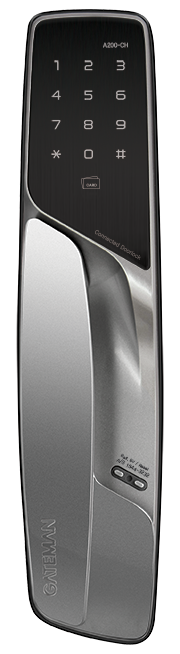
Product Recognition | |
|---|
Certification Number | ZC10-16065106 |
|---|
Name | A200-CH |
|---|
Short Description | A mortise type digital door lock for smart home services. |
|---|
Long Description | A mortise type digital door lock for smart home services.
'A200-CH' is a security enabled Z-Wave Plus product for Korean domestic market. It can be included and operated in any Z-Wave network with other Z-Wave certified devices. |
|---|
Brand | GATEMAN |
|---|
Product Identifier | GDM-M2D6D-K0 |
|---|
OEM Version | HW: 16.16.16.16.16 |
|---|
Hardware Platform | ZM5202 |
|---|
Z-Wave Version | 6.51.06 |
|---|
Library Type | SLAVE_ENHANCED_232 |
|---|
Device Type | Door Lock Keypad |
|---|
Role Type | ROLE_TYPE_SLAVE_SLEEPING_LISTENING |
|---|
Manufacturer ID | 0x0212 |
|---|
Product Type ID | 0xC600 |
|---|
Product ID | 0x0004 |
|---|
User Icon | MSB : 0x03, LSB: 0x00 |
|---|
Installer Icon | MSB : 0x03, LSB : 0x00 |
|---|
Frequency Plans | KR: 920.90MHz, 921.70MHz, 923.10MHz |
|---|
Categories | Locks |
|---|
Countries / Regions | Republic of Korea |
|---|
Documents | Category | Description | File |
|---|
Manual_Primary_Lang | Product or Owner's Manual | |
|
|---|
Features | Feature | Values |
|---|
Battery Quantity | | Battery Type | | Color | | Door Lock Type | | Firmware Updatable | Value |
|---|
Updatable by Manufacturer |
|
|
|---|
Association Groups | Group Number | Maximum Nodes Supported | End Point ID | Description |
|---|
1 | 5 | 0 | Z-Wave Plus Lifeline |
|
|---|
Configuration Parameters | Parameter Number | Name | Description | Format | Size | Min Value | Max Value | Default Value | Parameter Values |
|---|
2 | Auto relock on/off | Set the auto relock on/off | 0 | 1 | 0 | 0 | 0 | From | To | Description |
|---|
0 | 255 | unsigned value |
| 1 | Silent mode on/off | Set the silent mode on/off | 0 | 1 | 0 | 0 | 3 | From | To | Description |
|---|
1 | 3 | unsigned value |
|
|
|---|
Texts | ID | Description | Value |
|---|
2 | Exclusion | To exclude:
1. Touch keypad with palm
2. Enter User code(Normal Mode only. Enter Master code if operating Master Mode.)
3. Press 'R' button [Registration] from the inside of battery cover.
4. Press 9,#,3,# on the keypad (by sequence)
5. Wait until 'Ding dong dang' melody play than press 'R' button [Registration] | 1 | Inclusion | To include:
1. Touch keypad with palm
2. Enter User code(Normal Mode only. Enter Master code if operating Master Mode.)
3. Press 'R' button [Registration] from the inside of battery cover.
4. Press 9,#,1,# on the keypad (by sequence)
5. Wait until 'Ding dong dang' melody play than press 'R' button [Registration] | 4 | Device Wake-Up | The lock is always in 'Wake up status'.
However, touch with palm to begin and end action. | 5 | Factory Reset | To reset to factory defaults:
※ Use this procedure only in the event that the network primary controller is missing or otherwise inoperable. (User code or master code remains the same. Only network settings reset to factory defaults.)
1. Touch keypad with palm
2. Enter User code(Normal Mode only. Enter Master code if operating Master Mode.)
3. Press 'R' button [Registration] from the inside of battery cover.
4. Press 9,#,9,# on the keypad (by sequence)
5. Wait until 'Ding dong dang' melody play than press 'R' button [Registration] |
|
|---|
Supports NWI | Yes |
|---|
Supports Explorer Frames | Yes |
|---|
Is Flirs | Yes |
|---|