Product Recognition | |
|---|
Certification Number | ZC10-18116319 |
|---|
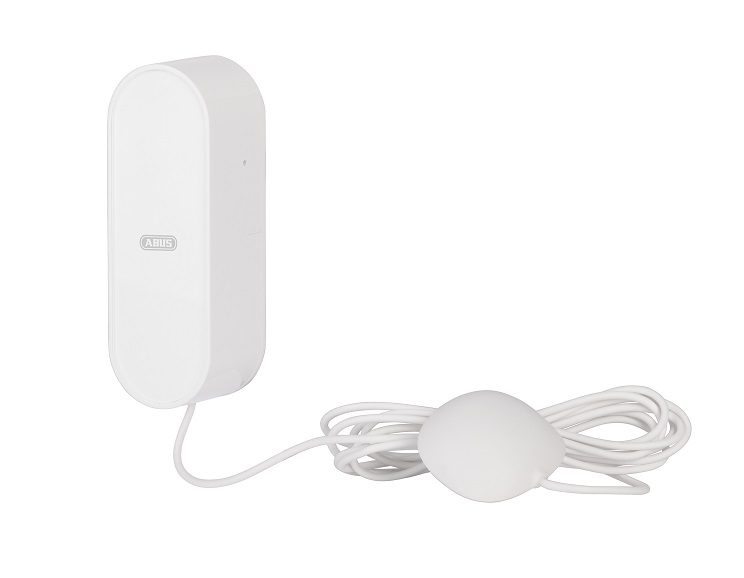
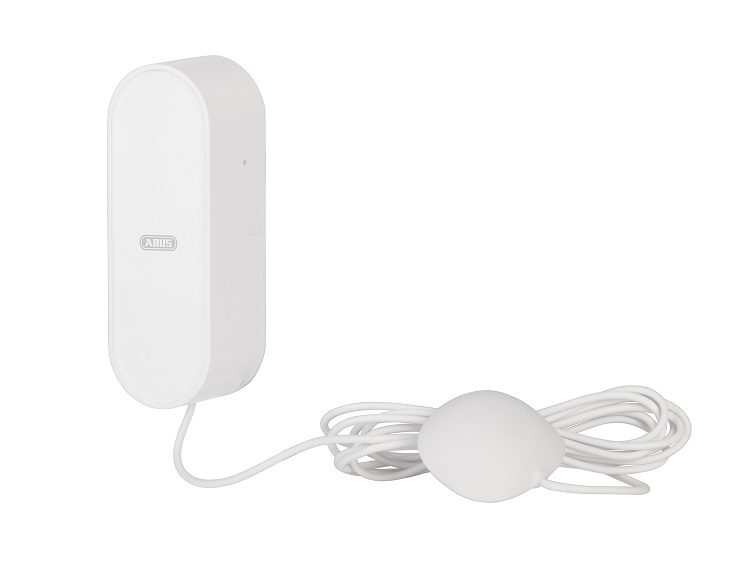
Name | ABUS Z-Wave Waterleak Detector |
|---|
Short Description | The ABUS Z-Wave Waterleak Detector protects reliably against water damage by detecting liquids. |
|---|
Long Description | The ABUS Z-Wave Waterleak Detector protects reliably against water damage by detecting liquids. The detector is Ideal for monitoring cellars, washing machines, and drains. The water level sensor can be flexible installed due to 120cm cable length. |
|---|
Brand | ABUS |
|---|
Product Identifier | SHWM10000 |
|---|
OEM Version | HW: 255 FW: 3.01 |
|---|
Hardware Platform | ZM5101 |
|---|
Z-Wave Version | 6.71.03 |
|---|
Library Type | SLAVE_ROUTING |
|---|
Device Type | Notification Sensor |
|---|
Role Type | ROLE_TYPE_SLAVE_SLEEPING_REPORTING |
|---|
Manufacturer ID | 0x0403 |
|---|
Product Type ID | 0x0002 |
|---|
Product ID | 0x0002 |
|---|
User Icon | 0x0C05 |
|---|
Installer Icon | 0x0C05 |
|---|
Frequency Plans | EU: 869.85MHz, 868.40MHz |
|---|
Categories | Sensors |
|---|
Countries / Regions | European Union |
|---|
Supported Command Classes | Identifier | Name | Key | Version |
|---|
COMMAND_CLASS_POWERLEVEL | Powerlevel | 0x73 | 1 | COMMAND_CLASS_MULTI_CHANNEL_ASSOCIATION_V3 | Multi-Channel Association V3 | 0x8E | 3 | COMMAND_CLASS_BATTERY | Battery | 0x80 | 1 | COMMAND_CLASS_TRANSPORT_SERVICE_V2 | Transport Service V2 | 0x55 | 2 | COMMAND_CLASS_WAKE_UP_V2 | Wake Up V2 | 0x84 | 2 | COMMAND_CLASS_DEVICE_RESET_LOCALLY | Device Reset Locally | 0x5A | 1 | COMMAND_CLASS_ZWAVEPLUS_INFO_V2 | Z-Wave Plus Info V2 | 0x5E | 2 | COMMAND_CLASS_ASSOCIATION_V2 | Association V2 | 0x85 | 2 | COMMAND_CLASS_ASSOCIATION_GRP_INFO | Association Group Info | 0x59 | 1 | COMMAND_CLASS_NOTIFICATION_V8 | Notification V8 | 0x71 | 8 | COMMAND_CLASS_SECURITY_2 | Security S2 | 0x9F | 1 | COMMAND_CLASS_VERSION_V3 | Version V3 | 0x86 | 3 | COMMAND_CLASS_SUPERVISION | Supervision | 0x6C | 1 | COMMAND_CLASS_MANUFACTURER_SPECIFIC_V2 | Manufacturer Specific V2 | 0x72 | 2 |
|
|---|
S2 Classes | S2_UNAUTHENTICATED |
|---|
Documents | Category | Description | File |
|---|
Manual_Primary_Lang | Product or Owner's Manual | |
|
|---|
Features | Feature | Values |
|---|
Battery Quantity | | Battery Type | | Color | | Communications Protocol | | Sensors | | Supported Notification Types | |
|
|---|
Association Groups | Group Number | Maximum Nodes Supported | End Point ID | Description |
|---|
1 | 5 | 0 | Association group 1: Lifeline association group - Maximum supported node is 1. Include command classes: Battery report, Notification report, and Device Reset Locally notification, Binary report. | 2 | 5 | 0 | Association group 2: Root Device group(Binary Sensor) Maximum supported nodes are 5. Binary Sensor Command Class: Compatible with 300 series 1- Binary Sensor reports status of water or no water via Lifeline. 2- When the sensor detects status change between water and no water, the device will be triggered. | 3 | 5 | 0 | Association group 3: Root Device group(Binary Sensor) Maximum supported nodes are 5. Binary Sensor Command Class:Compatible with 300 series 1-Binary Sensor reports the removed status of water sensor. 2-When the sensor detects status change of tamper, the device will be triggered. | 4 | 5 | 0 | Association group 4: Root Device group(Notification) Maximum supported nodes are 5. 1-Notification reports reports status of detect water or no water via Lifeline. 2-When the sensor detects status change between water and no water, the device will be triggered. . | 5 | 5 | 0 | Association group 5: Root Device group(Notification) Maximum supported nodes are 5. 1-Binary Sensor reports the removed status of water sensor. 2- When the sensor detects status change of tamper, the device will be triggered. |
|
|---|
Texts | ID | Description | Value |
|---|
5 | Factory Reset | 1. Press the Tamper-button 3 times within 1.5 Seconds
2. The device is now restored to factory settings
Note:
1, This procedure should only be used if the primary gateway is not capable of acting.
2, If the multi-sensor is set to the factory setting, the status is set to ""not included"", the association settings and possible configurations are reset to default. | 1 | Inclusion | A.) Slide the base unit from the mounting plate and remove the safety strip from the battery compartment.
B.) Click the + (Add) button in your Z-Wave App and follow the further instructions
C.) Press the Tamper-button 3 times within 1.5 seconds and the Status-LED on the base unit front will flash 3 times. The App will show if the Add device process was successful and the Status-LED will turn off. Repeat the inclusion process from step B if it was not successful. | 2 | Exclusion | A.) Click the - (Remove) button in your Z-Wave App and follow the further instructions.
B.) Press the Tamper-button 3 times within 1.5 seconds and the Status-LED on the base unit front will flash 3 times. The App will show if the Remove device process was successful and the Status-LED on device will flash 6 times. Repeat the exclusion process from step B if it was not successful. |
|
|---|
Supported Notification Types | Notification Type | Event / State |
|---|
Water Alarm | (Refer to parameters): State idle |
|
|---|
Supported Multilevel Sensors | Multilevel Sensor Type |
|---|
Water flow |
|
|---|
Supports NWI | Yes |
|---|
Supports Explorer Frames | Yes |
|---|
Radio Range Z-Wave (m) | 40 |
|---|