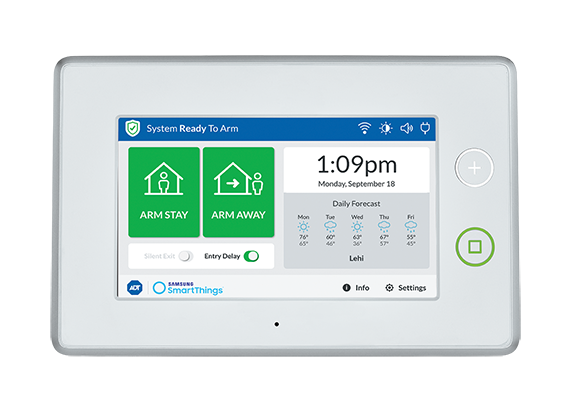
Product Recognition | |
|---|
Certification Number | ZC10-17105798 |
|---|
Name | ADT Security Hub |
|---|
Short Description | ADT and Samsung SmartThings. // The easy way to help make your home secure and smart. |
|---|
Long Description | The ADT Security Hub is the brain of your security system, helping protect your home with easy-to-install wireless detectors and alarms plus optional ADT professional monitoring services. It can also automate your home with a wide range of Works with SmartThings devices, including lights, cameras, doorbells, door locks, thermostats, and more. |
|---|
Brand | ADT SmartThings |
|---|
Product Identifier | F-ADT-HUB-1 |
|---|
OEM Version | HW: 26 FW: 4.54:00.14 |
|---|
Hardware Platform | SD3503 |
|---|
Z-Wave Version | 6.51.10 |
|---|
Library Type | CONTROLLER_STATIC |
|---|
Device Type | Central Controller |
|---|
Role Type | ROLE_TYPE_CONTROLLER_CENTRAL_STATIC |
|---|
Manufacturer ID | 0x014F |
|---|
Product Type ID | 0x4153 |
|---|
Product ID | 0x3031 |
|---|
User Icon | 0x0100 |
|---|
Installer Icon | 0x0100 |
|---|
Frequency Plans | US: 916.00MHz, 908.40MHz |
|---|
Categories | Security Systems |
|---|
Countries / Regions | United States of America |
|---|
Supported Command Classes | Identifier | Name | Key | Version |
|---|
COMMAND_CLASS_NO_OPERATION | No Operation | 0x00 | 1 | COMMAND_CLASS_POWERLEVEL | Powerlevel | 0x73 | 1 | COMMAND_CLASS_APPLICATION_STATUS | Application Status | 0x22 | 1 | COMMAND_CLASS_CRC_16_ENCAP | CRC16 Encapsulation | 0x56 | 1 | COMMAND_CLASS_SECURITY | Security S0 | 0x98 | 1 | COMMAND_CLASS_VERSION_V2 | Version V2 | 0x86 | 2 | COMMAND_CLASS_DEVICE_RESET_LOCALLY | Device Reset Locally | 0x5A | 1 | COMMAND_CLASS_ZWAVEPLUS_INFO_V2 | Z-Wave Plus Info V2 | 0x5E | 2 | COMMAND_CLASS_ASSOCIATION_V2 | Association V2 | 0x85 | 2 | COMMAND_CLASS_ASSOCIATION_GRP_INFO | Association Group Info | 0x59 | 1 | COMMAND_CLASS_MANUFACTURER_SPECIFIC_V2 | Manufacturer Specific V2 | 0x72 | 2 |
|
|---|
Controlled Command Classes | Identifier | Name | Key | Version |
|---|
COMMAND_CLASS_SENSOR_MULTILEVEL_V5 | Sensor Multilevel V5 | 0x31 | 5 | COMMAND_CLASS_THERMOSTAT_OPERATING_STATE_V2 | Thermostat Operating State V2 | 0x42 | 2 | COMMAND_CLASS_DOOR_LOCK_V2 | Door Lock V2 | 0x62 | 2 | COMMAND_CLASS_MULTI_CHANNEL_ASSOCIATION_V3 | Multi-Channel Association V3 | 0x8E | 3 | COMMAND_CLASS_CLOCK | Clock | 0x81 | 1 | COMMAND_CLASS_BATTERY | Battery | 0x80 | 1 | COMMAND_CLASS_SWITCH_BINARY | Switch Binary | 0x25 | 1 | COMMAND_CLASS_BASIC | Basic | 0x20 | 1 | COMMAND_CLASS_CRC_16_ENCAP | CRC16 Encapsulation | 0x56 | 1 | COMMAND_CLASS_SECURITY | Security S0 | 0x98 | 1 | COMMAND_CLASS_SENSOR_BINARY_V2 | Sensor Binary V2 | 0x30 | 2 | COMMAND_CLASS_THERMOSTAT_FAN_MODE_V3 | Thermostat Fan Mode V3 | 0x44 | 3 | COMMAND_CLASS_THERMOSTAT_MODE_V2 | Thermostat Mode V2 | 0x40 | 2 | COMMAND_CLASS_THERMOSTAT_SETPOINT_V2 | Thermostat Setpoint V2 | 0x43 | 2 | COMMAND_CLASS_VERSION_V2 | Version V2 | 0x86 | 2 | COMMAND_CLASS_WAKE_UP_V2 | Wake Up V2 | 0x84 | 2 | COMMAND_CLASS_DEVICE_RESET_LOCALLY | Device Reset Locally | 0x5A | 1 | COMMAND_CLASS_ZWAVEPLUS_INFO_V2 | Z-Wave Plus Info V2 | 0x5E | 2 | COMMAND_CLASS_BARRIER_OPERATOR | Barrier Operator | 0x66 | 1 | COMMAND_CLASS_SWITCH_MULTILEVEL_V3 | Switch Multilevel V3 | 0x26 | 3 | COMMAND_CLASS_ASSOCIATION_V2 | Association V2 | 0x85 | 2 | COMMAND_CLASS_METER_V3 | Meter V3 | 0x32 | 3 | COMMAND_CLASS_ASSOCIATION_GRP_INFO | Association Group Info | 0x59 | 1 | COMMAND_CLASS_MULTI_CHANNEL_V4 | Multi-Channel V4 | 0x60 | 4 | COMMAND_CLASS_SWITCH_COLOR_V2 | Switch Color V2 | 0x33 | 2 | COMMAND_CLASS_NOTIFICATION_V5 | Notification V5 | 0x71 | 5 | COMMAND_CLASS_CONFIGURATION_V2 | Configuration V2 | 0x70 | 2 | COMMAND_CLASS_MANUFACTURER_SPECIFIC_V2 | Manufacturer Specific V2 | 0x72 | 2 |
|
|---|
Documents | Category | Description | File |
|---|
Manual_Primary_Lang | Product or Owner's Manual | |
|
|---|
Features | Feature | Values |
|---|
Communications Connections | Value |
|---|
Ethernet (Wireless/WiFi) |
| Firmware Updatable | Value |
|---|
Updatable by Consumer by RF |
| Sensors | Value |
|---|
Air Temperature | Open/Closed (Binary) | General Purpose | Target Temperature |
| Color | | Supported Meter Type | | Supported Notification Types | Value |
|---|
Access Control | System | Appliance | Siren |
|
|
|---|
Association Groups | Group Number | Maximum Nodes Supported | End Point ID | Description |
|---|
1 | 5 | 0 | Z-Wave Plus Lifeline |
|
|---|
Texts | ID | Description | Value |
|---|
1 | Inclusion | In the SmartThings mobile app, go to the ""My Home"" section, ""Things"" tab, and tap ""Add a Thing."" When the app shows ""Looking for devices..."" the panel is ready to include Z-Wave devices. | 2 | Exclusion | In the SmartThings mobile app, go to the ""My Home"" section, ""Things"" tab, and tap the name of the device to show the device details. Then, tap the gear icon in the upper right and tap ""Remove.""
Alternatively, open the side menu (""More"" in the iOS app) and tap on ""Hub is Online."" Tap ""Z-Wave Utilities"" then ""General Device Exclusion"" and then the ""Remove"" button to confirm. The panel will enter Exclude Mode. | 3 | Learn Mode (adding another controller) | In the SmartThings mobile app, open the side menu (""More"" in the iOS app) and tap on ""Hub is Online."" Tap ""Z-Wave Utilities"" then ""Add hub to an existing Z-Wave network"" and confirm to activate Learn Mode on the panel. | 5 | Factory Reset | Please use this procedure only when the network primary controller is missing or otherwise inoperable. |
|
|---|
Supported / Controlled Meter Types | Meter Type | Rate Type | Description |
|---|
Electric meter | Import | Electric Meter Consumption |
|
|---|
Supports NWI | Yes |
|---|
Supports Explorer Frames | Yes |
|---|