Product Recognition | |
|---|
Certification Number | ZC10-17075691 |
|---|
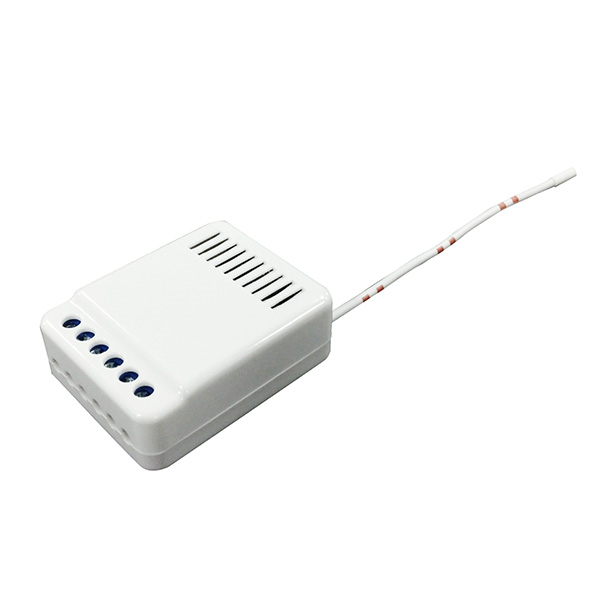
Name | Blind-curtain motor controller |
|---|
Short Description | Thanks for choosing the somfy’s curtain control module of the home automation device. This module is a Z-Wave™ enabled device (interoperable, two-way RF mesh networking technology) and is fully compatible with any Z-Wave™ enabled network and it’s security framework. |
|---|
Long Description | Z-Wave™ enabled devices displaying the Z-Wave™ logo can also be used with it regardless of the manufacturer, and ours can also be used in other manufacturer’s Z-Wave™ enabled networks. Users easily control the curtain to open and close by sending Z-Wave™ signal from Z-Wave™ Interface Controller. This module will send open/close signal to the appliance that attached to this module by receiving Z-Wave™ signal from controller or manually switch. Our special design the curtain not only can be opened and closed but also can be stopped under the Multilevel Switch command on the controller. When the device is secure included into Z-Wave network, above communication will be encrypted. This module also acts as repeater |
|---|
Brand | Somfy |
|---|
Product Identifier | SY-IOT101 |
|---|
OEM Version | HW: 1 FW: 39.16 |
|---|
Hardware Platform | ZM5101 |
|---|
Z-Wave Version | 6.61.00 |
|---|
Library Type | SLAVE_ENHANCED_232 |
|---|
Device Type | Window Covering - Pos/End Aware |
|---|
Role Type | ROLE_TYPE_SLAVE_ALWAYS_ON |
|---|
Manufacturer ID | 0x0047 |
|---|
Product Type ID | 0x2018 |
|---|
Product ID | 0x1805 |
|---|
User Icon | 0x1A00 |
|---|
Installer Icon | 0x1A00 |
|---|
Frequency Plans | KR: 920.90MHz, 921.70MHz, 923.10MHz |
|---|
Categories | Window Covering |
|---|
Countries / Regions | Republic of Korea |
|---|
Supported Command Classes | Identifier | Name | Key | Version |
|---|
COMMAND_CLASS_SWITCH_MULTILEVEL | Switch Multilevel | 0x26 | 1 | COMMAND_CLASS_POWERLEVEL | Powerlevel | 0x73 | 1 | COMMAND_CLASS_SWITCH_BINARY | Switch Binary | 0x25 | 1 | COMMAND_CLASS_BASIC | Basic | 0x20 | 1 | COMMAND_CLASS_SECURITY | Security S0 | 0x98 | 1 | COMMAND_CLASS_VERSION_V2 | Version V2 | 0x86 | 2 | COMMAND_CLASS_DEVICE_RESET_LOCALLY | Device Reset Locally | 0x5A | 1 | COMMAND_CLASS_ZWAVEPLUS_INFO_V2 | Z-Wave Plus Info V2 | 0x5E | 2 | COMMAND_CLASS_ASSOCIATION_V2 | Association V2 | 0x85 | 2 | COMMAND_CLASS_ASSOCIATION_GRP_INFO | Association Group Info | 0x59 | 1 | COMMAND_CLASS_MANUFACTURER_SPECIFIC | Manufacturer Specific | 0x72 | 1 | COMMAND_CLASS_FIRMWARE_UPDATE_MD_V2 | Firmware Update Meta-Data V2 | 0x7A | 2 |
|
|---|
Documents | Category | Description | File |
|---|
Manual_Primary_Lang | Product or Owner's Manual | |
|
|---|
Features | Feature | Values |
|---|
Color | | Communications Protocol | Value |
|---|
Manufacturer Proprietary Protocol |
| Communications Connections | Value |
|---|
Ethernet (Wireless/WiFi) |
| Firmware Updatable | Value |
|---|
Updatable by Manufacturer |
| Window Covering Control Features | Value |
|---|
Position Aware | Manual Calibration | Supports Curtains | Supports Horizontal Blinds/Louvers | Supports Up/Down Motion | Supports Left/Right Motion | Supports Open/Close Motion |
|
|
|---|
Association Groups | Group Number | Maximum Nodes Supported | End Point ID | Description |
|---|
1 | 5 | 0 | Z-Wave Plus Lifeline
|
|
|---|
Texts | ID | Description | Value |
|---|
5 | Factory Reset | Local Reset (Factory Default Reset )
- Press the program switch for above 10 second, then the LED is blinked until program switch is released.
- Release from the program switch.
- Then, SY-IOT101 module will try local reset.
- If local reset is succeeded, LED is blinked 5 times.
- After blinking LED, SY-IOT101 will send the “Device Reset Locally Notification” command and reset to the factory default.
- If local reset is failed, LED is turn off.
* Please use this procedure only when the network primary controller is missing or otherwise inoperable. | 6 | Additional Special Features | For “Manual Control Mode”
Press and hold Up Switch : UP
Press and hold Down Switch: Down
Release Up & Down Switch: Stop | 2 | Exclusion | For “Exclusion” removing from the network: Put the Z-Wave™ Interface Controller into “exclusion” mode, and following its instruction to add the SY-IOT101 to your controller. To get in the “exclusion” mode.
- Check if SY-IOT101 module is in inclusion mode
- Press the program switch for above 5 second, then the LED is turned on.
- Release from the program switch.
- Then, SY-IOT101 module will try inclusion.
- If inclusion is succeeded, LED is blinked 3 times.
- If exclusion is failed, LED is turn off. | 1 | Inclusion | For “Inclusion” in (adding to) a network: Put the Z-Wave™ Interface Controller into “inclusion” mode, and following its instruction to add the SY-IOT101to your controller. To get in the “inclusion” mode.
- Check if SY-IOT101 module is in exclusion mode.
- Press the program switch for above 5 second, then, the LED is turned on.
- Release from the program switch.
- Then, SY-IOT101 module will try inclusion.
- If inclusion is succeeded, LED is blinked 3 times.
- If inclusion is failed, LED is turn off. | 3 | Learn Mode (adding another controller) | Device Learn Mode : This mode is for factory default or service mode (curtain or blind mode), not used by user.
* Entering this learn mode is some difficult, because this mode is only for factory or service mode.
- Put curtain or blind at close position first with remote or electrical switch.
- Press the program switch for 300(ms) and release it after 900(ms) as following.
. When press & release the program switch at first time, LED will be blink one time.
. When press & release the program switch at second time, LED will be blink two times.
. When press & release the program switch at third time, LED will be blink three times
- After LED blink three times, module will try device learn.
- Open the curtain or blind. Then, close the curtain or blind.
- This mode is to distinguish the device (curtain or blind) and measure the total distance between up and down in case of blind device. |
|
|---|
Supports NWI | Yes |
|---|
Supports Explorer Frames | Yes |
|---|