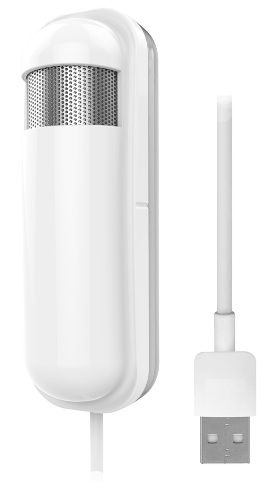
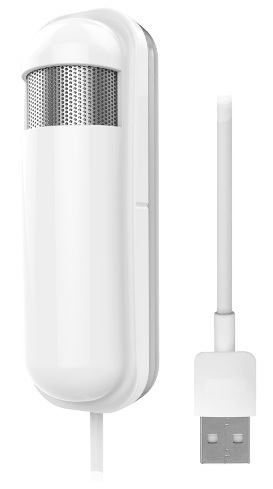
Product Recognition | |
|---|
Certification Number | ZC10-19096749 |
|---|
Name | CO2 Sensor-A |
|---|
Short Description | The PAT12 CO2 sensor is a device that allows you to check the air quality in your home by detecting and measuring CO2 concentrations. |
|---|
Long Description | The PAT12 sensor is easy to use and very convenient for your home. Just set the sensor on the wall in the rooms you would like to control, and you are ready to go. Moreover, the PAT12 can be integrated to other Z-Wave certified devices, and controlled with Philio app “Home Mate 2.” You can now protect your family and your business and make sure that air you are breathing is safe. Set up your PAT12 to send regular notifications and take control even when not at home. |
|---|
Brand | Philio |
|---|
Product Identifier | PAT12 |
|---|
Product Line | Philio Z-wave Products |
|---|
OEM Version | HW: 1 FW: 1.02:01.02 |
|---|
Hardware Platform | SD3502 |
|---|
Z-Wave Version | 6.81.03 |
|---|
Library Type | SLAVE_ENHANCED_232 |
|---|
Device Type | Notification Sensor |
|---|
Role Type | ROLE_TYPE_SLAVE_ALWAYS_ON |
|---|
Manufacturer ID | 0x013C |
|---|
Product Type ID | 0x0002 |
|---|
Product ID | 0x006B |
|---|
User Icon | 0x0D00 |
|---|
Installer Icon | 0x0D00 |
|---|
Frequency Plans | EU: 869.85MHz, 868.40MHz |
|---|
Categories | Sensors |
|---|
Countries / Regions | European Union |
|---|
Supported Command Classes | Identifier | Name | Key | Version |
|---|
COMMAND_CLASS_FIRMWARE_UPDATE_MD_V4 | Firmware Update Meta-Data V4 | 0x7A | 4 | COMMAND_CLASS_POWERLEVEL | Powerlevel | 0x73 | 1 | COMMAND_CLASS_SENSOR_MULTILEVEL | Sensor Multilevel | 0x31 | 1 | COMMAND_CLASS_CONFIGURATION | Configuration | 0x70 | 1 | COMMAND_CLASS_SECURITY | Security S0 | 0x98 | 1 | COMMAND_CLASS_TRANSPORT_SERVICE_V2 | Transport Service V2 | 0x55 | 2 | COMMAND_CLASS_VERSION_V2 | Version V2 | 0x86 | 2 | COMMAND_CLASS_DEVICE_RESET_LOCALLY | Device Reset Locally | 0x5A | 1 | COMMAND_CLASS_ZWAVEPLUS_INFO_V2 | Z-Wave Plus Info V2 | 0x5E | 2 | COMMAND_CLASS_ASSOCIATION_V2 | Association V2 | 0x85 | 2 | COMMAND_CLASS_ASSOCIATION_GRP_INFO | Association Group Info | 0x59 | 1 | COMMAND_CLASS_SECURITY_2 | Security S2 | 0x9F | 1 | COMMAND_CLASS_MANUFACTURER_SPECIFIC | Manufacturer Specific | 0x72 | 1 | COMMAND_CLASS_SENSOR_MULTILEVEL_V11 | Sensor Multilevel V11 | 0x31 | 11 | COMMAND_CLASS_VERSION_V3 | Version V3 | 0x86 | 3 | COMMAND_CLASS_SUPERVISION | Supervision | 0x6C | 1 | COMMAND_CLASS_MANUFACTURER_SPECIFIC_V2 | Manufacturer Specific V2 | 0x72 | 2 |
|
|---|
S2 Classes | S2_UNAUTHENTICATED |
|---|
Documents | Category | Description | File |
|---|
Manual_Primary_Lang | Product Manual | | Manual_English | Product Manual in English | |
|
|---|
Features | Feature | Values |
|---|
Firmware Updatable | |
|
|---|
Association Groups | Group Number | Maximum Nodes Supported | End Point ID | Group Name | Description |
|---|
1 | 5 | 0 | Lifeline | Used for returned events. |
|
|---|
Configuration Parameters | Parameter Number | Name | Description | Format | Size | Min Value | Max Value | Default Value | Parameter Values |
|---|
1 | Auto report CO2 Concentra- tion time | Units of 1 minute. | 1 | 2 | 1 | 32767 | 60 | From | To | Description |
|---|
1 | 32767 | Units of 1 minute. |
| 2 | CO2 Concentration differen- tial report | Units of 1 %. 0 means turn off the report | 1 | 1 | 1 | 100 | 10 | From | To | Description |
|---|
1 | 100 | Units of 1 % |
| 3 | Baseline level 1 | Units of 100 ppm. 0 means turn off the report | 1 | 1 | 0 | 50 | 0 | From | To | Description |
|---|
0 | 50 | Units of 100 ppm. |
| 4 | Baseline level 2 | Units of 100 ppm. 0 means turn off the report | 1 | 1 | 0 | 50 | 0 | From | To | Description |
|---|
0 | 50 | Units of 100 ppm. |
| 5 | Baseline level 3 | Units of 100 ppm. 0 means turn off the report | 1 | 1 | 0 | 50 | 0 | From | To | Description |
|---|
0 | 50 | Units of 100 ppm. |
| 6 | Baseline level 4 | Units of 100 ppm. 0 means turn off the report | 1 | 1 | 0 | 50 | 0 | From | To | Description |
|---|
0 | 50 | Units of 100 ppm. |
| 7 | Baseline level 5 | Units of 100 ppm. 0 means turn off the report | 1 | 1 | 0 | 50 | 0 | From | To | Description |
|---|
0 | 50 | Units of 100 ppm. |
|
|
|---|
Texts | ID | Description | Value |
|---|
8 | Where to find S2 DSK on product | The QR code can befoundon the device PAT12 or in the box. | 1 | Classic Inclusion | 1. Set your Z-Wave controller into inclusion mode by following the instructions provided by the controller manufacturer.
2. Press the include button of the PAT12 three times within 3 seconds to enter inclusion mode. | 2 | Classic Exclusion | 1. Set your Z-Wave controller into exclusion mode by following the instructions provided by the controller manufacturer.
2. Press the include button of the PAT12 three times within 3 seconds to enter exclusion mode.
3. Node ID has been excluded. | 5 | Factory Reset Procedure | 1. Press the include button of the PAT12 three times within 3 seconds to enter inclusion mode.
2. Within 1 second, again press the include button of the PAT12 for 5 seconds.
3. IDs will get excluded.
notice1:Please use this procedure only when the network primary controller is missing or otherwise inoperable. |
|
|---|
Supported Multilevel Sensors | Multilevel Sensor Type |
|---|
Carbon dioxide (CO2-level) |
|
|---|
Supports NWI | Yes |
|---|
Supports Explorer Frames | Yes |
|---|
Supports SmartStart | Yes |
|---|
Radio Range Z-Wave (m) | 40 |
|---|