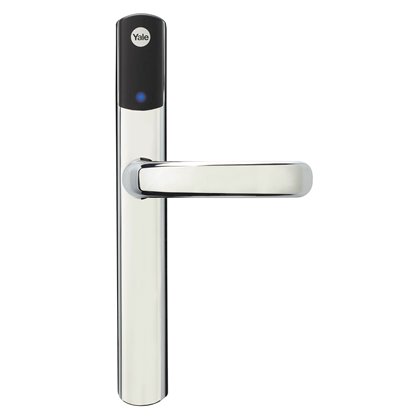
Product Recognition | |
|---|
Certification Number | ZC10-17085747 |
|---|
Name | Conexis L1 |
|---|
Short Description | Open the door to your world with the Conexis L1 Smart Door Lock. The Smart Door Lock that puts you fully in control giving you the freedom to secure your home without the need for a key. |
|---|
Long Description | Features:
Control Via Smartphone - Configure, Control and unlock your Smart Door Lock from your smartphone via our secure Bluetooth App.
Keyless - Say goodbye to keys, Open your Smart Door lock via your smartphone, Key Card or Key Tag.
Simple to Fit - Engineered for easy installation.
Connectivity - Compatible with the Yale Smart Home system. (Yale module sold separately)
Security as standard - Built in tamper alarm, PAS24 accredited.
Battery Operated - Powered by 4 AA batteries and a warning when they're running low.
Battery Backup - A 9v battery connection port can be used to power the Smart door lock in the event of flat batteries.
Secure Push & Turn Thumbturn - Engineered to give additional convenience and security to your door |
|---|
Brand | Yale |
|---|
Product Identifier | SD-L1000-CH |
|---|
OEM Version | HW: 32 FW: 32.16:15.16 |
|---|
Hardware Platform | ZM5202 |
|---|
Z-Wave Version | 6.71.01 |
|---|
Library Type | SLAVE_ENHANCED_232 |
|---|
Device Type | Door Lock - Keypad |
|---|
Role Type | ROLE_TYPE_SLAVE_SLEEPING_LISTENING |
|---|
Manufacturer ID | 0x0129 |
|---|
Product Type ID | 0x6600 |
|---|
Product ID | 0x0002 |
|---|
User Icon | 0x0300 |
|---|
Installer Icon | 0x0300 |
|---|
Frequency Plans | EU: 869.85MHz, 868.40MHz |
|---|
Categories | Locks |
|---|
Countries / Regions | European Union |
|---|
Supported Command Classes | Identifier | Name | Key | Version |
|---|
COMMAND_CLASS_FIRMWARE_UPDATE_MD_V4 | Firmware Update Meta-Data V4 | 0x7A | 4 | COMMAND_CLASS_POWERLEVEL | Powerlevel | 0x73 | 1 | COMMAND_CLASS_DOOR_LOCK_V2 | Door Lock V2 | 0x62 | 2 | COMMAND_CLASS_ALARM | Alarm | 0x71 | 1 | COMMAND_CLASS_BATTERY | Battery | 0x80 | 1 | COMMAND_CLASS_TIME_PARAMETERS | Time Parameters | 0x8B | 1 | COMMAND_CLASS_CONFIGURATION | Configuration | 0x70 | 1 | COMMAND_CLASS_SECURITY | Security S0 | 0x98 | 1 | COMMAND_CLASS_TIME_V2 | Time V2 | 0x8A | 2 | COMMAND_CLASS_TRANSPORT_SERVICE_V2 | Transport Service V2 | 0x55 | 2 | COMMAND_CLASS_VERSION_V2 | Version V2 | 0x86 | 2 | COMMAND_CLASS_DEVICE_RESET_LOCALLY | Device Reset Locally | 0x5A | 1 | COMMAND_CLASS_ZWAVEPLUS_INFO_V2 | Z-Wave Plus Info V2 | 0x5E | 2 | COMMAND_CLASS_ASSOCIATION_V2 | Association V2 | 0x85 | 2 | COMMAND_CLASS_ASSOCIATION_GRP_INFO | Association Group Info | 0x59 | 1 | COMMAND_CLASS_DOOR_LOCK_LOGGING | Door Lock Logging | 0x4C | 1 | COMMAND_CLASS_SECURITY_2 | Security S2 | 0x9F | 1 | COMMAND_CLASS_SUPERVISION | Supervision | 0x6C | 1 | COMMAND_CLASS_MANUFACTURER_SPECIFIC_V2 | Manufacturer Specific V2 | 0x72 | 2 |
|
|---|
S2 Classes | S2_ACCESS_CONTROL |
|---|
Documents | Category | Description | File |
|---|
Manual_Primary_Lang | Product or Owner's Manual | |
|
|---|
Features | Feature | Values |
|---|
Firmware Updatable | Value |
|---|
Updatable by Consumer by RF |
| Battery Quantity | | Battery Type | | Color | | IP (Ingress Protection) Rated | |
|
|---|
Association Groups | Group Number | Maximum Nodes Supported | End Point ID | Description |
|---|
1 | 1 | 0 | Z-Wave Plus Lifeline |
|
|---|
Configuration Parameters | Parameter Number | Name | Description | Format | Size | Min Value | Max Value | Default Value | Parameter Values |
|---|
7 | Wrong tag timeout | The amount of time the lock will not accept tags for once the wrong tag limit has been reached. It will still be possible to unlock through BLE or the Z-Wave hub. | 0 | 1 | 0 | 0 | 180 | From | To | Description |
|---|
1 | 250 | Timeout time (secs) |
| 2 | Auto Relock | Auto relock will cause the lock to automatically relock if the Conexis has been unlocked, but the lever handle has not been depressed (no-one has walked through the door). On or Off | 0 | 1 | 0 | 0 | 0 | From | To | Description |
|---|
0 | 0 | Auto relock off | 255 | 255 | Auto relock on |
| 1 | Volume | Volume Control (Silent, Low, High) | 0 | 1 | 0 | 0 | 3 | From | To | Description |
|---|
1 | 1 | Silent Mode | 2 | 2 | Low Volume Mode | 3 | 3 | High Volume |
|
|
|---|
Texts | ID | Description | Value |
|---|
1 | Inclusion | Put the Z-Wave controller into add or learn mode
Press the R button on the lock 3 times quickly (within 1.5 seconds)
Refer to the operation manual of the Z-Wave controller to complete the learn in process
For more information on this please visit:
www.yale.co.uk/smart-living | 5 | Factory Reset | Only use this when the existing Z-Wave controller is missing or inoperable
Lift up the lever handle
While holding the handle up, press the R button 3 times within 1.5 seconds | 2 | Exclusion | Put the existing Z-Wave controller into Remove Mode
Press the R button on the lock 3 times quickly (within 1.5 secs)
The lock is now ready to be added to a new Z-Wave controller
For more information on this please visit:
www.yale.co.uk/smart-living |
|
|---|
Supports NWI | Yes |
|---|
Supports Explorer Frames | Yes |
|---|
Is Flirs | Yes |
|---|