Product Recognition | |
|---|
Certification Number | ZC10-17115871 |
|---|
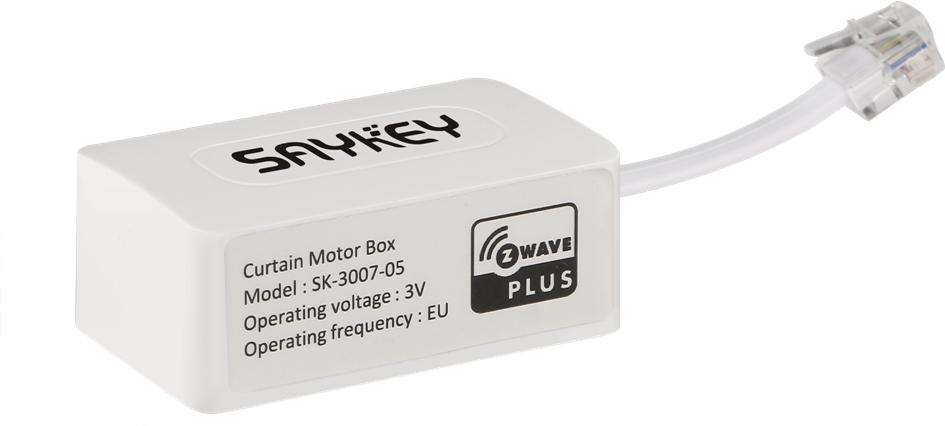
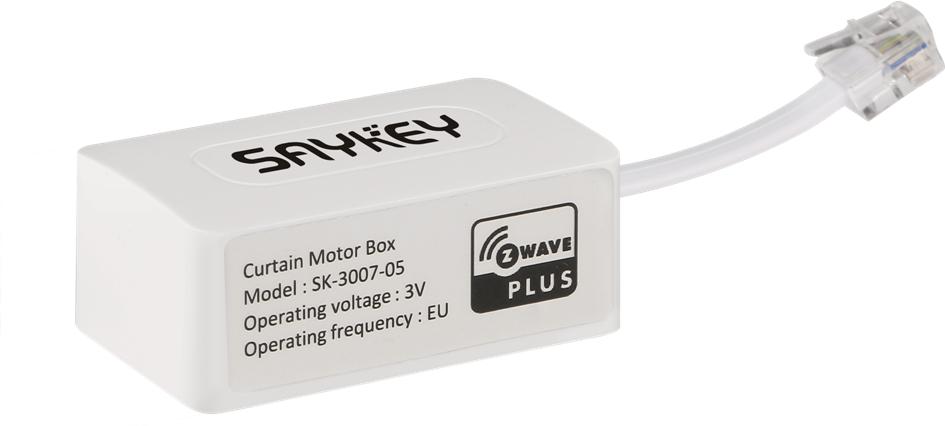
Name | Curtain Motor Control with external module |
|---|
Short Description | The SK-3007-05 curtain motor external module support connect specify motor to Z-Wave system reply. |
|---|
Long Description | The SK-3007-05 curtain motor external module support connect specify motor to Z-Wave system reply. It support control motor open/close/stop and position, meanwhile it can feedback motor position as soon as it stopped. |
|---|
Brand | Saykey |
|---|
Product Identifier | SK-3007-05 |
|---|
OEM Version | HW: 33 FW: 1.01:01.01 |
|---|
Hardware Platform | ZM5202 |
|---|
Z-Wave Version | 6.51.09 |
|---|
Library Type | SLAVE_ENHANCED_232 |
|---|
Device Type | Window Covering - Pos/End Aware |
|---|
Role Type | ROLE_TYPE_SLAVE_ALWAYS_ON |
|---|
Manufacturer ID | 0x032C |
|---|
Product Type ID | 0x3007 |
|---|
Product ID | 0x0005 |
|---|
User Icon | 0x1A00 |
|---|
Installer Icon | 0x1A00 |
|---|
Frequency Plans | EU: 869.85MHz, 868.40MHz |
|---|
Categories | Motor Control |
|---|
Countries / Regions | European Union |
|---|
Supported Command Classes | Identifier | Name | Key | Version |
|---|
COMMAND_CLASS_SWITCH_MULTILEVEL | Switch Multilevel | 0x26 | 1 | COMMAND_CLASS_POWERLEVEL | Powerlevel | 0x73 | 1 | COMMAND_CLASS_SWITCH_BINARY | Switch Binary | 0x25 | 1 | COMMAND_CLASS_BASIC | Basic | 0x20 | 1 | COMMAND_CLASS_CONFIGURATION | Configuration | 0x70 | 1 | COMMAND_CLASS_SECURITY | Security S0 | 0x98 | 1 | COMMAND_CLASS_VERSION_V2 | Version V2 | 0x86 | 2 | COMMAND_CLASS_DEVICE_RESET_LOCALLY | Device Reset Locally | 0x5A | 1 | COMMAND_CLASS_ZWAVEPLUS_INFO_V2 | Z-Wave Plus Info V2 | 0x5E | 2 | COMMAND_CLASS_ASSOCIATION_V2 | Association V2 | 0x85 | 2 | COMMAND_CLASS_ASSOCIATION_GRP_INFO | Association Group Info | 0x59 | 1 | COMMAND_CLASS_FIRMWARE_UPDATE_MD_V2 | Firmware Update Meta-Data V2 | 0x7A | 2 | COMMAND_CLASS_MANUFACTURER_SPECIFIC_V2 | Manufacturer Specific V2 | 0x72 | 2 |
|
|---|
Controlled Command Classes | Identifier | Name | Key | Version |
|---|
COMMAND_CLASS_SECURITY | Security S0 | 0x98 | 1 |
|
|---|
Documents | Category | Description | File |
|---|
Manual_Primary_Lang | Product or Owner's Manual | |
|
|---|
Features | Feature | Values |
|---|
Window Covering Control Features | Value |
|---|
Endpoint Aware | Position Aware | Manual Calibration | Supports Curtains | Supports Vertical Blinds | Supports Horizontal Blinds/Louvers | Supports Up/Down Motion | Supports Open/Close Motion | Supports Rotation Motion |
| Communications Connections | Value |
|---|
RS-232 (Serial) | RS-485 (Serial) | Manufacturer Proprietary |
| Communications Protocol | Value |
|---|
Manufacturer Proprietary Protocol |
| Firmware Updatable | Value |
|---|
Updatable by Professional/Technician |
|
|
|---|
Association Groups | Group Number | Maximum Nodes Supported | End Point ID | Description |
|---|
1 | 1 | 0 | Z-Wave Plus Lifeline, is assigned to send motor lifeline status to associated devices, including send the multilevel report frame while window cover position, send device local reset frame while set factory default manually etc. |
|
|---|
Configuration Parameters | Parameter Number | Name | Description | Format | Size | Min Value | Max Value | Default Value | Parameter Values |
|---|
4 | Motor position | Support Get only, feedback motor current position(0x00-0x63, 0xFE). | 0 | 1 | 0 | 0 | -127 | From | To | Description |
|---|
0 | 99 | current position | -127 | -127 | unknown postion |
| 6 | Set motor direction reverse | Support Set only. Toggle motor direction between reverse and default as send out set command with any value(0x00-0xFF). | 0 | 1 | 0 | 0 | 0 | From | To | Description |
|---|
-128 | 127 | Toggle motor direction. |
| 7 | Clear motor lead tail endpoint setting | Support Set only. Clear motor lead tail endpoint setting as send out set command with any value(0x00-0xFF). | 0 | 1 | 0 | 0 | 0 | From | To | Description |
|---|
-128 | 127 | Clear motor lead tail endpoint setting |
| 8 | Enable manual pull function | Support Set only. Enable manual pull function as send out set command with any value(0x00-0xFF). | 0 | 1 | 0 | 0 | 0 | From | To | Description |
|---|
-128 | 127 | Enable manual pull function |
| 9 | Disable manual pull function | Support Set only. Disable manual pull function as send out set command with any value(0x00-0xFF). | 0 | 1 | 0 | 0 | 0 | From | To | Description |
|---|
-128 | 127 | Disable manual pull function |
|
|
|---|
Texts | ID | Description | Value |
|---|
1 | Inclusion | 1. Connect power supply to motor and connect the external module to motor external connector, and Make sure the module is located within direct range of the Z-Wave controller.
2. Set the controller into the inclusion/add mode (refer to controller’s operating manual).
3. Click the PB-button triple times in 1.5 second, located left side of the motor external box.
4. Curtain motor will be detected and included in the Z-Wave network. | 2 | Exclusion | 1. Connect power supply to motor and connect the external module to motor external connector, and Make sure the module is located within direct range of the Z-Wave controller.
2. Set the controller into the exclusion/remove mode (refer to controller’s operating manual).
3. Click the PB-button triple times in 1.5 second, located left side of the motor external box.
4. Curtain motor will be detected and excluded from the Z-Wave network. | 5 | Factory Reset | 1. Connect power supply to motor and connect the external module to motor external connector.
2. Press and hold the PB-button excess 10 second.
3. Curtain motor will be reset to factory default and clear Z-Wave included network state.
Please use this procedure only when the network primary controller is missing or otherwise inoperable. |
|
|---|
Supports NWI | Yes |
|---|
Supports Explorer Frames | Yes |
|---|