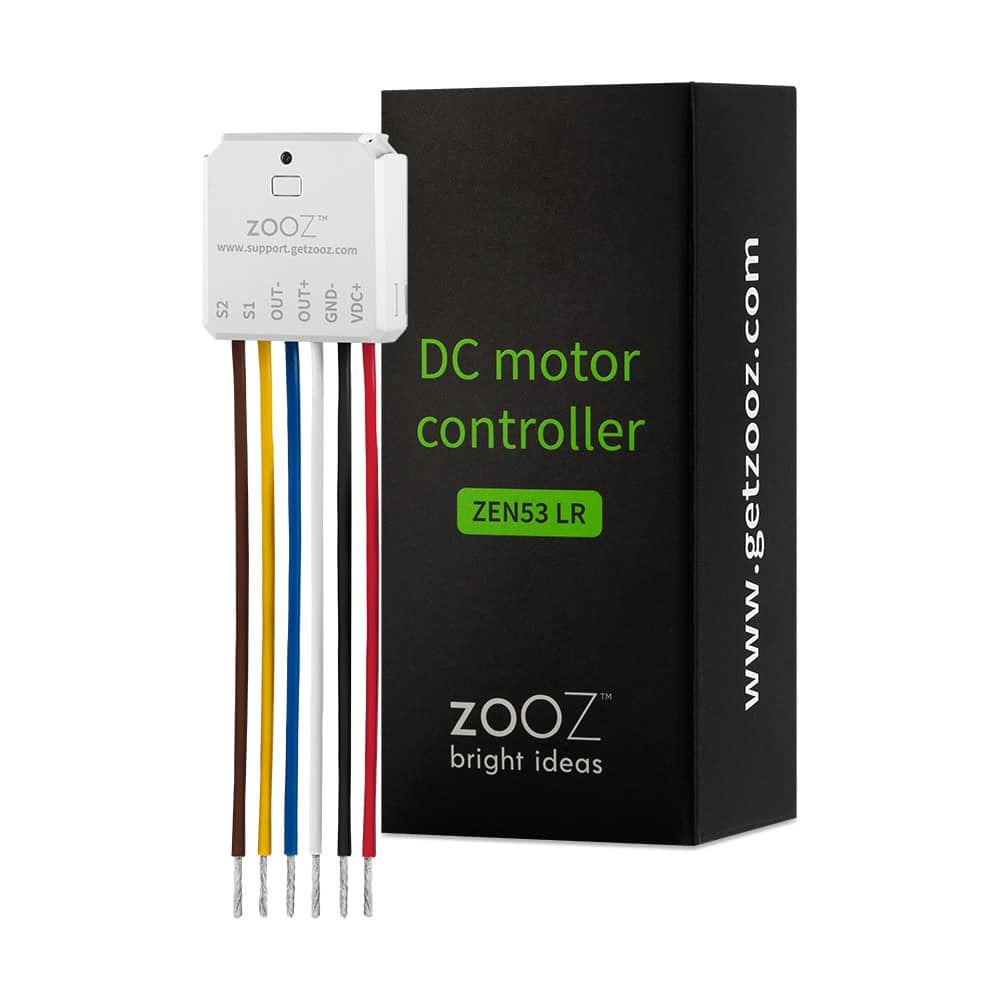
Product Recognition | |
|---|
Certification Number | ZC14-23090329 |
|---|
Name | DC Motor Controller |
|---|
Short Description | Manual or Z-Wave™ control of DC motors (reversed polarity). |
|---|
Long Description | PRODUCT HIGHLIGHTS:
- Manual or Z-Wave™ control of DC motors
- Great for motorized shades, blinds, awnings, screens, and more
- Shutter and Venetian blind modes to choose from
- Installs behind your existing wall switch (momentary button)
- 700 series Z-Wave™ chip for better range and faster control
- Z-Wave™ Long Range for a next-level wireless network
- Advanced configuration including timer settings and calibration
- Built-in Z-Wave™ signal repeater for boosted communication
- SmartStart and S2 Security for a safer network
PRODUCT SPECS:
- Power: 6-32 VDC
- Maximum Loads: 1.5 A (use with DC motors only)
- Z-Wave™ Range: Up to 300 feet line of sight (or up to a mile with LR enabled)
- Operating Temperature: 32-104° F (0-40° C)
- Installation: Indoor use only |
|---|
Brand | ZOOZ |
|---|
Product Identifier | ZEN53 LR |
|---|
Product Line | Smart Relays |
|---|
OEM Version | HW: 01 FW: 01.10 |
|---|
Hardware Platform | ZGM130S037HGN2 / ZGM130S037HGN1 |
|---|
Z-Wave Version | 7.16.3 |
|---|
Library Type | END_NODE_ENHANCED_232 |
|---|
Device Type | Window Covering DT |
|---|
Role Type | ROLE_TYPE_SLAVE_ALWAYS_ON |
|---|
Manufacturer ID | 0x027A |
|---|
Product Type ID | 0x0904 |
|---|
Product ID | 0x0219 |
|---|
User Icon | 0x1A00 |
|---|
Installer Icon | 0x1A00 |
|---|
Frequency Plans | US: 916.00MHz, 908.40MHz, US_LR: 912.00MHz, 920.00MHz |
|---|
Categories | Motor Control |
|---|
Countries / Regions | Argentina, Bahamas, Barbados, Bermuda, Bolivia, British Virgin Islands, Canada, Cayman Islands, Colombia, Ecuador, Guatemala, Haiti, Honduras, Jamaica, Mexico, Panama, Saint Kitts and Nevis, Suriname, Trinidad and Tobago, Turks and Caicos Islands, United States of America |
|---|
Supported Command Classes | Identifier | Name | Key | Version |
|---|
COMMAND_CLASS_BASIC_V2 | Basic V2 | 0x20 | 2 | COMMAND_CLASS_CONFIGURATION_V4 | Configuration V4 | 0x70 | 4 | COMMAND_CLASS_SWITCH_MULTILEVEL_V4 | Multilevel Switch V4 | 0x26 | 4 | COMMAND_CLASS_WINDOW_COVERING | Window Covering | 0x6A | 1 | COMMAND_CLASS_APPLICATION_STATUS | Application Status | 0x22 | 1 | COMMAND_CLASS_ASSOCIATION_V2 | Association V2 | 0x85 | 2 | COMMAND_CLASS_ASSOCIATION_GRP_INFO_V3 | Association Group Information (AGI) V3 | 0x59 | 3 | COMMAND_CLASS_DEVICE_RESET_LOCALLY | Device Reset Locally | 0x5A | 1 | COMMAND_CLASS_FIRMWARE_UPDATE_MD_V5 | Firmware Update Meta Data V5 | 0x7A | 5 | COMMAND_CLASS_INDICATOR_V3 | Indicator V3 | 0x87 | 3 | COMMAND_CLASS_MANUFACTURER_SPECIFIC_V2 | Manufacturer Specific V2 | 0x72 | 2 | COMMAND_CLASS_MULTI_CHANNEL_ASSOCIATION_V3 | Multi Channel Association V3 | 0x8E | 3 | COMMAND_CLASS_VERSION_V3 | Version V3 | 0x86 | 3 | COMMAND_CLASS_ZWAVEPLUS_INFO_V2 | Z-Wave Plus Info V2 | 0x5E | 2 | COMMAND_CLASS_SECURITY_2 | Security 2 | 0x9F | 1 | COMMAND_CLASS_SUPERVISION | Supervision | 0x6C | 1 | COMMAND_CLASS_TRANSPORT_SERVICE_V2 | Transport Service V2 | 0x55 | 2 | COMMAND_CLASS_POWERLEVEL | Powerlevel | 0x73 | 1 |
|
|---|
S2 Classes | S2_AUTHENTICATED, S2_UNAUTHENTICATED |
|---|
Documents | Category | File |
|---|
Manual_English | |
|
|---|
Features | Feature | Values |
|---|
Firmware Updatable | Value |
|---|
Updatable by Consumer by RF |
| Z-Wave Scene Type | | Switch Load Capacity Current | |
|
|---|
Association Groups | Group Number | Maximum Nodes Supported | End Point ID | Group Name | Profile |
|---|
1 | 5 | 0 | Lifeline | 0x0001 | 2 | 5 | 0 | On/Off Control | 0x2001 | 3 | 5 | 0 | Multilevel Set | 0x2002 | 4 | 5 | 0 | Multilevel Start/Stop | 0x2003 |
|
|---|
Configuration Parameters | Parameter Number | Name | Description | Format | Size | Min Value | Max Value | Default Value |
|---|
1 | Restores state after power failure | Restores state after power failure | 1 | 1 | 0 | 0 | 0x64 | 2 | Led indicator load status | Led indicator load status | 1 | 1 | 0 | 0 | 0x01 | 3 | Motor moving time(Shutter mode) | Motor moving time(Shutter mode) | 1 | 2 | 0 | 0 | 0x1770 | 4 | Blade Turn Time (Venetian mode) | Blade Turn Time (Venetian mode) | 1 | 2 | 0 | 0 | 0x03E8 | 5 | Moving time Calibration | Moving time Calibration | 1 | 1 | 0 | 0 | 0x00 | 6 | Curtain working mode | Curtain working mode | 1 | 1 | 0 | 0 | 0x01 | 7 | External Switch control Way | External Switch control Way | 1 | 1 | 0 | 0 | 0x00 | 8 | Enable External Switch Pair | Enable External Switch Pair | 1 | 1 | 0 | 0 | 0x01 | 9 | Inverts the orientation of Motor | Inverts the orientation of Motor | 1 | 1 | 0 | 0 | 0x00 | 10 | Auto turn-on timer | Auto turn-on timer | 1 | 4 | 0 | 0 | 0x00000000 | 11 | Auto turn-off timer | Auto turn-off timer | 1 | 4 | 0 | 0 | 0x00000000 | 17 | Set repositioning begins | Set repositioning begins | 1 | 1 | 0 | 0 | 0x00 |
|
|---|
Texts | ID | Description | Value |
|---|
8 | Where to find S2 DSK on product | The SmartStart QRCode is located on the back of the relay, next to the Z-Wave Plus™ logo. | 1 | Classic Inclusion | 1. ADD DEVICE to your hub: Initiate inclusion (pairing) in the app (or web interface). Check Long Range if using. Not sure how? Scan one of the QR codes below for step-by-step instructions or get in touch: www.support.getzooz.com
2. Finalize inclusion at the device. Tap the Z-Wave™ button 3 times quickly if using traditional Z-Wave™ inclusion.
The LED indicator will blink green to signal communication and turn green for 2 seconds if inclusion is successful or turn red for 2 seconds if the pairing attempt fails. | 2 | Classic Exclusion | 1. Bring your Z-Wave™ hub close to the device if possible
2. Put the Z-Wave hub into exclusion mode (not sure how to do that? ask@getzooz.com)
3. Click the Z-Wave button on the relay 3 times quickly (the LED indicator will start blinking green)
4. Your hub will confirm exclusion, the LED indicator on the device will turn green for 2 seconds, and the ZEN53 will disappear from your controller's device list. | 5 | Factory Reset Procedure | If your primary controller is missing or inoperable, you may need to reset the device to factory settings. To reset the ZEN53, click the Z-Wave™ button once, and immediately after, press and hold it down for 15 seconds.
The LED indicator will flash red during the process and turn red for 3 seconds to confirm a successful reset. |
|
|---|
Supports NWI | Yes |
|---|
Supports Explorer Frames | Yes |
|---|
Supports SmartStart | Yes |
|---|
Radio Range Z-Wave (m) | 40 |
|---|
Radio Range Z-Wave LR (m) | 400 |
|---|