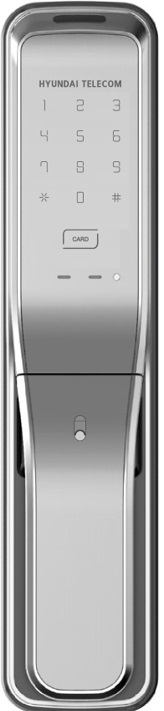
Product Recognition | |
|---|
Certification Number | ZC10-19116802 |
|---|
Name | DIGITAL DOOR LOCK |
|---|
Short Description | - Lock & Unlock Automatically
- Supports Z-Wave |
|---|
Long Description | - Lock & Unlock Automatically
- Supports Z-Wave
- Touchscreen Keypad
- Push/Pull Type |
|---|
Brand | HYUNDAI TELECOM |
|---|
Product Identifier | HDL-7300SK |
|---|
Product Line | Locks |
|---|
OEM Version | HW: 1 FW: 1.00:01.00 |
|---|
Hardware Platform | ZM5101 |
|---|
Z-Wave Version | 6.81.06 |
|---|
Library Type | SLAVE_ENHANCED_232 |
|---|
Device Type | Door Lock - Keypad |
|---|
Role Type | ROLE_TYPE_SLAVE_SLEEPING_LISTENING |
|---|
Manufacturer ID | 0x0374 |
|---|
Product Type ID | 0x0001 |
|---|
Product ID | 0x0082 |
|---|
User Icon | 0x0300 |
|---|
Installer Icon | 0x0300 |
|---|
Frequency Plans | EU: 869.85MHz, 868.40MHz |
|---|
Categories | Locks |
|---|
Countries / Regions | European Union |
|---|
Supported Command Classes | Identifier | Name | Key | Version |
|---|
COMMAND_CLASS_FIRMWARE_UPDATE_MD_V4 | Firmware Update Meta-Data V4 | 0x7A | 4 | COMMAND_CLASS_POWERLEVEL | Powerlevel | 0x73 | 1 | COMMAND_CLASS_USER_CODE | User Code | 0x63 | 1 | COMMAND_CLASS_DOOR_LOCK_V2 | Door Lock V2 | 0x62 | 2 | COMMAND_CLASS_BATTERY | Battery | 0x80 | 1 | COMMAND_CLASS_SECURITY | Security S0 | 0x98 | 1 | COMMAND_CLASS_TRANSPORT_SERVICE_V2 | Transport Service V2 | 0x55 | 2 | COMMAND_CLASS_DEVICE_RESET_LOCALLY | Device Reset Locally | 0x5A | 1 | COMMAND_CLASS_ZWAVEPLUS_INFO_V2 | Z-Wave Plus Info V2 | 0x5E | 2 | COMMAND_CLASS_ASSOCIATION_V2 | Association V2 | 0x85 | 2 | COMMAND_CLASS_ASSOCIATION_GRP_INFO | Association Group Info | 0x59 | 1 | COMMAND_CLASS_NOTIFICATION_V8 | Notification V8 | 0x71 | 8 | COMMAND_CLASS_SECURITY_2 | Security S2 | 0x9F | 1 | COMMAND_CLASS_VERSION_V3 | Version V3 | 0x86 | 3 | COMMAND_CLASS_SUPERVISION | Supervision | 0x6C | 1 | COMMAND_CLASS_MANUFACTURER_SPECIFIC_V2 | Manufacturer Specific V2 | 0x72 | 2 |
|
|---|
S2 Classes | S2_ACCESS_CONTROL |
|---|
Documents | Category | Description | File |
|---|
Manual_Primary_Lang | Product Manual in English | | Manual_English | Product Manual in English | |
|
|---|
Association Groups | Group Number | Maximum Nodes Supported | End Point ID | Group Name | Description |
|---|
1 | 5 | 0 | Lifeline | Group 1 is the Lifeline group. It can contain up to 5 nodes. The Lifeline group on this lock is used to report door lock operation report, and device reset locally notifications to nodes on the group list. |
|
|---|
Texts | ID | Description | Value |
|---|
8 | Where to find S2 DSK on product | SmartStart enabled products can be added into a Z-Wave network by scanning
the Z-Wave QR Code present on the product with a controller providing SmartStart
inclusion. No further action is required and the SmartStart product will be added
automatically within 10 minutes of being switched on in the network vicinity.
Please Save the QR Code carefully.If both the DSK representation on the product
and any DSK provided in the product packaging were to fade,rub off or, be lost,the
device would not be able to be added to a Z-Wave network.
You can find the QR code and DSK inside of battery box. | 1 | Classic Inclusion | To add or include the HDL-7300SK into a Z-Wave network
1. Set the controller in inclusion mode.
2. Open the battery cover of the indoor body and press the [REG 1] button.
3. Press the [1][4] button after pressing the [*] button. | 2 | Classic Exclusion | To remove or exclude the HDL-7300SK into a Z-Wave network
1. Set the controller in exclusion mode.
2. Open the battery cover of the indoor body and press the [REG 1] button.
3. Press the [3][6] button after pressing the [*] button. | 4 | Wake-Up Procedure | KeyPad Touch | 5 | Factory Reset Procedure | To Factory Reset
1. Open the battery cover of the indoor body and press the [REG 1] button.
2. Press the [8][0] button after pressing the [*] button. |
|
|---|
Supported Notification Types | Notification Type | Event / State |
|---|
Access Control | Manual lock operation | Access Control | Manual unlock operation | Access Control | RF lock operation | Access Control | RF unlock operation | Access Control | Keypad lock operation | Access Control | Keypad unlock operation | Access Control | Auto lock locked operation | Access Control | Lock state: Lock jammed | Access Control | All user codes deleted | Access Control | Single user code deleted | Access Control | New user code added | Access Control | New user code not added due to duplicate code | Access Control | Door handle state: Window/door handle is open | Access Control | Door handle state: Window/door handle is closed | Emergency Alarm | Contact police | Emergency Alarm | Contact fire service |
|
|---|
Supports NWI | Yes |
|---|
Supports Explorer Frames | Yes |
|---|
Is Flirs | Yes |
|---|
Radio Range Z-Wave (m) | 40 |
|---|