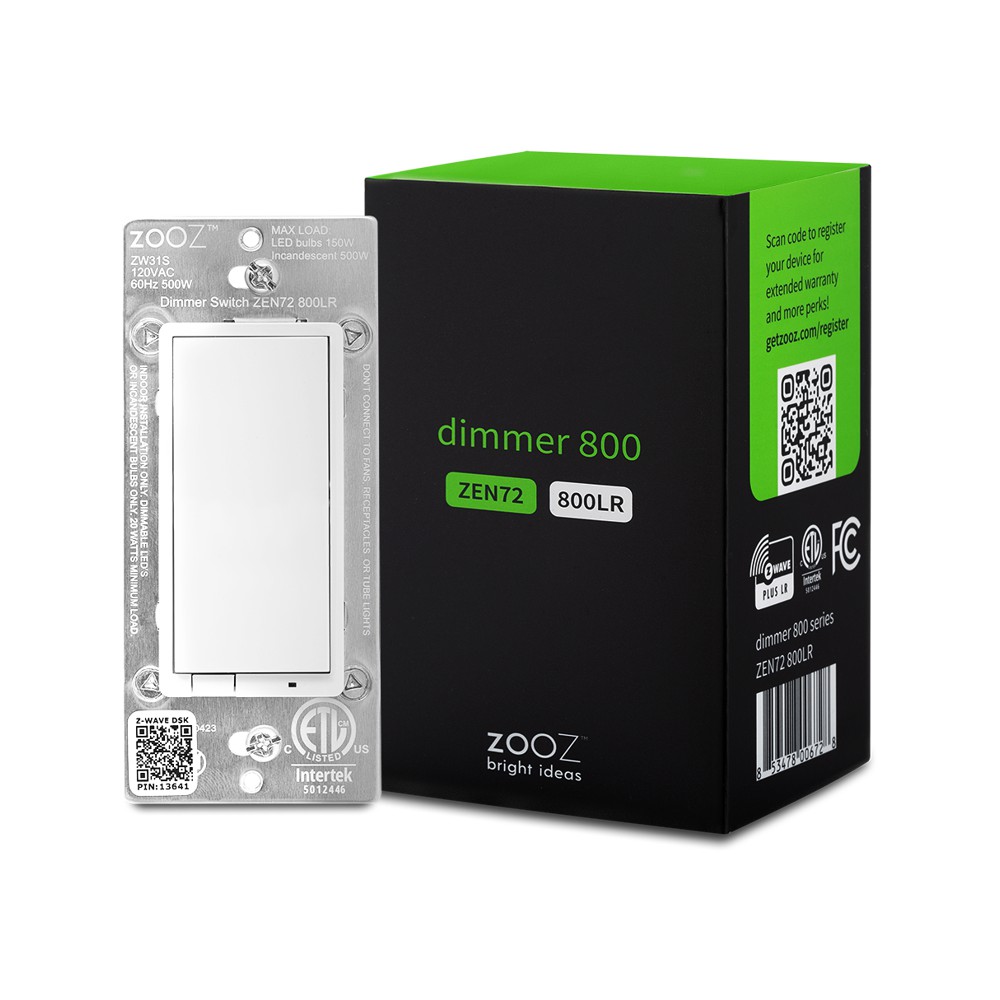
Product Recognition | |
|---|
Certification Number | ZC14-23080308 |
|---|
Name | Dimmer Switch 800 |
|---|
Short Description | Use the 800LR Zooz smart dimmer in smart lighting applications for smooth lighting control and reliable wireless communication. |
|---|
Long Description | PRODUCT HIGHLIGHTS:
- Manual or Z-Wave™ on/off and brightness control
- 800 series Z-Wave™ chip for better range and faster control
- Direct 3-Way: works with regular on/off switches in a 3-way
- Scene control: trigger actions with multi-tap (select hubs only)
- Smart bulb mode: disable relay and control lights via Z-Wave™
- Night light mode: press down when off to turn lights on to 20%
- Z-Wave™ Long Range for ultra reliable no-mesh communication
- Built-in Z-Wave™ range test tool and signal repeater
- Works with LED and incandescent bulbs (don’t use with tubes)
SPECIFICATIONS:
- Model Number: ZEN72 800LR
- Region: US/CA/MX
- Power: 120 VAC, 60 Hz
- Maximum Load: 150W LED bulbs, 500W Incandescent; Do NOT connect to tube lights, fans, or switched receptacles
- Range: Up to 500 feet line of sight
- Operating Temperature: 32-104° F (0-40° C)
- Installation and Use: Indoor only |
|---|
Brand | Zooz |
|---|
Product Identifier | ZEN72 800LR |
|---|
Product Line | Light Switches |
|---|
OEM Version | HW: 03 FW: 03.10 |
|---|
Hardware Platform | EFR32ZG23A |
|---|
Z-Wave Version | 7.19.2 |
|---|
Library Type | END_NODE_ENHANCED_232 |
|---|
Device Type | Multilevel Switch DT |
|---|
Role Type | ROLE_TYPE_END_NODE_ALWAYS_ON |
|---|
Manufacturer ID | 0x027A |
|---|
Product Type ID | 0x7000 |
|---|
Product ID | 0xA002 |
|---|
User Icon | 0x0600 |
|---|
Installer Icon | 0x0604 |
|---|
Frequency Plans | US: 916.00MHz, 908.40MHz, US_LR: 912.00MHz, 920.00MHz |
|---|
Categories | Dimming Lighting Devices |
|---|
Countries / Regions | Canada, Mexico, United States of America |
|---|
Supported Command Classes | Identifier | Name | Key | Version |
|---|
COMMAND_CLASS_ASSOCIATION_V2 | Association V2 | 0x85 | 2 | COMMAND_CLASS_ASSOCIATION_GRP_INFO_V3 | Association Group Information (AGI) V3 | 0x59 | 3 | COMMAND_CLASS_DEVICE_RESET_LOCALLY | Device Reset Locally | 0x5A | 1 | COMMAND_CLASS_FIRMWARE_UPDATE_MD_V5 | Firmware Update Meta Data V5 | 0x7A | 5 | COMMAND_CLASS_INDICATOR_V3 | Indicator V3 | 0x87 | 3 | COMMAND_CLASS_MANUFACTURER_SPECIFIC_V2 | Manufacturer Specific V2 | 0x72 | 2 | COMMAND_CLASS_MULTI_CHANNEL_ASSOCIATION_V3 | Multi Channel Association V3 | 0x8E | 3 | COMMAND_CLASS_VERSION_V3 | Version V3 | 0x86 | 3 | COMMAND_CLASS_ZWAVEPLUS_INFO_V2 | Z-Wave Plus Info V2 | 0x5E | 2 | COMMAND_CLASS_SECURITY_2 | Security 2 | 0x9F | 1 | COMMAND_CLASS_SUPERVISION | Supervision | 0x6C | 1 | COMMAND_CLASS_TRANSPORT_SERVICE_V2 | Transport Service V2 | 0x55 | 2 | COMMAND_CLASS_POWERLEVEL | Powerlevel | 0x73 | 1 | COMMAND_CLASS_BASIC_V2 | Basic V2 | 0x20 | 2 | COMMAND_CLASS_SWITCH_MULTILEVEL_V4 | Multilevel Switch V4 | 0x26 | 4 | COMMAND_CLASS_CENTRAL_SCENE_V3 | Central Scene V3 | 0x5B | 3 | COMMAND_CLASS_CONFIGURATION_V4 | Configuration V4 | 0x70 | 4 |
|
|---|
S2 Classes | S2_AUTHENTICATED, S2_UNAUTHENTICATED |
|---|
Documents | Category | File |
|---|
Manual_English | |
|
|---|
Features | Feature | Values |
|---|
Color | | Electric Load Type | Value |
|---|
Incandescent | Dimmable LED |
| Firmware Updatable | Value |
|---|
Updatable by Consumer by RF |
| Neutral Wire Required | | Switch Load Capacity Watts | | Z-Wave Scene Type | |
|
|---|
Association Groups | Group Number | Maximum Nodes Supported | End Point ID | Group Name | Profile |
|---|
1 | 5 | 0 | Lifeline | 0x0001 | 2 | 5 | 0 | BASIC SET Group | 0x2001 | 3 | 5 | 0 | MULTILEVEL SET Group | 0x2002 | 4 | 5 | 0 | SWITCH_MULTILEVEL CHANGE | 0x2003 |
|
|---|
Configuration Parameters | Parameter Number | Name | Description | Format | Size | Min Value | Max Value | Default Value |
|---|
1 | Locally Button function | Change the function of the up and down key. | 1 | 1 | 0 | 0 | 0x00 | 2 | LED Indicator | Indicator behavior. | 1 | 1 | 0 | 0 | 0x00 | 3 | Auto Turn-Off Timer | Setting auto off minutes. | 1 | 4 | 0 | 0 | 0x00000000 | 5 | Auto Turn-On Timer | Setting auto on minutes. | 1 | 4 | 0 | 0 | 0x00000000 | 7 | Association Group Trigger | Select control association group way. | 1 | 1 | 0 | 0 | 0x0F | 8 | Restores state | Restore state after power failure. | 1 | 1 | 0 | 0 | 0x02 | 9 | Ramp rate for physical on | Rate for manually turn on. | 1 | 1 | 0 | 0 | 0x00 | 10 | Multilevel minimum value | Set the maximum brightness value. | 1 | 1 | 0 | 0 | 0x01 | 11 | Multilevel maximum value | Set the minimum brightness value. | 1 | 1 | 0 | 0 | 0x63 | 23 | LED Indicator Color | Setting indicator led's color. | 1 | 1 | 0 | 0 | 0x01 | 24 | LED Indicator Brightness | Setting indicator led's brightness. | 1 | 1 | 0 | 0 | 0x01 | 25 | Single Tap Behavior | Single tap behavior. | 1 | 1 | 0 | 0 | 0x00 | 31 | Scene of momentary switch in 3-way | Enable scene from momentary switch in 3-way. | 1 | 1 | 0 | 0 | 0x01 |
|
|---|
Texts | ID | Description | Value |
|---|
8 | Where to find S2 DSK on product | SCAN THE QR CODE / ENTER THE 5-DIGIT DSK, visual arrow pointing to the DSK PIN code on the switch | 1 | Classic Inclusion | 1. Initiate inclusion (pairing) in the app (or web interface).
2. TAP UP 3 TIMES QUICKLY if using traditional Z-Wave inclusion.
3. The LED indicator will blink blue to signal communication and turn green for 3 seconds if inclusion is successful or turn red for 3 seconds if the pairing attempt fails. | 2 | Classic Exclusion | 1. Bring your Z-Wave gateway (hub) close to the switch if possible
2. Put the Z-Wave hub into exclusion mode (not sure how to do that? ask@getzooz.com)
3. Tap the lower paddle on the switch 3 times quickly (the LED indicator will start blinking blue)
4. Your hub will confirm exclusion, the LED indicator on the switch will turn green for 3 seconds, and the device will disappear from your controller's device list
reset | 5 | Factory Reset Procedure | If your primary controller is missing or inoperable, you may need to reset the device to factory settings. To reset the switch, press and hold the lower paddle for 10 seconds until the LED indicator starts blinking. Release paddle, and immediately after, tap the lower paddle 5 times to complete the reset. The LED indicator will flash blue 3 times and turn red for 3 seconds to confirm successful reset. |
|
|---|
Supports NWI | Yes |
|---|
Supports Explorer Frames | Yes |
|---|
Supports SmartStart | Yes |
|---|
Radio Range Z-Wave (m) | 40 |
|---|
Radio Range Z-Wave LR (m) | 400 |
|---|