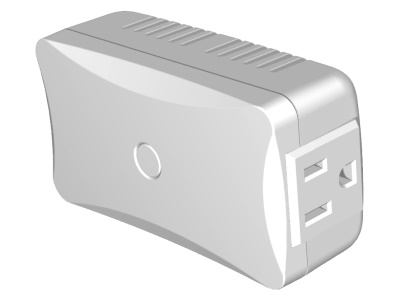
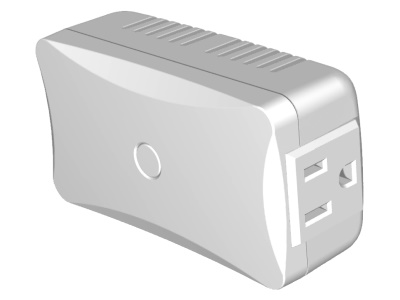
Product Recognition | |
|---|
Certification Number | ZC10-17085755 |
|---|
Name | Dimming Switch Module (Dual Mode) |
|---|
Short Description | The ZDS-210 is a Z-Wave enabled device and allows remote Dimming or ON/OFF control of specified lamps. |
|---|
Long Description | ZDS-210 enabled product allows users to remotely control lighting, home appliance, and make home control easy with low installation and maintenance costs. You may begin with a few Z-Wave enabled devices as well as some of our products to build up a complete home automation system.
The ZDS-210 is a Z-Wave enabled device and is fully compatible with any Z-Wave Plus enabled network. It can be configured as either a “DIMMER” or a “SWITCH” device. It allows remote Dimming or ON/OFF control of specified lamps. Each module is designed to act as a repeater, which will re-transmit a radio frequency (RF) signal by routing the signal around obstacles and radio dead spots to ensure that the signal is received at its intended destination.
ZDS-210 is a security enabled Z-Wave plus device. A security Enabled Z-Wave Plus Controller must be used in order to fully utilize the product. |
|---|
Brand | Remotec |
|---|
Product Identifier | ZDS-210NA |
|---|
OEM Version | HW: 1 FW: 0.32 |
|---|
Hardware Platform | ZM5202 |
|---|
Z-Wave Version | 6.71.01 |
|---|
Library Type | SLAVE_ENHANCED_232 |
|---|
Device Type | Light Dimmer Switch |
|---|
Role Type | ROLE_TYPE_SLAVE_ALWAYS_ON |
|---|
Manufacturer ID | 0x5254 |
|---|
Product Type ID | 0x8200 |
|---|
Product ID | 0x8131 |
|---|
User Icon | 0x0600 |
|---|
Installer Icon | 0x0601 |
|---|
Frequency Plans | US: 916.00MHz, 908.40MHz |
|---|
Categories | All Lighting Devices, Dimming Lighting Devices, On/Off Switches/Devices |
|---|
Countries / Regions | United States of America |
|---|
Supported Command Classes | Identifier | Name | Key | Version |
|---|
COMMAND_CLASS_FIRMWARE_UPDATE_MD_V4 | Firmware Update Meta-Data V4 | 0x7A | 4 | COMMAND_CLASS_SCENE_ACTUATOR_CONF | Scene Actuator Conf | 0x2C | 1 | COMMAND_CLASS_POWERLEVEL | Powerlevel | 0x73 | 1 | COMMAND_CLASS_CONFIGURATION | Configuration | 0x70 | 1 | COMMAND_CLASS_SECURITY | Security S0 | 0x98 | 1 | COMMAND_CLASS_TRANSPORT_SERVICE_V2 | Transport Service V2 | 0x55 | 2 | COMMAND_CLASS_VERSION_V2 | Version V2 | 0x86 | 2 | COMMAND_CLASS_DEVICE_RESET_LOCALLY | Device Reset Locally | 0x5A | 1 | COMMAND_CLASS_ZWAVEPLUS_INFO_V2 | Z-Wave Plus Info V2 | 0x5E | 2 | COMMAND_CLASS_ASSOCIATION_V2 | Association V2 | 0x85 | 2 | COMMAND_CLASS_SWITCH_MULTILEVEL_V4 | Switch Multilevel V4 | 0x26 | 4 | COMMAND_CLASS_BASIC_V2 | Basic V2 | 0x20 | 2 | COMMAND_CLASS_SECURITY_2 | Security S2 | 0x9F | 1 | COMMAND_CLASS_SUPERVISION | Supervision | 0x6C | 1 | COMMAND_CLASS_SCENE_ACTIVATION | Scene Activation | 0x2B | 1 | COMMAND_CLASS_MANUFACTURER_SPECIFIC_V2 | Manufacturer Specific V2 | 0x72 | 2 | COMMAND_CLASS_ASSOCIATION_GRP_INFO_V2 | Association Group Information V2 | 0x59 | 2 |
|
|---|
S2 Classes | S2_UNAUTHENTICATED |
|---|
Documents | Category | Description | File |
|---|
Manual_Primary_Lang | Product or Owner's Manual | |
|
|---|
Features | Feature | Values |
|---|
Electric Load Type | Value |
|---|
Incandescent | Fluorescent | Dimmable LED |
| Color | | Firmware Updatable | Value |
|---|
Updatable by Consumer by RF |
| Switch Load Capacity Watts | Value |
|---|
Dimmer Mode : 330W ; Switch Mode : 500W |
|
|
|---|
Association Groups | Group Number | Maximum Nodes Supported | End Point ID | Description |
|---|
1 | 1 | 0 | Association group_1 (max. 1 node) is default to associate with the primary controller (Gateway/Hub/Controller) for ZDS-210 Status change report, refer to below for report details:
ZDS-210 will trigger AUTO report function if the Dimmer or Switch status had been changed.
Device Reset Locally Notification(Only report when the ZDS-210 Dimming Switch Module has been triggered the RESET TO DEFAULT)
| 2 | 4 | 0 | Dimmer mode: After receiving a dimming command from a local switch or gateway (e.g. 50%), the ZDS-210 will automatically send out a related basic set command (e.g. 50%) to its associated group.
Switch mode: After receiving a basic set command from a local switch or gateway, On (0xFF) or Off (0x00), the ZDS-210 will automatically send out a related basic set command, On (0xFF) or Off (0x00) to its associated group.
(Max. 4 node ID's can be assigned to this association group)
|
|
|---|
Configuration Parameters | Parameter Number | Name | Description | Format | Size | Min Value | Max Value | Default Value | Parameter Values |
|---|
5 | Switch returns to the last position saved before power failure | 0 (0x00) - Switch does not save the state after power failure, device returns to "off" position 1 (0x01) - Switch saves its state before power failure | 0 | 1 | 0 | 0 | 1 | From | To | Description |
|---|
1 | 1 | Save | 0 | 0 | Not Save |
| 17 | Time to move the Dimmer from 0% to max. dimming values | Time to move the Dimmer from 0% to max. dimming values. (The ZDS-210 will implement the dimming duration if received this parameter value from controller/gateway. Otherwise, the ZDS-210 will implement the local parameter value) | 0 | 1 | 0 | 0 | 3 | From | To | Description |
|---|
0 | 5 | Seconds |
|
|
|---|
Texts | ID | Description | Value |
|---|
1 | Inclusion | Include or exclude the ZDS-210 from the existing Z-Wave home control network with your primary controller.
- Refer to your primary controller instructions to process the inclusion / exclusion setup procedure.
- When prompted by your primary controller, triple click the PROG button within 1 second.
(The unit will enter classical inclusion/exclusion first, then jump to NWI, and after 20 seconds, it will finally exit NWI mode automatically if there is no inclusion/exclusion request.)
- The primary controller should indicate that the action was successful. If the controller indicates the action was unsuccessful, please repeat the procedure. | 2 | Exclusion | Include or exclude the ZDS-210 from the existing Z-Wave home control network with your primary controller.
- Refer to your primary controller instructions to process the inclusion / exclusion setup procedure.
- When prompted by your primary controller, triple click the PROG button within 1 second.
(The unit will enter classical inclusion/exclusion first, then jump to NWI, and after 20 seconds, it will finally exit NWI mode automatically if there is no inclusion/exclusion request.)
- The primary controller should indicate that the action was successful. If the controller indicates the action was unsuccessful, please repeat the procedure. | 5 | Factory Reset | Step 1: Press and keep holding the PROG button for no less than 10 seconds.
• LED state will toggle for first 5 seconds of being pressed.
• LED state will toggle again after the remaining 5 seconds.
Step 2: Release the PROG button then triple click the PROG button within 2 seconds of step 1.
• LED will stay in previous ON or OFF stage.
Remark : Please use this procedure only when the network primary controller is missing or otherwise inoperable. |
|
|---|
Supports NWI | Yes |
|---|
Supports Explorer Frames | Yes |
|---|