Product Recognition | |
|---|
Certification Number | ZC10-18056123 |
|---|
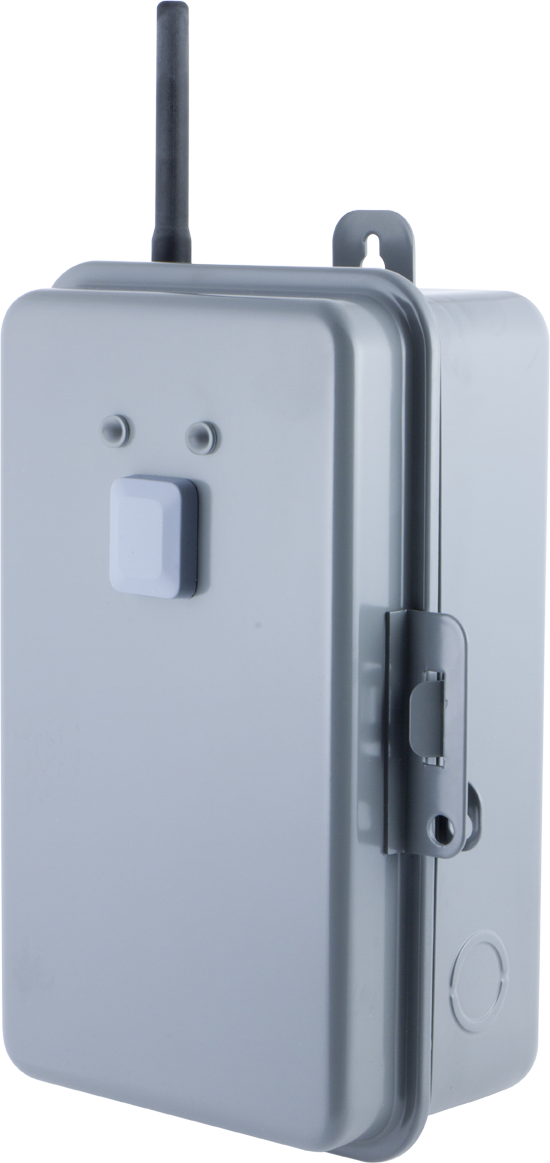
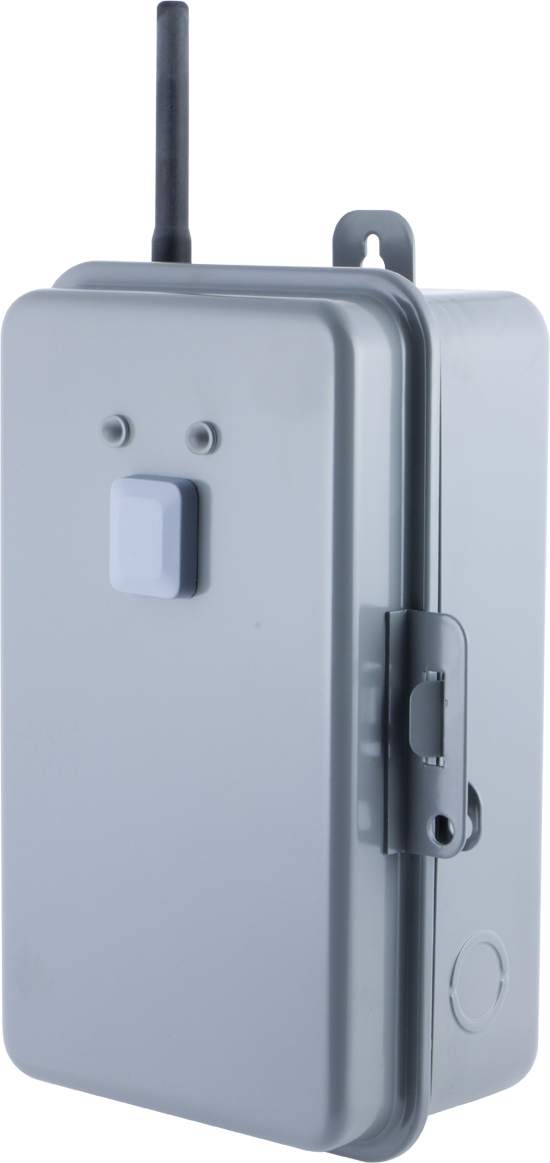
Name | Direct-Wire Outdoor Smart Switch (40 Amp) |
|---|
Short Description | When added to a Z-Wave network, this direct-wire switch enables wireless control of on/off functions for large load applications. |
|---|
Long Description | Transform any home into a smart home with the GE 40 Amp Z-Wave Direct-Wire Indoor/Outdoor Smart Switch. When added to a Z-Wave network, the heavy duty switch enables wireless control of on/off functions for large load, hard-wired applications such as waters heaters, landscape lighting, spas, pool pumps and heaters. The Smart Switch can be used indoors or outdoors and features an easy access wire connection block, front mounted LED lights indicating power and on/off status, and an override switch to turn connected devices on or off manually. The Smart Switch is housed in a lockable, tamper-resistant case to ensure settings and wiring are secure. The rugged, weather-resistant design will keep out dirt and debris while being suitable for use in extreme weather conditions. The GE Z-Wave Direct-Wire Outdoor Smart Switch is also equipped with state-of-the-art energy monitoring capability, allowing you to monitor watts and kilowatt hours, helping you keep your energy costs to a minimum. Take control of your home lighting and large load devices with GE Z-Wave Smart Lighting Controls! |
|---|
Brand | GE |
|---|
Product Identifier | 14285/ZW4007 |
|---|
OEM Version | HW: 255 FW: 5.53 |
|---|
Hardware Platform | ZM5202 |
|---|
Z-Wave Version | 6.81.01 |
|---|
Library Type | SLAVE_ENHANCED_232 |
|---|
Device Type | On/Off Power Switch |
|---|
Role Type | ROLE_TYPE_SLAVE_ALWAYS_ON |
|---|
Manufacturer ID | 0x0063 |
|---|
Product Type ID | 0x4F44 |
|---|
Product ID | 0x3032 |
|---|
User Icon | 0x0700 |
|---|
Installer Icon | 0x0700 |
|---|
Frequency Plans | US: 916.00MHz, 908.40MHz |
|---|
Categories | Energy Meters, All Lighting Devices, On/Off Switches/Devices |
|---|
Countries / Regions | United States of America |
|---|
Supported Command Classes | Identifier | Name | Key | Version |
|---|
COMMAND_CLASS_FIRMWARE_UPDATE_MD_V4 | Firmware Update Meta-Data V4 | 0x7A | 4 | COMMAND_CLASS_SCENE_ACTUATOR_CONF | Scene Actuator Conf | 0x2C | 1 | COMMAND_CLASS_POWERLEVEL | Powerlevel | 0x73 | 1 | COMMAND_CLASS_SWITCH_BINARY | Switch Binary | 0x25 | 1 | COMMAND_CLASS_BASIC | Basic | 0x20 | 1 | COMMAND_CLASS_TRANSPORT_SERVICE_V2 | Transport Service V2 | 0x55 | 2 | COMMAND_CLASS_VERSION_V2 | Version V2 | 0x86 | 2 | COMMAND_CLASS_DEVICE_RESET_LOCALLY | Device Reset Locally | 0x5A | 1 | COMMAND_CLASS_ZWAVEPLUS_INFO_V2 | Z-Wave Plus Info V2 | 0x5E | 2 | COMMAND_CLASS_ASSOCIATION_V2 | Association V2 | 0x85 | 2 | COMMAND_CLASS_METER_V3 | Meter V3 | 0x32 | 3 | COMMAND_CLASS_ASSOCIATION_GRP_INFO | Association Group Info | 0x59 | 1 | COMMAND_CLASS_CONFIGURATION_V3 | Configuration V3 | 0x70 | 3 | COMMAND_CLASS_SECURITY_2 | Security S2 | 0x9F | 1 | COMMAND_CLASS_CENTRAL_SCENE_V3 | Central Scene V3 | 0x5B | 3 | COMMAND_CLASS_SUPERVISION | Supervision | 0x6C | 1 | COMMAND_CLASS_SCENE_ACTIVATION | Scene Activation | 0x2B | 1 | COMMAND_CLASS_MANUFACTURER_SPECIFIC_V2 | Manufacturer Specific V2 | 0x72 | 2 |
|
|---|
Controlled Command Classes | Identifier | Name | Key | Version |
|---|
COMMAND_CLASS_BASIC | Basic | 0x20 | 1 |
|
|---|
S2 Classes | S2_UNAUTHENTICATED, S2_AUTHENTICATED |
|---|
Documents | Category | Description | File |
|---|
Manual_Primary_Lang | Product or Owner's Manual | |
|
|---|
Features | Feature | Values |
|---|
Firmware Updatable | Value |
|---|
Updatable by Consumer by RF |
| Loads Controlled | | Outdoor Use | | Supported Meter Type | | Z-Wave Scene Type | Value |
|---|
Scene & Central Scene |
|
|
|---|
Association Groups | Group Number | Maximum Nodes Supported | End Point ID | Description |
|---|
3 | 5 | 0 | Basic Set, controlled by pressing the On or Off button | 1 | 5 | 0 | Z-Wave Plus Lifeline, Binary Switch Report | 2 | 5 | 0 | Basic Set, controlled by local load |
|
|---|
Configuration Parameters | Parameter Number | Name | Description | Format | Size | Min Value | Max Value | Default Value | Parameter Values |
|---|
1 | Product State after Power Reset | State of the product after power loss | 0 | 1 | 0 | 0 | 0 | From | To | Description |
|---|
0 | 0 | Return to last state | 1 | 1 | Return to off | 2 | 2 | Return to on |
| 2 | Energy Report Mode | Reporting mode | 0 | 1 | 0 | 0 | 0 | From | To | Description |
|---|
0 | 0 | Once monthly | 1 | 1 | Device reports based on Parameter 3 setting (Every 5-60 minutes) | 2 | 2 | Once daily |
| 3 | Energy Report Frequency | Reporting frequency | 0 | 1 | 0 | 0 | 0 | From | To | Description |
|---|
5 | 60 | 5 minutes (default) - 60 minutes (max) |
|
|
|---|
Texts | ID | Description | Value |
|---|
5 | Factory Reset | 1. Place the device into ON mode (upper position of Operating Mode Switch)
2. Press and hold the programming button.
3. While holding programming button, place device into OFF mode (middle position of Operating Mode Switch).
4. While holding programming button, place device back into ON mode (upper position of Operating Mode Switch).
5. After three (3) seconds, release programming button. Green LED will flash 3 times when completed successfully.
Note: This should only be used in the event your network’s primary controller is missing or otherwise inoperable. | 2 | Exclusion | 1. Follow the instructions for your Z-Wave certified controller to remove a device from the Z-Wave network.
2. Once the controller is ready to remove your device press and release the programming button to remove it from the network. | 1 | Inclusion | 1. Follow the instructions for your Z-Wave certified controller to add a device to the Z-Wave network.
2. Once the controller is ready to add your device, press and release the programming button to add it to the network. If prompted by the controller to enter the S2 security code, refer to the QR code/security number on the back of the box, or the QR code label on the product.
3. Once your controller has confirmed that the device has been added, refresh the Z-Wave network to optimize performance. |
|
|---|
Supported / Controlled Meter Types | Meter Type | Rate Type | Description |
|---|
Electric meter | Import | Electric Meter Consumption |
|
|---|
Supports NWI | Yes |
|---|
Supports Explorer Frames | Yes |
|---|
Supports SmartStart | Yes |
|---|
Radio Range Z-Wave (m) | 40 |
|---|