
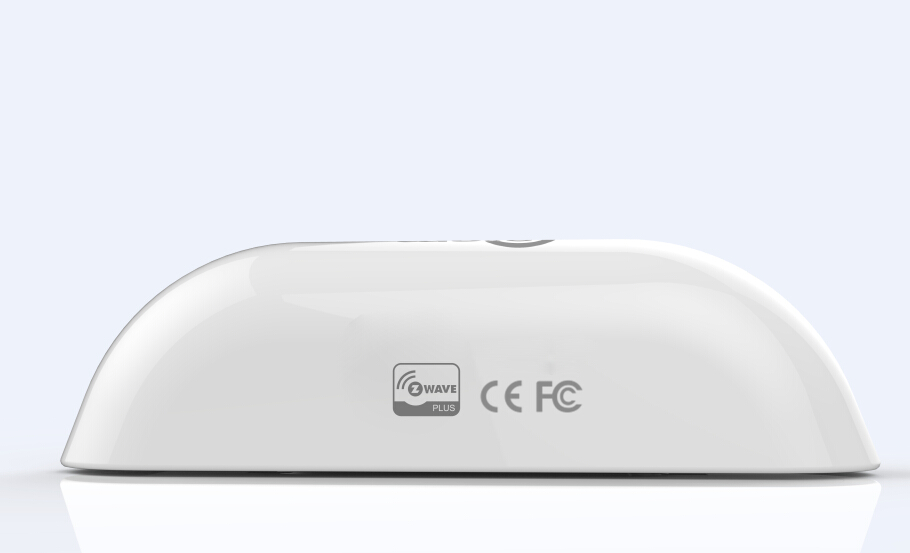
| Product Recognition | |
|---|
| Certification Number | ZC10-16020010 |
|---|
| Name | Door Sensor |
|---|
| Short Description | Smart Door sensor, detect the close and open status of the door or window |
|---|
| Long Description | Door Sensor
Two status: open and close
Compatible with 300 series and 500 series
Power: CR14250 x1
Standby current: 1uA
Battery life: 10 years
Install on the door or window
Easily install with screws or sticker.
Operation temperature: 0-40℃
Size: Main body (L x W x H): 70mmx20mmx20mm
Deputy body (L x W x H): 40mmx11mmx11mm |
|---|
| Brand | Coolcam |
|---|
| Product Identifier | NAS-DS01Z |
|---|
| OEM Version | 41 |
|---|
| Hardware Platform | ZM5202 |
|---|
| Z-Wave Version | 6.51.06 |
|---|
| Library Type | SLAVE_ROUTING |
|---|
| Device Type | Notification Sensor |
|---|
| Role Type | ROLE_TYPE_SLAVE_SLEEPING_REPORTING |
|---|
| Manufacturer ID | 0x0258 |
|---|
| Product Type ID | 0x0003 |
|---|
| Product ID | 0x0082 |
|---|
| Frequency Plans | US: 916.00MHz, 908.40MHz |
|---|
| Categories | Sensors |
|---|
| Countries / Regions | United States of America |
|---|
| Controlled Command Classes | | Identifier | Name | Key | Version |
|---|
| COMMAND_CLASS_BASIC | Basic | 0x20 | 1 |
|
|---|
| Documents | |
|---|
| Association Groups | | Group Number | Maximum Nodes Supported | End Point ID | Description |
|---|
| 1 | 4 | 0 | Every group can be support to associated 5 devices max.
GROUP 1 is lifeline service that assigned to Sensor (Door/Window detector) status – Open/Close. It enables the sensor to send reports and readings to Z-Wave Controller or Z-Wave Gateway whenever the sensor is triggered. This Group Support:
NOTIFICATION_REPORT BATTERY_REPORT SENSOR_BINARY_REPORT DEVICE_RESET_LOCALLY_NOTIFICATION
GROUP 2 allows for sending control commands to associated devices such as relay module, lighting, etc. This association group is configured through the advanced parameters no. 1 and 2. This Group Support:
BASIC_SET.
GROUP 3 allows for Send Notification to associated devices in this group. This Group Support: NOTIFICATION_REPORT
GROUP 4 allows for Send Notification to associated devices in this group. This Group Support: SENSOR_BINARY_REPORT
|
|
|---|
| Texts | | ID | Description | Value |
|---|
| 1 | Inclusion | Add the Sensor (Door/Window detector) to Z-Wave Network
1.Remove the sensor cover.
2.Make sure the sensor is powered.
3.Set Z-Wave controller or Z-Wave gateway into inclusion mode (Refer to the controller or gateway operating manual)
4.Press the button three times within 1.5 second, the device will enter inclusion mode. And the LED will flash on and off alternately five times. | | 2 | Exclusion | Delete the Sensor (Door/Window detector) from Z-Wave Network
1.Remove the device cover.
2.Make sure the sensor is powered.
3.Set Z-Wave controller or Z-Wave gateway into exclusion mode (Refer to the controller or gateway operating manual)
4.Press the button three times within 1.5 second, the device will enter exclusion mode. | | 4 | Device Wake-Up | Manual Wakeup the Sensor
You can press the button once to wake up the device and send wakeup notification to controller. If press successfully, the LED will blink one time. | | 5 | Factory Reset | Restore the Sensor (Door/Window detector) to Factory Default Settings
Reset procedure will delete all information on the Z-Wave network and Z-Wave controller or Z-Wave Gateway, and restore the sensor to factory default settings.
1.Remove the device cover.
2.Make sure the sensor is powered.
3.Press and hold the button for 10 seconds,
4.Release the button. | | 6 | Additional Special Features | Advanced Configuration
1. Configuring the OFF Delay
This configuration parameter that can be used to adjust the amount of delay before the OFF command is transmitted. This parameter can be configured with the value of 0 through 65535, where 0 means send OFF command immediately and 65535 means 65535 seconds of delay.
Function: On/Off Duration.
Parameter Number: 1.
Parameter Size: 2 Byte
Available Settings: 0 ~ 65535 (in seconds, each 1s).
Default Setting: 0 (s)
2. Basic Set Level
Basic Set Command will be sent where contains a value when the door/window is opened or closed, the receiver will take it for consideration; for instance, if a lamp module is received the Basic Set Command of which value is decisive as to how bright of dim level of lamp module shall be.
Function: Basic Set
Parameter Number: 2
Parameter Size: 1 Byte
Available Settings: 0, 1 ~ 99 or 255
0 – OFF, Alarm cancelling or turning a device off
1 ~ 99 or 255 – ON (Binary Switch Device) Dim Level (Multilevel Switch Device)
Default Setting: 255 |
|
|---|
| Supports NWI | Yes |
|---|
| Supports Explorer Frames | Yes |
|---|