Product Recognition | |
|---|
Certification Number | ZC10-18066144 |
|---|
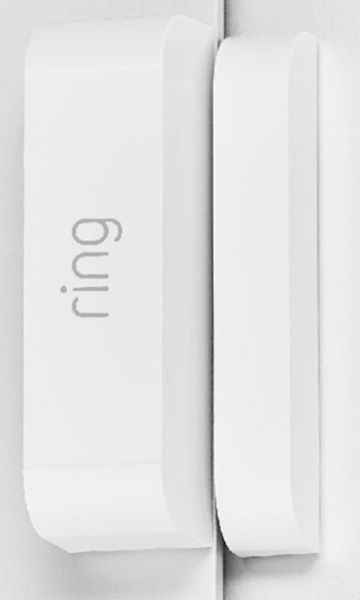
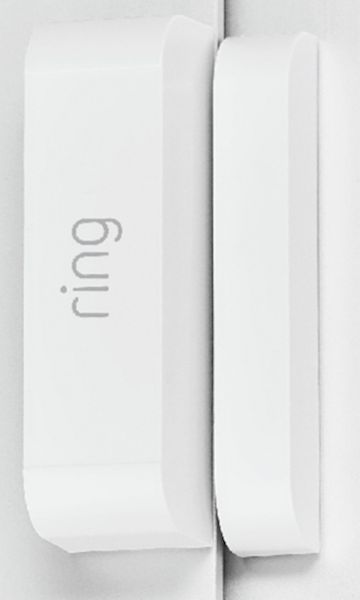
Name | Door/Window Contact Sensor w/ Smart Start |
|---|
Short Description | Ring Z-Wave door/window contact sensor is used as a primary intrusion detection unit in the system. |
|---|
Long Description | The Ring Protect security system is Ring’s entry into the DIY security solution space intended to provide customers with a Ring-branded, unique and simplified home security system. Ring Protect features a Z-Wave door/window contact sensor which will be used as a primary intrusion detection unit in the system. The door/window will be included in the professionally monitored alarm system. Additionally, the sensor’s functionality will be extended to the automation features of the Ring Protect solution. |
|---|
Brand | Ring |
|---|
Product Identifier | RING-DW-SS |
|---|
OEM Version | HW: 1 FW: 11.01 |
|---|
Hardware Platform | ZM5202 |
|---|
Z-Wave Version | 6.80.00 |
|---|
Library Type | SLAVE_ENHANCED_232 |
|---|
Device Type | Notification Sensor |
|---|
Role Type | ROLE_TYPE_SLAVE_SLEEPING_REPORTING |
|---|
Manufacturer ID | 0x0346 |
|---|
Product Type ID | 0x0201 |
|---|
Product ID | 0x0201 |
|---|
User Icon | 0x0C07 |
|---|
Installer Icon | 0x0C07 |
|---|
Frequency Plans | US: 916.00MHz, 908.40MHz |
|---|
Categories | Sensors |
|---|
Countries / Regions | United States of America |
|---|
Supported Command Classes | Identifier | Name | Key | Version |
|---|
COMMAND_CLASS_FIRMWARE_UPDATE_MD_V4 | Firmware Update Meta-Data V4 | 0x7A | 4 | COMMAND_CLASS_POWERLEVEL | Powerlevel | 0x73 | 1 | COMMAND_CLASS_BATTERY | Battery | 0x80 | 1 | COMMAND_CLASS_CONFIGURATION | Configuration | 0x70 | 1 | COMMAND_CLASS_TRANSPORT_SERVICE_V2 | Transport Service V2 | 0x55 | 2 | COMMAND_CLASS_VERSION_V2 | Version V2 | 0x86 | 2 | COMMAND_CLASS_WAKE_UP_V2 | Wake Up V2 | 0x84 | 2 | COMMAND_CLASS_ZWAVEPLUS_INFO_V2 | Z-Wave Plus Info V2 | 0x5E | 2 | COMMAND_CLASS_ASSOCIATION_V2 | Association V2 | 0x85 | 2 | COMMAND_CLASS_ASSOCIATION_GRP_INFO | Association Group Info | 0x59 | 1 | COMMAND_CLASS_NOTIFICATION_V8 | Notification V8 | 0x71 | 8 | COMMAND_CLASS_BASIC_V2 | Basic V2 | 0x20 | 2 | COMMAND_CLASS_SECURITY_2 | Security S2 | 0x9F | 1 | COMMAND_CLASS_SUPERVISION | Supervision | 0x6C | 1 | COMMAND_CLASS_MANUFACTURER_SPECIFIC_V2 | Manufacturer Specific V2 | 0x72 | 2 |
|
|---|
S2 Classes | S2_UNAUTHENTICATED, S2_AUTHENTICATED |
|---|
Documents | Category | Description | File |
|---|
Manual_Primary_Lang | Product or Owner's Manual | |
|
|---|
Features | Feature | Values |
|---|
Firmware Updatable | Value |
|---|
Updatable by Manufacturer |
| Battery Type | | Supported Notification Types | | Color | |
|
|---|
Association Groups | Group Number | Maximum Nodes Supported | End Point ID | Description |
|---|
1 | 1 | 0 | Z-Wave Plus Lifeline
lifeline group who will receive unsolicited messages relating to door/window open/close notifications, case tampering notifications, and low-battery notifications | 2 | 1 | 0 | Z-Wave Basic
The sensor will send a basic report of either 0x00 for “Closed” or 0xFF for “Open.”
|
|
|---|
Configuration Parameters | Parameter Number | Name | Description | Format | Size | Min Value | Max Value | Default Value | Parameter Values |
|---|
1 | wait time | Configuration Value: 255 to 4200 seconds in 255 second increments that the sensor should wait between sending unsolicited battery reports. The default configuration value for parameter 1 is defaulted to 4200 minutes on exclusion. | 0 | 2 | 0 | 0 | 4200 | From | To | Description |
|---|
255 | 4200 | minutes on exclusion |
|
|
|---|
Texts | ID | Description | Value |
|---|
4 | Device Wake-Up | By open the top cover, the sensor will get to tamper state and stay awake. | 2 | Exclusion | Exclusion Instructions:
1. Initiate remove sensor flow in the Ring Alarm mobile application – Select the setting icon from device details page and choose “Remove Device”
2. Open contact sensor’s cover
3. Remove and replace battery quickly | 1 | Inclusion | Ring Contact Sensor can be added via SmartStart or via classic inclusion mode –
SmartStart Inclusion Steps:
1. Initiate add sensor flow in the Ring Alarm mobile application – Follow the guided add flow instructions provided in the application
2. Scan the QR code found on the package of the sensor or the QR code found on the back of the sensor
3. Pull the battery tab on the sensor
4. When the inclusion process in complete, the LED on the sensor will be solid blue, then go out.
5. Test the sensor. Place the magnet next to the sensor to represent a closed position (see Installation video to see where to
position the magnet). If the LED flashes ONE TIME, it is successfully communicating on your Zwave network. If the LED on the
sensor flashes slow and steady for 5 seconds, you need to repeat the inclusion process.
Classic Inclusion Steps:
1. Initiate add sensor flow in the Ring Alarm mobile application – Follow the guided add flow instructions provided in the application
2. Select add manually and enter the 5 digit DSK pin found on the package of the sensor or the QR code found on the back of the sensor
3. Pull the battery tab on the sensor
4. When the inclusion process in complete, the LED on the sensor will be solid blue, then go out.
5. Test the sensor. Place the magnet next to the sensor to represent a closed position (see Installation video to see where to position the magnet). If the LED flashes ONE TIME, it is successfully communicating on your Z-Wave network. If the LED on the
sensor flashes slow and steady for 5 seconds, you need to repeat the inclusion process. | 5 | Factory Reset | Factory Default Instructions
1. Open contact sensor’s cover
2. Press and hold the reset button on sensor circuitry
3. Remove and replace battery quickly – Blue LED will start to blink rapidly
4. Wait for the blue LED to stop blinking
Use this procedure only in the event that the network primary controller is missing or otherwise inoperable. |
|
|---|
Supported Notification Types | Notification Type | Event / State |
|---|
Home Security | (Refer to parameters): State idle |
|
|---|
Supports NWI | Yes |
|---|
Supports Explorer Frames | Yes |
|---|
Supports SmartStart | Yes |
|---|