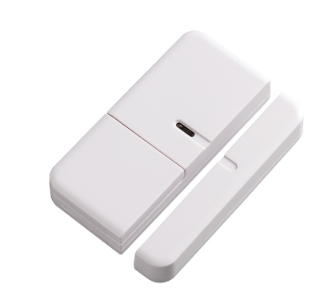
Product Recognition | |
|---|
Certification Number | ZC10-18066167 |
|---|
Name | Door/Window Detector |
|---|
Short Description | The mini door/window contact detector is a Z-Wave enabled device and is fully compatible with any Z-Wave enabled network. |
|---|
Long Description | This sensor offers information whether a door or window is open or closed.
The product consists of a magnetic element and the main unit. One of the parts is mounted on the moving part of the window or of the door. The other part is placed on the frame. The installation can be done with screws or double-sided tape.
The SM810 is a battery-powered device, which is in sleeping mode unless an action is detected. After a programmable sleeping time the device wakes up and sends a status information. After this the unit goes back to sleeping mode. Batteries can be changed without unscrewing the device from the door or frame.
The unit will give a visual warning on the device and sends a warning to the Z-Wave controller, when batteries need to be replaced. The units send information to a controller or any other associated Z-Wave device. Up to 4 devices can be controlled from this device.
The device needs to be included into a Z-Wave network by a remote control or any other Z-Wave controller. For configuration of certain behavior a static controller such as a PC with home automation software or a gateway is required. |
|---|
Brand | Everspring |
|---|
Product Identifier | SM810-1 |
|---|
OEM Version | HW: 1 FW: 1.01:00.01 |
|---|
Hardware Platform | SD3502 |
|---|
Z-Wave Version | 6.71.01 |
|---|
Library Type | SLAVE_ENHANCED_232 |
|---|
Device Type | Notification Sensor |
|---|
Role Type | ROLE_TYPE_SLAVE_SLEEPING_REPORTING |
|---|
Manufacturer ID | 0x0060 |
|---|
Product Type ID | 0x0002 |
|---|
Product ID | 0x0003 |
|---|
User Icon | 0x0C06 |
|---|
Installer Icon | 0x0C06 |
|---|
Frequency Plans | EU: 869.85MHz, 868.40MHz |
|---|
Categories | Sensors |
|---|
Countries / Regions | European Union |
|---|
Supported Command Classes | Identifier | Name | Key | Version |
|---|
COMMAND_CLASS_FIRMWARE_UPDATE_MD_V4 | Firmware Update Meta-Data V4 | 0x7A | 4 | COMMAND_CLASS_POWERLEVEL | Powerlevel | 0x73 | 1 | COMMAND_CLASS_BATTERY | Battery | 0x80 | 1 | COMMAND_CLASS_SECURITY | Security S0 | 0x98 | 1 | COMMAND_CLASS_TRANSPORT_SERVICE_V2 | Transport Service V2 | 0x55 | 2 | COMMAND_CLASS_VERSION_V2 | Version V2 | 0x86 | 2 | COMMAND_CLASS_WAKE_UP_V2 | Wake Up V2 | 0x84 | 2 | COMMAND_CLASS_DEVICE_RESET_LOCALLY | Device Reset Locally | 0x5A | 1 | COMMAND_CLASS_ZWAVEPLUS_INFO_V2 | Z-Wave Plus Info V2 | 0x5E | 2 | COMMAND_CLASS_ASSOCIATION_V2 | Association V2 | 0x85 | 2 | COMMAND_CLASS_ASSOCIATION_GRP_INFO | Association Group Info | 0x59 | 1 | COMMAND_CLASS_SECURITY_2 | Security S2 | 0x9F | 1 | COMMAND_CLASS_SUPERVISION | Supervision | 0x6C | 1 | COMMAND_CLASS_MANUFACTURER_SPECIFIC_V2 | Manufacturer Specific V2 | 0x72 | 2 | COMMAND_CLASS_NOTIFICATION_V4 | Notification V4 | 0x71 | 4 |
|
|---|
Controlled Command Classes | Identifier | Name | Key | Version |
|---|
COMMAND_CLASS_BASIC | Basic | 0x20 | 1 |
|
|---|
S2 Classes | S2_UNAUTHENTICATED, S2_AUTHENTICATED |
|---|
Documents | Category | Description | File |
|---|
Manual_Primary_Lang | Product or Owner's Manual | |
|
|---|
Features | Feature | Values |
|---|
Battery Type | | Sensors | Value |
|---|
Open/Closed (Binary) |
| Supported Notification Types | | Battery Quantity | | Color | | Firmware Updatable | Value |
|---|
Updatable by Consumer via Internet |
|
|
|---|
Association Groups | Group Number | Maximum Nodes Supported | End Point ID | Description |
|---|
1 | 1 | 0 | Z-Wave Plus Lifeline | 2 | 4 | 0 | Basic Set |
|
|---|
Texts | ID | Description | Value |
|---|
5 | Factory Reset | Please use this procedure only when the network primary controller is missing or otherwise inoperable.
1. Press the tamper switch 3 times within 1.5 seconds to put the unit into exclusion mode.
2. Within 1 second of step 1, press the tamper switch again and hold for 5 seconds.
3. Node ID is excluded. The device reverts to factory default state. | 1 | Inclusion | 1. Put the Z-Wave Controller into inclusion mode.
2. Press the tamper switch 3 times within 1.5 seconds to put the unit into inclusion mode. | 2 | Exclusion | 1. Put the Z-Wave Controller into exclusion mode.
2. Press the tamper switch 3 times within 1.5 seconds to put the unit into exclusion mode. | 4 | Device Wake-Up | After it has been included into a Z-Wave network, the detector will go to sleep but will send a Wakeup Notification Command periodically at preset period to the controller. The detector will stay awake for 10 seconds at least and then go back to sleep to conserve battery life.
The time interval between Wakeup Notification Commands can be set in the Wakeup Command Class based on the range values below:
Minimum Wake Up Interval 600s (10 minutes)
Maximum Wake Up Interval 86400s (1 day)
Default Wake Up Interval 14400s (4 hours)
Wake Up Interval Step Seconds 600s (10 minutes) |
|
|---|
Supported Notification Types | Notification Type | Event / State |
|---|
Access Control | (Refer to parameters): State idle |
|
|---|
Supported Multilevel Sensors | Multilevel Sensor Type |
|---|
General purpose |
|
|---|
Supports NWI | Yes |
|---|
Supports Explorer Frames | Yes |
|---|
Radio Range Z-Wave (m) | 40 |
|---|