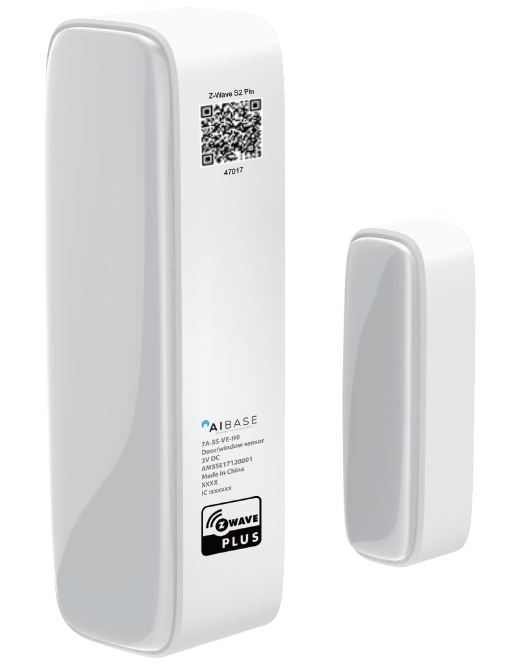
Product Recognition | |
|---|
Certification Number | ZC10-18056126 |
|---|
Name | Door/Window Sensor |
|---|
Short Description | This sensor uses the Z-Wave communication module to connect with Z-Wave Gateway. |
|---|
Long Description | ✓ Well design to match your door/window installation
✓ Firmware Wireless update
✓ Low voltage alarm to remind changing battery
✓ Easy installation by screws or 3M adhesive tape. |
|---|
Brand | Aibase |
|---|
Product Identifier | HA-ZW-5SE |
|---|
OEM Version | HW: 32 FW: 1.08 |
|---|
Hardware Platform | ZM5101 |
|---|
Z-Wave Version | 6.71.01 |
|---|
Library Type | SLAVE_ENHANCED_232 |
|---|
Device Type | Notification Sensor |
|---|
Role Type | ROLE_TYPE_SLAVE_SLEEPING_REPORTING |
|---|
Manufacturer ID | 0x0384 |
|---|
Product Type ID | 0x0200 |
|---|
Product ID | 0x0008 |
|---|
User Icon | 0x0c06 |
|---|
Installer Icon | 0x0c06 |
|---|
Frequency Plans | US: 916.00MHz, 908.40MHz |
|---|
Categories | Sensors |
|---|
Countries / Regions | United States of America |
|---|
Supported Command Classes | Identifier | Name | Key | Version |
|---|
COMMAND_CLASS_FIRMWARE_UPDATE_MD_V4 | Firmware Update Meta-Data V4 | 0x7A | 4 | COMMAND_CLASS_POWERLEVEL | Powerlevel | 0x73 | 1 | COMMAND_CLASS_BATTERY | Battery | 0x80 | 1 | COMMAND_CLASS_CONFIGURATION | Configuration | 0x70 | 1 | COMMAND_CLASS_SECURITY | Security S0 | 0x98 | 1 | COMMAND_CLASS_TRANSPORT_SERVICE_V2 | Transport Service V2 | 0x55 | 2 | COMMAND_CLASS_VERSION_V2 | Version V2 | 0x86 | 2 | COMMAND_CLASS_WAKE_UP_V2 | Wake Up V2 | 0x84 | 2 | COMMAND_CLASS_DEVICE_RESET_LOCALLY | Device Reset Locally | 0x5A | 1 | COMMAND_CLASS_ZWAVEPLUS_INFO_V2 | Z-Wave Plus Info V2 | 0x5E | 2 | COMMAND_CLASS_ASSOCIATION_V2 | Association V2 | 0x85 | 2 | COMMAND_CLASS_ASSOCIATION_GRP_INFO | Association Group Info | 0x59 | 1 | COMMAND_CLASS_NOTIFICATION_V8 | Notification V8 | 0x71 | 8 | COMMAND_CLASS_SECURITY_2 | Security S2 | 0x9F | 1 | COMMAND_CLASS_SUPERVISION | Supervision | 0x6C | 1 | COMMAND_CLASS_MANUFACTURER_SPECIFIC_V2 | Manufacturer Specific V2 | 0x72 | 2 |
|
|---|
Controlled Command Classes | Identifier | Name | Key | Version |
|---|
COMMAND_CLASS_BASIC | Basic | 0x20 | 1 |
|
|---|
S2 Classes | S2_UNAUTHENTICATED, S2_AUTHENTICATED |
|---|
Documents | Category | Description | File |
|---|
Manual_Primary_Lang | Product or Owner's Manual | |
|
|---|
Features | Feature | Values |
|---|
Battery Quantity | | Firmware Updatable | Value |
|---|
Updatable by Consumer by RF |
| Supported Notification Types | Value |
|---|
Access Control | Home Security |
| Sensors | Value |
|---|
Open/Closed (Binary) |
| Battery Type | |
|
|---|
Association Groups | Group Number | Maximum Nodes Supported | End Point ID | Description |
|---|
2 | 5 | 0 | 1.Basic Set
Sensor will send Basic Set when the sensor body and magnet removed or combined.
| 1 | 5 | 0 | 1. Notification Report.
Sensor will send Notification Report when the supported event is triggered.
2. Battery Report.
Sensor will send Battery Report when the battery level is low and the battery report’s value is 0xFF.
3. Device Reset Locally.
|
|
|---|
Configuration Parameters | Parameter Number | Name | Description | Format | Size | Min Value | Max Value | Default Value | Parameter Values |
|---|
254 | Enable/disable the configuration command | Lock/unlock all configuration parameters. | 0 | 1 | 0 | 0 | 0 | From | To | Description |
|---|
0 | 0 | Unlock | 1 | 1 | Lock |
| 10 | Level of low battery | This parameter defines a battery level as the “low battery”. | 0 | 1 | 0 | 0 | 10 | |
|
|---|
Texts | ID | Description | Value |
|---|
1 | Inclusion | Add for inclusion:
1). Insert the battery.
2). Set the Z-Wave network main controller into learning mode.
3). Triggering this action button.
4). If the add for inclusion is successful, the LED will blink fast and then keep on 3 seconds. Otherwise, the LED will blink 25 seconds and then turn off, in which case you need to repeat the process from step | 2 | Exclusion | Remove for exclusion;
1. Insert the CR battery.
2. Set the Z-Wave network main controller into exclusion mode.
3. Triggering this action button.
If the remove for exclusion is successful, the LED will blink fast and turn off. Otherwise, the LED will keep solid for 2 seconds and then turn off, in which case you need to repeat the process from step 2. | 5 | Factory Reset | LED will blink fast for 5 seconds and then keep solid for 3 seconds, after that Door/Window Sensor will send “Device_Reset_Locally” to the main controller and exclude from the Z-Wave network.
Please use this procedure only when the network primary controller is missing or otherwise inoperable. | 4 | Device Wake-Up | 1. Short press 3 time.
2. LED will blink one time; sending wake up notification cc |
|
|---|
Supported Notification Types | Notification Type | Event / State |
|---|
Access Control | (Refer to parameters): State idle | Home Security | (Refer to parameters): State idle |
|
|---|
Supported Multilevel Sensors | Multilevel Sensor Type |
|---|
General purpose |
|
|---|
Supports NWI | Yes |
|---|
Supports Explorer Frames | Yes |
|---|
Radio Range Z-Wave (m) | 40 |
|---|