Product Recognition | |
|---|
Certification Number | ZC10-18096233 |
|---|
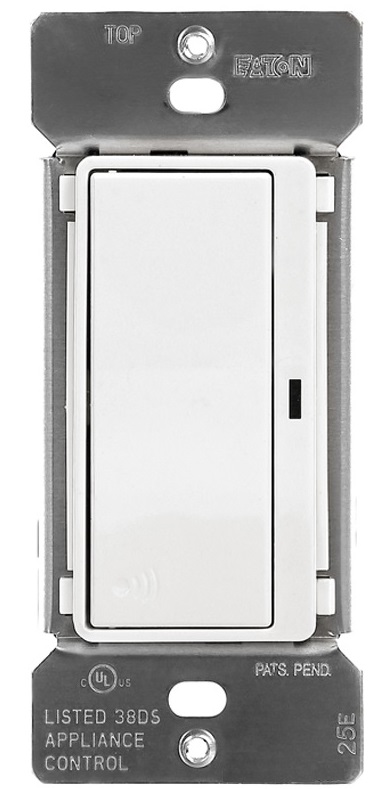
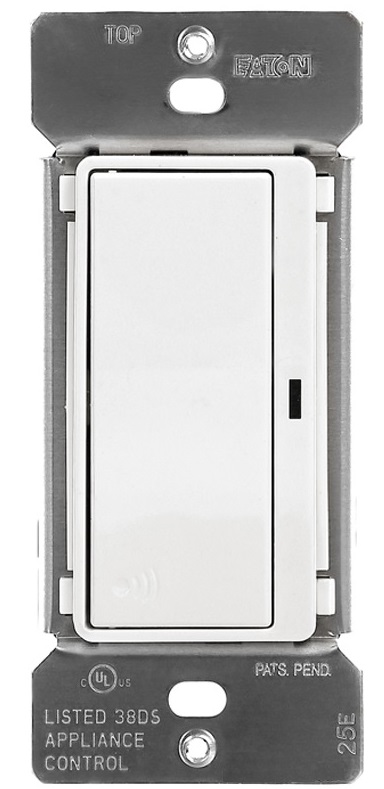
Name | Eatons Z-Wave Plus Accessory Switch |
|---|
Short Description | Eaton’s Z-Wave Plus Accessory Switch can be used with Eaton's Z-Wave Plus devices to provide 3-way, multi-location ON/OFF control. |
|---|
Long Description | Eaton’s Z-Wave Accessory Switch can be used with Eaton's RF9601 switch & other Z-Wave Plus certified devices to provide 3-way, multi-location ON/OFF control of a selected Z-Wave wireless switch without the need for traditional 3-way wiring. You can use your compatible Z-Wave certified controller to associate each accessory with up to (5) other Z-Wave load controlling devices.
Features & Benefits:
• Wireless accessory for Eaton’s Z-Wave Wireless Switch (RF9601)
• Ideal for applications where no traveler wires exist for 3-Way & multi-location control
• Neutral is required for installation
• Supports Z-Wave Plus technology including S2 Security certification for advanced encryption & cybersecurity
• Can be associated with (5) other Z-Wave Plus devices when used with a compatible Z-Wave controller |
|---|
Brand | Eaton |
|---|
Product Identifier | RF9617 |
|---|
OEM Version | HW: 0 FW: 2.00 |
|---|
Hardware Platform | ZM5101 |
|---|
Z-Wave Version | 6.71.03 |
|---|
Library Type | SLAVE_ENHANCED_232_NOFLIRS_NOMR |
|---|
Device Type | On/Off Power Switch |
|---|
Role Type | ROLE_TYPE_SLAVE_ALWAYS_ON |
|---|
Manufacturer ID | 0x001A |
|---|
Product Type ID | 0x5352 |
|---|
Product ID | 0x0504 |
|---|
User Icon | 0x0700 |
|---|
Installer Icon | 0x0700 |
|---|
Frequency Plans | US: 916.00MHz, 908.40MHz |
|---|
Categories | All Lighting Devices, Lighting Accessories |
|---|
Countries / Regions | United States of America |
|---|
Supported Command Classes | Identifier | Name | Key | Version |
|---|
COMMAND_CLASS_SCENE_ACTUATOR_CONF | Scene Actuator Conf | 0x2C | 1 | COMMAND_CLASS_NODE_NAMING | Node Naming | 0x77 | 1 | COMMAND_CLASS_POWERLEVEL | Powerlevel | 0x73 | 1 | COMMAND_CLASS_ALARM | Alarm | 0x71 | 1 | COMMAND_CLASS_SWITCH_BINARY | Switch Binary | 0x25 | 1 | COMMAND_CLASS_CONFIGURATION | Configuration | 0x70 | 1 | COMMAND_CLASS_TRANSPORT_SERVICE_V2 | Transport Service V2 | 0x55 | 2 | COMMAND_CLASS_VERSION_V2 | Version V2 | 0x86 | 2 | COMMAND_CLASS_DEVICE_RESET_LOCALLY | Device Reset Locally | 0x5A | 1 | COMMAND_CLASS_ZWAVEPLUS_INFO_V2 | Z-Wave Plus Info V2 | 0x5E | 2 | COMMAND_CLASS_ASSOCIATION_V2 | Association V2 | 0x85 | 2 | COMMAND_CLASS_ASSOCIATION_GRP_INFO | Association Group Info | 0x59 | 1 | COMMAND_CLASS_BASIC_V2 | Basic V2 | 0x20 | 2 | COMMAND_CLASS_SECURITY_2 | Security S2 | 0x9F | 1 | COMMAND_CLASS_SUPERVISION | Supervision | 0x6C | 1 | COMMAND_CLASS_PROTECTION | Protection | 0x75 | 1 | COMMAND_CLASS_SCENE_ACTIVATION | Scene Activation | 0x2B | 1 | COMMAND_CLASS_FIRMWARE_UPDATE_MD_V2 | Firmware Update Meta-Data V2 | 0x7A | 2 | COMMAND_CLASS_MANUFACTURER_SPECIFIC_V2 | Manufacturer Specific V2 | 0x72 | 2 |
|
|---|
Controlled Command Classes | Identifier | Name | Key | Version |
|---|
COMMAND_CLASS_BASIC_V2 | Basic V2 | 0x20 | 2 |
|
|---|
S2 Classes | S2_UNAUTHENTICATED, S2_AUTHENTICATED |
|---|
Documents | Category | Description | File |
|---|
Manual_Primary_Lang | Product or Owner's Manual | |
|
|---|
Features | Feature | Values |
|---|
Neutral Wire Required | | Z-Wave Scene Type | | Firmware Updatable | Value |
|---|
Updatable by Consumer by RF |
| Switch Type | Value |
|---|
Decorator Paddle Push with Indicator |
|
|
|---|
Association Groups | Group Number | Maximum Nodes Supported | End Point ID | Description |
|---|
1 | 5 | 0 | Z-Wave Plus Lifeline | 2 | 5 | 0 | ON/OFF |
|
|---|
Configuration Parameters | Parameter Number | Name | Description | Format | Size | Min Value | Max Value | Default Value | Parameter Values |
|---|
1 | Delayed OFF Time | Allows the switch to turn off after a delay. | 0 | 1 | 0 | 127 | 10 | From | To | Description |
|---|
0 | 127 | Delayed OFF Time |
| 2 | Panic ON Time | Sets ON time for Panic Mode | 0 | 1 | 0 | 127 | 1 | From | To | Description |
|---|
0 | 127 | Panic ON Time |
| 3 | Panic OFF Time | Sets OFF time for Panic Mode | 0 | 1 | 0 | 127 | 1 | From | To | Description |
|---|
0 | 127 | Panic OFF Time |
| 5 | Power UP State | 1 = OFF 2 = ON 3 = Last State | 0 | 1 | 1 | 3 | 1 | From | To | Description |
|---|
1 | 1 | Turn OFF when power is restored | 2 | 2 | Turn ON when power is restored | 3 | 3 | Return to last state when power is restored |
| 6 | Panic Mode Enable | 0 = OFF 1 = ON As default Panic Mode is disabled | 0 | 1 | 0 | 1 | 0 | From | To | Description |
|---|
0 | 0 | Turn Panic Mode ON | 1 | 1 | Turn Panic Mode OFF |
|
|
|---|
Texts | ID | Description | Value |
|---|
1 | Inclusion | 1. To include this device in a Z-Wave network, select the command on your Z Wave controller for inclusion (Install, Add Device,
Add Node, Include Device, etc.). Then press the device ON/OFF button one time to include it in the network.
2. Based on the controller, the controller may ask you to scan the QR code or manually enter 5 digit code under the QR code
to install the device as a secured device. You may find this QR code on the device or included in device packaging.
3. After the Device is added to the network, the blue indicator LED will stop blinking. This indicates the device is installed in the Z-Wave
network. | 2 | Exclusion | 1. To exclude this device from a Z-Wave network, select the setting on your Z-Wave controller for exclusion
(Uninstall, Remove Device, Remove Node, Exclude Device, etc.).
2. Once your controller is in exclusion mode, press the device ON/OFF button one time to exclude it from the network. The LED will start
blinking. | 5 | Factory Reset | Please use this procedure only when the network primary controller is missing or otherwise inoperable.
The device could be reset locally. This will cause the device to be excluded from its network and restore to factory default.
Before leaving the network the switch will send a notification to the controller indicating its departure from the Z-Wave network.
1. Turn the device ON.
2. Press and hold ON/OFF button for 20 second till the LED flashes for the third time.
3. Release the ON/OFF button.
4. LED will start flashing rapidly. Once the LED starts blinking slowly, that indicates the device is not part of the network. |
|
|---|
Supports NWI | Yes |
|---|
Supports Explorer Frames | Yes |
|---|