Product Recognition | |
|---|
Certification Number | ZC10-18126327 |
|---|
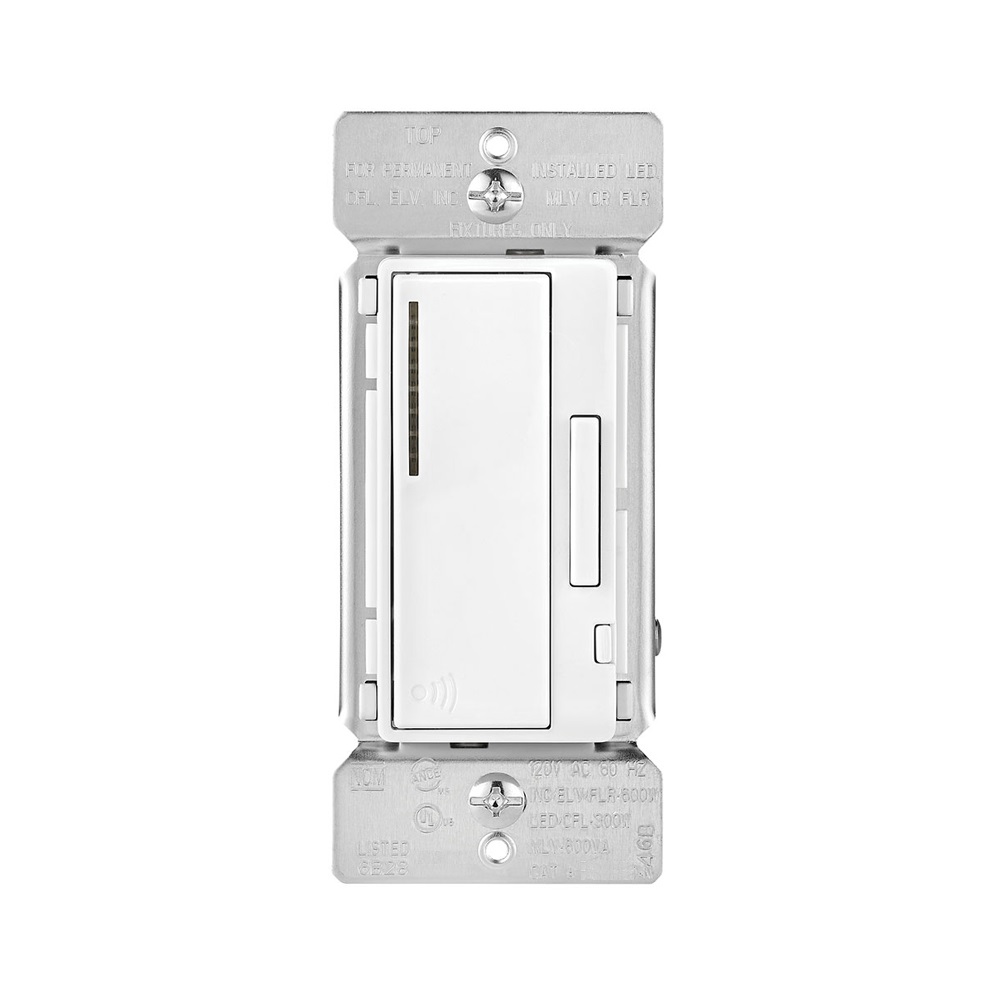
Name | Eaton’s Z-Wave Plus Universal Dimmer |
|---|
Short Description | Eaton’s Z-Wave plus Universal dimmer replaces regular switches (where a neutral is present) to provide local and remote ON/OFF and DIM UP/Down control for most common residential lighting loads including LEDs. |
|---|
Long Description | Eaton’s Z-Wave plus Universal dimmer replaces regular switches (where a neutral is present) to provide local and remote ON/OFF and Dim UP/Down control for most common residential lighting loads including LEDs and certain motor loads. Each dimmer can be manually and remotely controlled by commands sent from your compatible Z-Wave certified controller.
Features & Benefits:
• Replaces standard switch to add local and wireless control
• Compatible with most common residential lighting loads including LED, CFLs, INC, MLVs, ELVs, HAL.
• Single pole and 3-Way control: Use with Z-Wave Plus Accessory dimmer RF9642-Z
• Neutral is required for installation
• Features 7 step blue load indicating LED light that can be dimmed in ON or OFF state
• Supports Z-Wave Plus technology including S2 Security certification for advanced encryption & cybersecurity
• Voice and app based control when used with compatible Z-Wave controller |
|---|
Brand | Eaton |
|---|
Product Identifier | RF9640-N |
|---|
OEM Version | HW: 255 FW: 2.00 |
|---|
Hardware Platform | ZM5101 |
|---|
Z-Wave Version | 6.71.03 |
|---|
Library Type | SLAVE_ENHANCED_232 |
|---|
Device Type | Light Dimmer Switch |
|---|
Role Type | ROLE_TYPE_SLAVE_ALWAYS_ON |
|---|
Manufacturer ID | 0x001A |
|---|
Product Type ID | 0x4449 |
|---|
Product ID | 0x0501 |
|---|
User Icon | 0x0600 |
|---|
Installer Icon | 0x0600 |
|---|
Frequency Plans | US: 916.00MHz, 908.40MHz |
|---|
Categories | All Lighting Devices, Dimming Lighting Devices |
|---|
Countries / Regions | United States of America |
|---|
Supported Command Classes | Identifier | Name | Key | Version |
|---|
COMMAND_CLASS_FIRMWARE_UPDATE_MD_V4 | Firmware Update Meta-Data V4 | 0x7A | 4 | COMMAND_CLASS_SCENE_ACTUATOR_CONF | Scene Actuator Conf | 0x2C | 1 | COMMAND_CLASS_NODE_NAMING | Node Naming | 0x77 | 1 | COMMAND_CLASS_POWERLEVEL | Powerlevel | 0x73 | 1 | COMMAND_CLASS_ALARM | Alarm | 0x71 | 1 | COMMAND_CLASS_CONFIGURATION | Configuration | 0x70 | 1 | COMMAND_CLASS_SECURITY | Security S0 | 0x98 | 1 | COMMAND_CLASS_TRANSPORT_SERVICE_V2 | Transport Service V2 | 0x55 | 2 | COMMAND_CLASS_VERSION_V2 | Version V2 | 0x86 | 2 | COMMAND_CLASS_DEVICE_RESET_LOCALLY | Device Reset Locally | 0x5A | 1 | COMMAND_CLASS_ZWAVEPLUS_INFO_V2 | Z-Wave Plus Info V2 | 0x5E | 2 | COMMAND_CLASS_ASSOCIATION_V2 | Association V2 | 0x85 | 2 | COMMAND_CLASS_ASSOCIATION_GRP_INFO | Association Group Info | 0x59 | 1 | COMMAND_CLASS_SWITCH_MULTILEVEL_V4 | Switch Multilevel V4 | 0x26 | 4 | COMMAND_CLASS_BASIC_V2 | Basic V2 | 0x20 | 2 | COMMAND_CLASS_SECURITY_2 | Security S2 | 0x9F | 1 | COMMAND_CLASS_SUPERVISION | Supervision | 0x6C | 1 | COMMAND_CLASS_PROTECTION | Protection | 0x75 | 1 | COMMAND_CLASS_SCENE_ACTIVATION | Scene Activation | 0x2B | 1 | COMMAND_CLASS_MANUFACTURER_SPECIFIC_V2 | Manufacturer Specific V2 | 0x72 | 2 |
|
|---|
Controlled Command Classes | Identifier | Name | Key | Version |
|---|
COMMAND_CLASS_SWITCH_MULTILEVEL_V4 | Switch Multilevel V4 | 0x26 | 4 | COMMAND_CLASS_BASIC_V2 | Basic V2 | 0x20 | 2 |
|
|---|
S2 Classes | S2_UNAUTHENTICATED, S2_AUTHENTICATED |
|---|
Documents | Category | Description | File |
|---|
Manual_Primary_Lang | Product or Owner's Manual | |
|
|---|
Features | Feature | Values |
|---|
Electric Load Type | Value |
|---|
Incandescent | Dimmable LED | Dimmable Fluorescent | Dimmable MLV (Magnetic) | Dimmable ELV (Magnetic) |
| Z-Wave Scene Type | | Neutral Wire Required | | Switch Load Capacity Watts | | Firmware Updatable | Value |
|---|
Updatable by Consumer by RF |
|
|
|---|
Association Groups | Group Number | Maximum Nodes Supported | End Point ID | Description |
|---|
1 | 5 | 0 | Z-Wave Plus Lifeline | 2 | 5 | 0 | ON/OFF | 3 | 5 | 0 | DIM up / DIM Down |
|
|---|
Configuration Parameters | Parameter Number | Name | Description | Format | Size | Min Value | Max Value | Default Value | Parameter Values |
|---|
5 | Power Up State | The State that the device comes is at when the power is restored after a power outage | 0 | 1 | 0 | 0 | 3 | From | To | Description |
|---|
1 | 1 | Device Stays OFF | 2 | 2 | Device Stays ON | 3 | 3 | Device reverts to last state |
| 6 | Panic Mode Enable | Enables or Disables Panic Mode | 0 | 1 | 0 | 0 | 0 | From | To | Description |
|---|
0 | 0 | Panic Mode OFF | 1 | 1 | Panic Mode ON |
| 7 | Dimmer Ramp Time | Time it takes to ramp up the dimmer | 0 | 1 | 0 | 0 | 1 | From | To | Description |
|---|
0 | 127 | Choose value between 0 to 127 for dimmer to gradually come on |
| 8 | Kickstart Enable/Disable | Kickstart feature makes the light come ON at full brightness before going back to preset | 0 | 1 | 0 | 0 | 0 | From | To | Description |
|---|
0 | 0 | Kickstart is Disabled | 1 | 1 | KickStart is Enabled |
| 9 | Reset Max/Min Levels to Factory Default | Reset Max/Min Levels to Factory Default | 0 | 1 | 0 | 0 | 0 | From | To | Description |
|---|
0 | 0 | Reset to Factory Default |
| 11 | Set Minimum Dimming Level | Lower end trim setting. Higher the value, smaller the dimming range | 0 | 1 | 0 | 0 | 1 | From | To | Description |
|---|
1 | 99 | Minimum dim level setting |
| 2 | Panic ON Time | Panic Mode ON Time in seconds | 0 | 1 | 0 | 0 | 1 | From | To | Description |
|---|
0 | 127 | Panic ON Time |
| 3 | Panic OFF Time | Panic Mode OFF Time in seconds | 0 | 1 | 0 | 0 | 1 | From | To | Description |
|---|
0 | 127 | Panic OFF Time |
| 1 | Delayed OFF Time | Press and hold the device for 2 seconds to activate delayed OFF. This allows the user to safely exit the room before lights go OFF | 0 | 1 | 0 | 0 | 10 | From | To | Description |
|---|
0 | 127 | Delayed OFF Time | 0 | 0 | |
|
|
|---|
Texts | ID | Description | Value |
|---|
1 | Inclusion | 1. To include this device in a Z-Wave network, select the command on your Z-Wave controller for inclusion (Install, Add Device,
Add Node, Include Device, etc.). Then press the device ON/OFF button one time to include it in the network.
2. Based on the controller, the controller may ask you to scan the QR code or manually enter 5 digit code under the QR code
to install the device as a secured device. You may find this QR code on the device or included in device packaging.
3. After the Device is added to the network, the blue indicator LED will stop blinking. This indicates the device is installed in the Z-Wave
network. | 2 | Exclusion | 1. To exclude this device from a Z-Wave network, select the setting on your Z-Wave controller for exclusion
(Uninstall, Remove Device, Remove Node, Exclude Device, etc.).
2. Once your controller is in exclusion mode, press the device ON/OFF button one time to exclude it from the network. The LED will start blinking. | 5 | Factory Reset | The device could be reset locally. This will cause the device to be excluded from its network and restore to factory default.
Before leaving the network the switch will send a notification to the controller indicating its departure from the Z-Wave network.
1. Turn the device ON.
2. Press and hold ON/OFF button for 20 second till the LED flashes for the third time.
3. Release the ON/OFF button.
4. LED will start flashing rapidly. Once the LED starts blinking slowly, that indicates the device is not part of the network. |
|
|---|
Supports NWI | Yes |
|---|
Supports Explorer Frames | Yes |
|---|
Radio Range Z-Wave (m) | 40 |
|---|