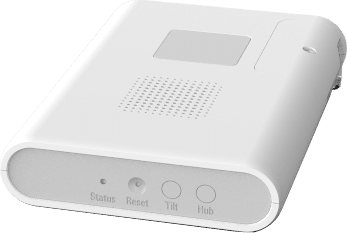
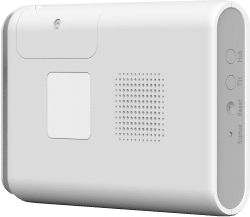
Product Recognition | |
|---|
Certification Number | ZC14-21120036 |
|---|
Name | Ecolink 700 Series Garage Door Controller |
|---|
Short Description | This is garage door controller allows users to wirelessly control and monitor their garage door. It monitors and reports the state of the garage door through use of a paired wireless (or wired) tilt sensor. It also determines when the garage door is active by utilizing an accelerometer to detect specific vibration patterns. |
|---|
Long Description | The Ecolink Garage Door Controller supports Z-Wave Long Range™ (must be added via SmartStart™) and Z-Wave Plus™ , features S2 encryption, and is designed for indoor use only. There are a few methods to add a device to a Z-Wave™ network: SmartStart™, Class |
|---|
Brand | Ecolink |
|---|
Product Identifier | GDZW7-ECO |
|---|
Product Line | Z-Wave Long Range |
|---|
OEM Version | HW: 01 FW: 01.00 |
|---|
Hardware Platform | ZGM130S037HGN2 / ZGM130S037HGN1 |
|---|
Z-Wave Version | 7.15.4 |
|---|
Library Type | END_NODE_ENHANCED_232 |
|---|
Device Type | Motorized Barrier DT |
|---|
Role Type | ROLE_TYPE_SLAVE_ALWAYS_ON |
|---|
Manufacturer ID | 0x014A |
|---|
Product Type ID | 0x0007 |
|---|
Product ID | 0x4731 |
|---|
User Icon | 0x1E00 |
|---|
Installer Icon | 0x1E00 |
|---|
Frequency Plans | US_LR: 912.00MHz, 920.00MHz |
|---|
Categories | Motor Control, All Controllers, Security Systems |
|---|
Countries / Regions | United States of America |
|---|
Supported Command Classes | Identifier | Name | Key | Version |
|---|
COMMAND_CLASS_BARRIER_OPERATOR | Barrier Operator | 0x66 | 1 | COMMAND_CLASS_BASIC_V2 | Basic V2 | 0x20 | 2 | COMMAND_CLASS_CONFIGURATION_V4 | Configuration V4 | 0x70 | 4 | COMMAND_CLASS_NOTIFICATION_V8 | Notification V8 | 0x71 | 8 | COMMAND_CLASS_ASSOCIATION_V2 | Association V2 | 0x85 | 2 | COMMAND_CLASS_ASSOCIATION_GRP_INFO_V3 | Association Group Information (AGI) V3 | 0x59 | 3 | COMMAND_CLASS_DEVICE_RESET_LOCALLY | Device Reset Locally | 0x5A | 1 | COMMAND_CLASS_FIRMWARE_UPDATE_MD_V5 | Firmware Update Meta Data V5 | 0x7A | 5 | COMMAND_CLASS_INDICATOR_V3 | Indicator V3 | 0x87 | 3 | COMMAND_CLASS_MANUFACTURER_SPECIFIC_V2 | Manufacturer Specific V2 | 0x72 | 2 | COMMAND_CLASS_MULTI_CHANNEL_ASSOCIATION_V3 | Multi Channel Association V3 | 0x8E | 3 | COMMAND_CLASS_VERSION_V3 | Version V3 | 0x86 | 3 | COMMAND_CLASS_ZWAVEPLUS_INFO_V2 | Z-Wave Plus Info V2 | 0x5E | 2 | COMMAND_CLASS_SECURITY | Security 0 | 0x98 | 1 | COMMAND_CLASS_SECURITY_2 | Security 2 | 0x9F | 1 | COMMAND_CLASS_SUPERVISION | Supervision | 0x6C | 1 | COMMAND_CLASS_TRANSPORT_SERVICE_V2 | Transport Service V2 | 0x55 | 2 | COMMAND_CLASS_POWERLEVEL | Powerlevel | 0x73 | 1 |
|
|---|
S2 Classes | S2_ACCESS_CONTROL |
|---|
Documents | Category | File |
|---|
Manual_English | |
|
|---|
Features | Feature | Values |
|---|
Firmware Updatable | Value |
|---|
Updatable by Manufacturer |
|
|
|---|
Association Groups | Group Number | Maximum Nodes Supported | End Point ID | Group Name | Profile |
|---|
1 | 1 | 0 | Lifeline | 0x0001 |
|
|---|
Configuration Parameters | Parameter Number | Name | Description | Format | Size | Min Value | Max Value | Default Value | Flag Advanced |
|---|
1 | Unattended Wait Period | Unattended close operation wait period in seconds. | 1 | 1 | 0 | 0 | 0x05 | | 2 | Relay Switch Period | Number of milliseconds to turn on relay switch for. | 1 | 2 | 0 | 0 | 0x03E8 | | 3 | Door Open Timeout | Seconds allowed for garage door to open until timeout. | 1 | 1 | 0 | 0 | 0x14 | | 4 | Door Close Timeout | Seconds allowed for garage door to close until timeout. | 1 | 1 | 0 | 0 | 0x0F | | 5 | Accelerometer Force | Accelerometer Force needed to interrupt operation. | 1 | 1 | 0 | 0 | 0x04 | | 6 | Application-Level Retries | Number of attempts on top of the stack-level retries to try to reach the controller/hub with Z-Wave messages. | 1 | 1 | 0 | 0 | 0x03 | Yes |
|
|---|
Texts | ID | Description | Value |
|---|
1 | Classic Inclusion | 1. Follow the instructions of the Z-Wave controller to put the Z-Wave controller into manual or classic Z-Wave inclusion mode.
2. Locate and press the hub button on the device.
3. When it is successfully added, the device will beep and blink green once. | 2 | Classic Exclusion | 1. Follow the Z-Wave controller’s instructions on putting the Z-Wave controller into removal/exclusion mode.
2. Locate and press the hub button.
3. Device’s status indicator will blink red and beep three times to indicate successful removal. | 5 | Factory Reset Procedure | Hold the reset button down for ten seconds. The status indicator will blink red while the reset button is pressed and will go out after ten seconds.
The device’s status indicator will turn green when the reset operation is complete. | 8 | Where to find S2 DSK on product | On the back of the device. |
|
|---|
Supported Notification Types | Notification Type | Event / State |
|---|
Access Control | Door state: Window/door is open | Access Control | Door state: Window/door is closed | Access Control | Barrier unable to perform requested operation due to UL requirements | Access Control | Barrier failed to perform requested operation, device malfunction | Access Control | Barrier sensor status: Barrier sensor not detected / supervisory error | Access Control | Barrier Battery status: Barrier sensor low battery warning | System | Cover status: Tampering, product cover removed |
|
|---|
Supports NWI | Yes |
|---|
Supports Explorer Frames | Yes |
|---|
Supports SmartStart | Yes |
|---|
Radio Range Z-Wave LR (m) | 400 |
|---|