Product Recognition | |
|---|
Certification Number | ZC10-18096240 |
|---|
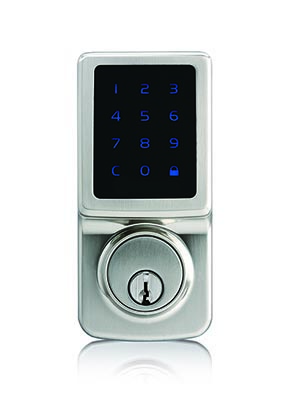
Name | Electronic Z-Wave Deadbolt |
|---|
Short Description | An electronic touchscreen deadbolt with Z-Wave. |
|---|
Long Description | Great Convenience
。Touch to activate, touch to lock
。Connect your Z-Wave smart home system and operate from anywhere
。Holds up to 25 user codes
。Holds up to 4 single-entry codes
。Vacation mode (deactivates all user codes temporarily)
。Auto-lock with adjustable delay (10 - 99 seconds)
。Back-up mechanical keyway
Uncompromised Security
。ANSI Grade 2 quality – deadbolt operates over 150,000 times
。ANSI A156.25 compliant - resistant to dust, rain, and corrosion under variable temperatures
。4-digit random guiding code prevents code-probing
。Touch screen is temporarily disabled after 4 consecutive incorrect entries
Easy Installation
。Easy installation with a Philips screwdriver
。Fits most standard door preparations
。Online video instruction available (please scan the QR code on this box) |
|---|
Brand | Faultless |
|---|
Product Identifier | A15-WG014-S2 |
|---|
OEM Version | HW: 255 FW: 3.01:01.01 |
|---|
Hardware Platform | ZM5202 |
|---|
Z-Wave Version | 6.71.03 |
|---|
Library Type | SLAVE_ENHANCED |
|---|
Device Type | Door Lock - Keypad |
|---|
Role Type | ROLE_TYPE_SLAVE_SLEEPING_LISTENING |
|---|
Manufacturer ID | 0x0262 |
|---|
Product Type ID | 0x0004 |
|---|
Product ID | 0x0002 |
|---|
User Icon | 0x0300 |
|---|
Installer Icon | 0x0300 |
|---|
Frequency Plans | US: 916.00MHz, 908.40MHz |
|---|
Categories | Locks |
|---|
Countries / Regions | United States of America |
|---|
Supported Command Classes | Identifier | Name | Key | Version |
|---|
COMMAND_CLASS_DOOR_LOCK | Door Lock | 0x62 | 1 | COMMAND_CLASS_POWERLEVEL | Powerlevel | 0x73 | 1 | COMMAND_CLASS_USER_CODE | User Code | 0x63 | 1 | COMMAND_CLASS_BATTERY | Battery | 0x80 | 1 | COMMAND_CLASS_CONFIGURATION | Configuration | 0x70 | 1 | COMMAND_CLASS_SECURITY | Security S0 | 0x98 | 1 | COMMAND_CLASS_NOTIFICATION_V3 | Notification V3 | 0x71 | 3 | COMMAND_CLASS_TRANSPORT_SERVICE_V2 | Transport Service V2 | 0x55 | 2 | COMMAND_CLASS_VERSION_V2 | Version V2 | 0x86 | 2 | COMMAND_CLASS_DEVICE_RESET_LOCALLY | Device Reset Locally | 0x5A | 1 | COMMAND_CLASS_ZWAVEPLUS_INFO_V2 | Z-Wave Plus Info V2 | 0x5E | 2 | COMMAND_CLASS_ASSOCIATION_V2 | Association V2 | 0x85 | 2 | COMMAND_CLASS_ASSOCIATION_GRP_INFO | Association Group Info | 0x59 | 1 | COMMAND_CLASS_SECURITY_2 | Security S2 | 0x9F | 1 | COMMAND_CLASS_MANUFACTURER_SPECIFIC | Manufacturer Specific | 0x72 | 1 | COMMAND_CLASS_SUPERVISION | Supervision | 0x6C | 1 |
|
|---|
S2 Classes | S2_ACCESS_CONTROL |
|---|
Documents | Category | Description | File |
|---|
Manual_Primary_Lang | Product or Owner's Manual | |
|
|---|
Features | Feature | Values |
|---|
Battery Type | | Door Lock Type | | Battery Quantity | | Outdoor Use | | Supported Notification Types | Value |
|---|
Access Control | Power Management |
| Firmware Updatable | Value |
|---|
Updatable by Manufacturer |
|
|
|---|
Association Groups | Group Number | Maximum Nodes Supported | End Point ID | Description |
|---|
1 | 5 | 0 | Z-Wave Plus Lifeline; A NOTIFICATION frame is sent to the nodes in this association group when a lifeline event occurs. |
|
|---|
Configuration Parameters | Parameter Number | Name | Description | Format | Size | Min Value | Max Value | Default Value | Parameter Values |
|---|
1 | Guiding code on/off | Value 0X00=off 0x01=on | 0 | 1 | 0 | 0 | 1 | From | To | Description |
|---|
0 | 1 | 0X00=off 0x01=on |
| 2 | vacation mode on/off | Value 0X00=off 0x01=on | 0 | 1 | 0 | 0 | 0 | From | To | Description |
|---|
0 | 1 | 0X00=off 0x01=on |
| 3 | volume on/off | Value 0X00=off 0x01=on | 0 | 1 | 0 | 0 | 1 | From | To | Description |
|---|
0 | 1 | 0X00=off 0x01=on |
| 4 | auto-lock on/off | Value 0X00=off 0x01=on | 0 | 1 | 0 | 0 | 0 | From | To | Description |
|---|
0 | 1 | 0X00=off 0x01=on |
| 5 | auto lock timer 10-99 | Value 0X0A~0X63 =10~99seconds | 0 | 1 | 0 | 0 | 10 | From | To | Description |
|---|
10 | 99 | 0X0A~0X63 =10~99seconds |
|
|
|---|
Texts | ID | Description | Value |
|---|
1 | Inclusion | 1. Press [SET] for 1 second
2. Enter 4 -8 digits programing Code
3. Press the buttons #90#
4. Include successfully (beep * 1) / unsuccessfully (beep x 3) | 2 | Exclusion | 1. Press [SET] for 1 second
2. Enter 4 -8 digits programing Code
3. Press the buttons #90#
4. Exclusion successfully (beep * 1) /unsuccessfully (beep x 3) | 5 | Factory Reset | 1. Remove one battery
2. Press and hold SET button while inserting the battery back.
Hold the set button until long beep has finished.
3. Restoring the lock to factory settings will remove its connection to your network and clear all devices from its association group.
The reset procedure should only be used when the primary controller is missing or inoperable.
4.Please re-enter the default Programming Code to set up the lock after restoring to factory settings. |
|
|---|
Supported Notification Types | Notification Type | Event / State |
|---|
Access Control | (Refer to parameters): State idle | Power Management | (Refer to parameters): State idle |
|
|---|
Supports NWI | Yes |
|---|
Supports Explorer Frames | Yes |
|---|
Is Flirs | Yes |
|---|
Radio Range Z-Wave (m) | 40 |
|---|

.jpg)