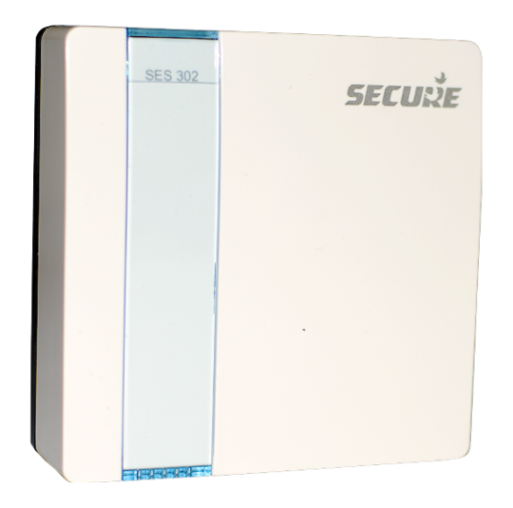
Product Recognition | |
|---|
Certification Number | ZC10-15010007 |
|---|
Name | Environmental Sensor |
|---|
Short Description | The Environmental Sensor (SES 302) is a temperature sensor, which also supports four external digital temperature sensors or one external analog temperature sensor. |
|---|
Long Description | The Environmental Sensor (SES 302) measures temperature. The sensor is battery-operated devices which transmit information to an associated device in a network. It can support either 1 thermistor (SES 001) or up to 4 external digital temperature sensors (SES 002/003). SES 302 operates on 2x AA batteries, providing a nominal life of 2 years (with on-board sensors operating with the default configuration). |
|---|
Brand | Secure Controls (UK) |
|---|
Product Identifier | SES 302 |
|---|
OEM Version | FW: 1.1 |
|---|
Hardware Platform | ZM5202 |
|---|
Z-Wave Version | 6.51.02 |
|---|
Library Type | SLAVE_ROUTING |
|---|
Device Type | Multilevel Sensor |
|---|
Role Type | ROLE_TYPE_SLAVE_SLEEPING_REPORTING |
|---|
Manufacturer ID | 0x0059 |
|---|
Product Type ID | 0x000D |
|---|
Product ID | 0x0002 |
|---|
Frequency Plans | EU: 869.85MHz, 868.40MHz |
|---|
Categories | Sensors |
|---|
Countries / Regions | European Union |
|---|
Documents | Category | Description | File |
|---|
Manual_Primary_Lang | Product or Owner's Manual | |
|
|---|
Association Groups | Group Number | Maximum Nodes Supported | End Point ID | Description |
|---|
1 | 2 | 0 | Z-Wave Plus Lifeline, in which multilevel sensor report, Battery low alarm are reported.
Each endpoint supports 1 association group. |
|
|---|
Configuration Parameters | Parameter Number | Name | Description | Format | Size | Min Value | Max Value | Default Value | Parameter Values |
|---|
1 | Delta Temperature | This Parameter is used to configure the delta based temperature report. To configure Delta temperature reporting to 2 °C. The value need to configured in device is 2/0.1 = 20. Controllers may only allow configuring signed values. In order to set values in the range 128…255, the value sent in the application shall be equal to desired value minus 256. For example, to set Delta Temperature to 130, it may be needed to set a value 130−256=−126. | 0 | 1 | 0 | 0 | 0 | From | To | Description |
|---|
0 | 255 | Resolution is in 0.1 deg C |
| 2 | Temp Reporting Intervals | This Parameter is used to configure the time interval based temperature report. Controllers may only allow configuring signed values. In order to set values in the range 128…255, the value sent in the application shall be equal to desired value minus 256. For example, to set Delta Temperature to 130, it may be needed to set a value 130−256=−126. | 0 | 1 | 0 | 0 | 5 | From | To | Description |
|---|
0 | 255 | Resolution is in 1 minute |
|
|
|---|
Texts | ID | Description | Value |
|---|
2 | Exclusion | Step 1.On the Z-Wave controller, select exclusion for removing a device from the network.
Step 2: On the SES 302, press the button, hold and release after 1 second to send a request (Network Information Frame) to remove from the network. On successful exclusion the LED will flash 2 times. The total process can take up to 2 seconds. If the LED flashes 4-times this means that the exclusion process has failed, so try moving the SES 302 to another position and repeat the exclusion steps. The controller will show when the exclusion operation is successful. | 3 | Learn Mode (adding another controller) | Not applicable | 5 | Factory Reset | Please use this procedure only when the primary controller is missing or otherwise inoperable.
To reset the device to factory resst, press the button 3 times within 3 seconds it will put the device in factory default, that include setting all the configuration, Association to factory default and removing the device from Z-Wave network. | 6 | Additional Special Features | None | 1 | Inclusion | Step 1.On the Z-Wave controller, select Include for adding a device to the network.
Step 2: On the SES 302, press the button, hold and release after 1 second to send a request (Network Information Frame) to join the network. On successful inclusion the LED will flash 2 times. The total process can take up to 20 seconds. If the LED flashes 4-times this means that the inclusion process has failed, so try moving the SES 302 to another position and repeat the Inclusion steps. If the inclusion process fails again, the device may be already included in another network. So first exclude and then include the device. The controller will show when the inclusion operation is successful. | 4 | Device Wake-Up | Device can be wakeup by button press of more then one second, devcie will stay in wakeup state for about 10 seconds.
device will also wakeup on the every wakeup interval configured by controller. The minimum wakeup interval can be configured is 2 minutes and maximum wakeup interval can be configured is 24 hours in setps of one minte.
Default wakeup interval is 24 hours. |
|
|---|
Supports NWI | Yes |
|---|
Supports Explorer Frames | Yes |
|---|