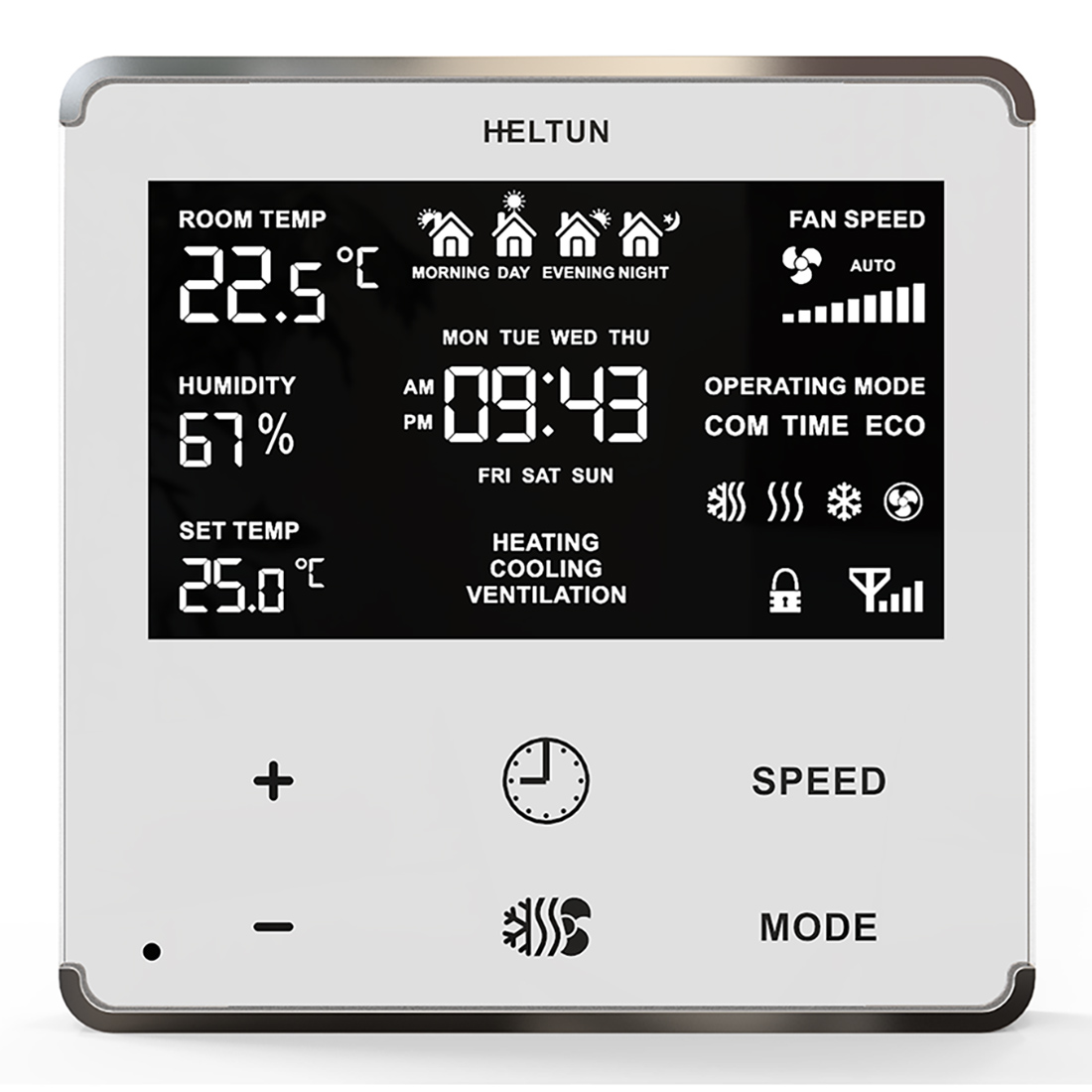
1 | TIME CORRECTION | Time correction by controller | 3 | 1 | 0 | 1 | 1 | From | To | Description |
|---|
0 | 0 | Switch off auto-correction | 1 | 0 | If thermostat is connected to a Z-Wave gateway, the time and day will be periodically polled and corrected from the gateway |
|
2 | TIME FORMAT | Time format | 3 | 1 | 0 | 1 | 1 | From | To | Description |
|---|
0 | 0 | 24 hour format | 1 | 0 | 12 hour (AM/PM) format |
|
6 | DEGREE MODE | Degree mode (C/F) Floor and air temperature, as well as Set Point and all Parameters will be indicated in the chosen mode. Factory default value is degrees Celsius (0). | 3 | 1 | 0 | 1 | 0 | From | To | Description |
|---|
0 | 0 | Celsius | 1 | 0 | Fahrenheit |
|
31 | SENSORS REPORT TIME | Sensors consecutive reporting interval, minutes. When the device is connected to the Z-Wave gateway (controller), it periodically sends to the gateway reports from its room & floor temperature, humidity and light sensors even if there are not changes in the values. This Parameter defines the interval between consecutive reports. The value can be adjusted from 1 min to 120 min. Note: If the sensor readings change, the device will send the report to the gateway regardless of this parameter value. In order not to increase traffic on your network, it is not recommended to reduce the value of this parameter. We recommend to reduce the value of this parameter only in case of poor connection, when reports from the device does not always reach the gateway. | 2 | 1 | 1 | 120 | 10 | From | To | Description |
|---|
1 | 120 | The value can be adjusted from 1 to 120 minutes |
|
3 | WEEKDAY | Week day. This parameter allows manually adjustment of the day of the week in case if the thermostat is not connected to any Z-Wave gateway or Parameter 09 (auto-correction) is selected as 0. | 3 | 1 | 1 | 7 | 1 | From | To | Description |
|---|
1 | 0 | Monday | 2 | 0 | Tuesday | 3 | 0 | Wednesday | 4 | 0 | Thursday | 5 | 0 | Friday | 6 | 0 | Saturday | 7 | 0 | Sunday |
|
4 | HOUR | This Parameter allows manual adjustment of Time in hours (24 hours). | 2 | 1 | 0 | 23 | 0 | From | To | Description |
|---|
0 | 23 | Manual adjustment of time hours (24 hours). |
|
5 | MINUTE | This Parameter allows manual adjustment of the Time in minutes (60 minutes)) | 2 | 1 | 0 | 59 | 0 | From | To | Description |
|---|
0 | 59 | Manual adjustment of time minutes (60 minutes) |
|
44 | EVENING START TIME | Evening start time for the Temperature Schedules. Format: HHMM. e.g.08:00 should be sent as 0800. | 2 | 2 | 0 | 2359 | 1800 | From | To | Description |
|---|
0 | 2359 | Evening start time. Format: HHMM (from 00:00 to 23:59) |
|
45 | NIGHT START TIME | Night start time for the Temperature Schedules. Format: HHMM. e.g.08:00 should be sent as 0800. | 2 | 2 | 0 | 2359 | 2300 | From | To | Description |
|---|
0 | 2359 | Night start time. Format: HHMM (from 00:00 to 23:59) |
|
9 | AUTO BRIGHTNESS | Display auto-brightness control The HE-FT01 can adjust its display brightness automatically depending on the ambient room brightness. | 3 | 1 | 0 | 1 | 1 | From | To | Description |
|---|
0 | 0 | Manual Control: Inactive Level brightness will be set to the level defined by Parameter 10. | 1 | 0 | Automatic Brightness Control. |
|
8 | TEMP HYSTERESYS | This Parameter defines the hysteresis value for temperature control. The HE-FT01 will stabilize the temperature with the selected hysteresis. For example, if the SET POINT is set for 25°C and HYSTERESIS is set for 0.5°C, the HE-FT01 will change the state to IDLE if the temperature reaches 25.0°C. It will change the state to HEATING if the temperature becomes lower than 24.5°C, and will change the state to COOLING if the temperature rises beyond 25.5°C. The hysteresis value can be changed from 0.2°C to 10.0°C range in Celsius mode, and 0.3°F to 18.0°F in Fahrenheit. The factory-default value is 0.5°C (0.9°F). | 2 | 1 | 2 | 100 | 5 | From | To | Description |
|---|
2 | 100 | Temperature hysteresis value (°C x 10) |
|
17 | RESERVED | Parameter reserved by the manufacturer. Setting this parameter will have no impact on DUT functionality. | 2 | 1 | 0 | 1 | 0 | From | To | Description |
|---|
0 | 1 | Parameter reserved by the manufacturer. Setting this parameter will have no impact on DUT functionality. |
|
23 | RESERVED | Parameter reserved by the manufacturer. Setting this parameter will have no impact on DUT functionality. | 2 | 1 | 0 | 1 | 0 | From | To | Description |
|---|
0 | 1 | Parameter reserved by the manufacturer. Setting this parameter will have no impact on DUT functionality. |
|
24 | RESERVED | Parameter reserved by the manufacturer. Setting this parameter will have no impact on DUT functionality. | 2 | 1 | 0 | 1 | 0 | From | To | Description |
|---|
0 | 1 | Parameter reserved by the manufacturer. Setting this parameter will have no impact on DUT functionality. |
|
25 | RESERVED | Parameter reserved by the manufacturer. Setting this parameter will have no impact on DUT functionality. | 2 | 1 | 0 | 1 | 0 | From | To | Description |
|---|
0 | 1 | Parameter reserved by the manufacturer. Setting this parameter will have no impact on DUT functionality. |
|
41 | TIME MODE OPERATION | This parameter determines the Climate Mode (Heating or Cooling) to which HE-FT01 will switch when the TIME operating mode is selected. | 3 | 1 | 1 | 3 | 1 | From | To | Description |
|---|
1 | 0 | The thermostat will go to Heating & Cooling mode | 2 | 0 | The thermostat goes to Heating mode | 3 | 0 | The thermostat goes to Cooling Mode |
|
42 | MORNING START TIME | Morning start time for the Temperature Schedules. Format: HHMM. e.g.08:00 should be sent as 0800. | 2 | 2 | 0 | 2359 | 600 | From | To | Description |
|---|
0 | 2359 | Morning start time. Format: HHMM (from 00:00 to 23:59) |
|
43 | DAY START TIME | Day start time for the Temperature Schedules. Format: HHMM. e.g.08:00 should be sent as 0800. | 2 | 2 | 0 | 2359 | 900 | From | To | Description |
|---|
0 | 2359 | Day start time. Format: HHMM (from 00:00 to 23:59) |
|
7 | AIR TEMP CORRECTION | This Parameter defines the offset value for room air temperature. If the internal air temperature sensor is not correctly calibrated, then manual calibration can be accomplished by adjusting the values up to ±9.5°C (±17°F). This value will be added or subtracted from the internal air temperature sensor reading. | 1 | 1 | -95 | 95 | 0 | From | To | Description |
|---|
-95 | 95 | Air temperature offset value (°C x 10) |
|

.png)
.jpg)
.jpg)