Product Recognition | |
|---|
Certification Number | ZC10-17115859 |
|---|
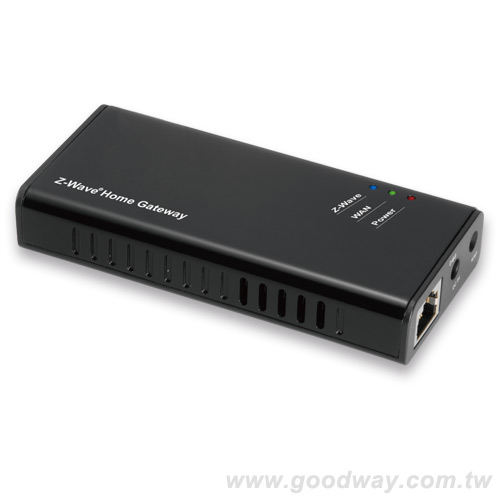
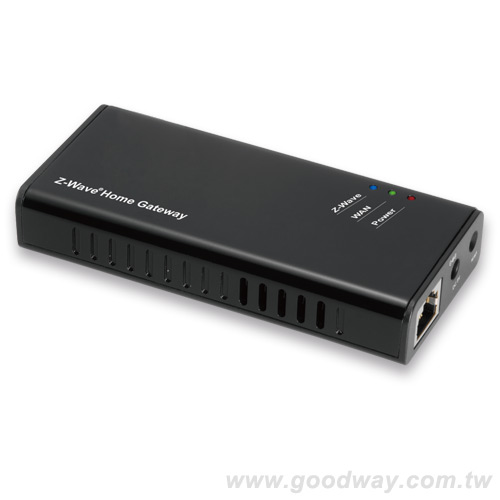
Name | FG2200 Z-Wave® Home Gateway |
|---|
Short Description | Able to connect wireless with hundreds of compatible smart devices, allowing you to monitor, control and secure your home from anywhere. |
|---|
Long Description | 1. FG2200 is the kernel of your smart home. Able to connect wireless with hundreds of compatible smart devices, allowing you to monitor, control and secure your home from anywhere.
2. Best platform providing the connection between cloud and home automation.
3. Scene editing function helps user to configure scenarios. |
|---|
Brand | Good Way Technology, Co., Ltd |
|---|
Product Identifier | Gateway / FG2200 |
|---|
OEM Version | HW: 1 FW: 4.45:02.01 |
|---|
Hardware Platform | ZM5101 |
|---|
Z-Wave Version | 6.51.10 |
|---|
Library Type | CONTROLLER_STATIC |
|---|
Device Type | Gateway |
|---|
Role Type | ROLE_TYPE_CONTROLLER_CENTRAL_STATIC |
|---|
Manufacturer ID | 0x0068 |
|---|
Product Type ID | 0x0002 |
|---|
Product ID | 0x0002 |
|---|
User Icon | 0x0500 |
|---|
Installer Icon | 0x0500 |
|---|
Frequency Plans | EU: 869.85MHz, 868.40MHz |
|---|
Categories | All Controllers, Gateway Controller |
|---|
Countries / Regions | European Union |
|---|
Supported Command Classes | Identifier | Name | Key | Version |
|---|
COMMAND_CLASS_POWERLEVEL | Powerlevel | 0x73 | 1 | COMMAND_CLASS_APPLICATION_STATUS | Application Status | 0x22 | 1 | COMMAND_CLASS_CRC_16_ENCAP | CRC16 Encapsulation | 0x56 | 1 | COMMAND_CLASS_SECURITY | Security S0 | 0x98 | 1 | COMMAND_CLASS_VERSION_V2 | Version V2 | 0x86 | 2 | COMMAND_CLASS_DEVICE_RESET_LOCALLY | Device Reset Locally | 0x5A | 1 | COMMAND_CLASS_ZWAVEPLUS_INFO_V2 | Z-Wave Plus Info V2 | 0x5E | 2 | COMMAND_CLASS_ASSOCIATION_V2 | Association V2 | 0x85 | 2 | COMMAND_CLASS_ASSOCIATION_GRP_INFO | Association Group Info | 0x59 | 1 | COMMAND_CLASS_MANUFACTURER_SPECIFIC | Manufacturer Specific | 0x72 | 1 |
|
|---|
Controlled Command Classes | Identifier | Name | Key | Version |
|---|
COMMAND_CLASS_SWITCH_MULTILEVEL | Switch Multilevel | 0x26 | 1 | COMMAND_CLASS_SENSOR_MULTILEVEL_V5 | Sensor Multilevel V5 | 0x31 | 5 | COMMAND_CLASS_NO_OPERATION | No Operation | 0x00 | 1 | COMMAND_CLASS_MULTI_CHANNEL_ASSOCIATION_V3 | Multi-Channel Association V3 | 0x8E | 3 | COMMAND_CLASS_BATTERY | Battery | 0x80 | 1 | COMMAND_CLASS_SWITCH_BINARY | Switch Binary | 0x25 | 1 | COMMAND_CLASS_BASIC | Basic | 0x20 | 1 | COMMAND_CLASS_CRC_16_ENCAP | CRC16 Encapsulation | 0x56 | 1 | COMMAND_CLASS_SECURITY | Security S0 | 0x98 | 1 | COMMAND_CLASS_SENSOR_BINARY_V2 | Sensor Binary V2 | 0x30 | 2 | COMMAND_CLASS_VERSION_V2 | Version V2 | 0x86 | 2 | COMMAND_CLASS_WAKE_UP_V2 | Wake Up V2 | 0x84 | 2 | COMMAND_CLASS_ZWAVEPLUS_INFO_V2 | Z-Wave Plus Info V2 | 0x5E | 2 | COMMAND_CLASS_ASSOCIATION_V2 | Association V2 | 0x85 | 2 | COMMAND_CLASS_ASSOCIATION_GRP_INFO | Association Group Info | 0x59 | 1 | COMMAND_CLASS_MULTI_CHANNEL_V4 | Multi-Channel V4 | 0x60 | 4 | COMMAND_CLASS_NOTIFICATION_V4 | Notification V4 | 0x71 | 4 | COMMAND_CLASS_METER_V4 | Meter V4 | 0x32 | 4 |
|
|---|
Documents | Category | Description | File |
|---|
Manual_Primary_Lang | Product or Owner's Manual | |
|
|---|
Features | Feature | Values |
|---|
Communications Connections | Value |
|---|
Ethernet (Wireless/WiFi) |
| Sensors | Value |
|---|
Motion/No Motion (Binary) | Air Temperature | Luminance | Humidity | Open/Closed (Binary) | Smoke Density | General Purpose | Power | Voltage | Current | Distance | Water Temperature | Soil Temperature | Particulate Matter | Carbon Dioxide | Carbon Monoxide | Target Temperature |
| Supported Notification Types | Value |
|---|
Smoke Alarm | CO Alarm | CO2 Alarm | Heat Alarm | Water Alarm | Power Management | Home Health | Siren | Water Valve |
| Communications Protocol | Value |
|---|
Manufacturer Proprietary Protocol |
| Color | |
|
|---|
Association Groups | Group Number | Maximum Nodes Supported | End Point ID | Description |
|---|
1 | 1 | 0 | Z-Wave Plus Lifeline |
|
|---|
Texts | ID | Description | Value |
|---|
23 | Controller Inclusion | The Android APP application, please see manual 5.1.1
Ensure Gateway is connected, enter device page and click “Inclusion” to include devices. After the inclusion show window is finished, you can view the device at the device interface. | 24 | Controller Exclusion | The Android APP application, please see manual 5.1.2
Ensure Gateway is connected, enter device page and click “Exclusion” to exclude devices. After the exclusion show window is finished, you can view the device is remove from the device interface. | 3 | Learn Mode (adding another controller) | The Android APP application, please see manual 5.1.3
Ensure the Gateway not include any device or Reset the Gateway. You can review and control the device for learned Gateway. Into the Learn Mode, show “Processing…”, operate another Controller into add device mode, after the completion of the study to be prompted to add success. When you need initiate a replication of network information from the controller to another controller or want to receive network information, please enter ""include"" and ""learn mode"". | 5 | Factory Reset | The Android APP application, please see manual 5.1.4&4.1.5
Click “Reset”, show “Are you sure to reset Z-Dongle?”and click OK to reset the Z-Wave network,or FG3200/FG2200 Reset button 10 seconds after the reset to reset the factory default.
And manual P.10
The gateway will send DEVICE_RESET_LOCALLY_NOTIFICATION to associated Z-Wave devices when it is reset or factory-reset.
manual P.22
If this controller is the primary controller for your network, resetting it will result in the nodes in your network being orphaned and it will be necessary after the reset to exclude and re-include all of the nodes in the network. If this controller is being used as a secondary controller in the network, use this procedure to reset this controller only in the event that the network primary controller is missing or otherwise inoperable |
|
|---|
Supports NWI | Yes |
|---|
Supports Explorer Frames | Yes |
|---|