Product Recognition | |
|---|
Certification Number | ZC10-18076177 |
|---|
Name | Gold XV 824 |
|---|
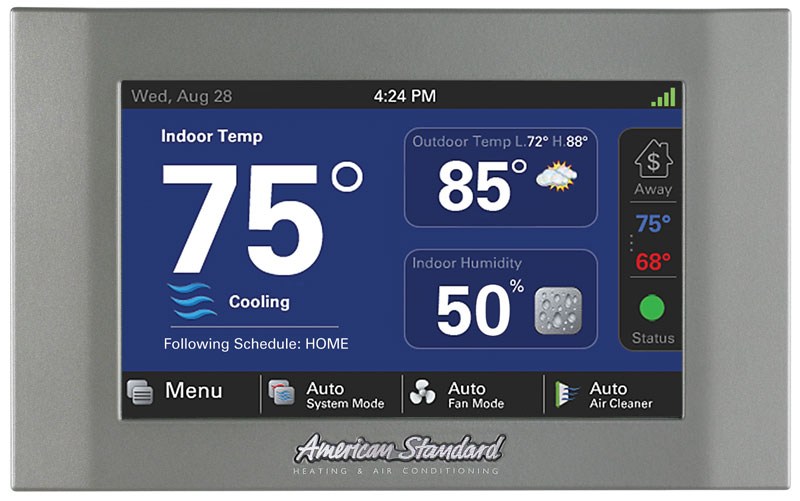
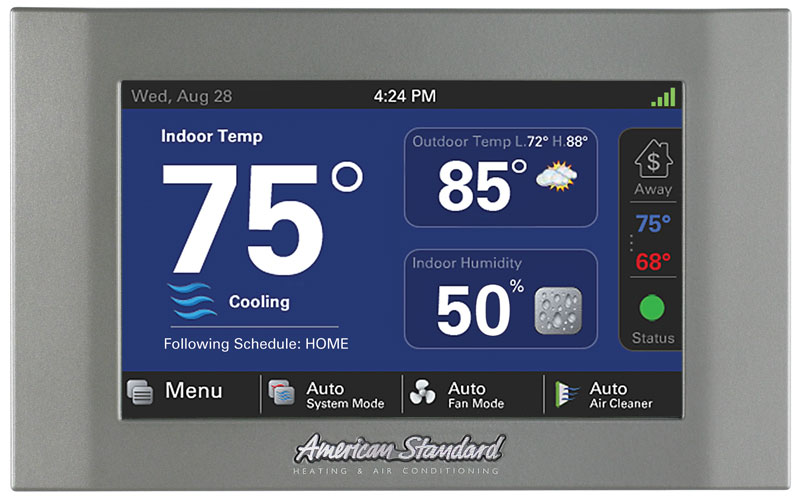
Short Description | Embedded within the Gold 824 comfort control is a secure Z-Wave Plus Central Static Controller designed to enable remote control of a Z-Wave network from the Nexia Home Intelligence web portal. |
|---|
Long Description | When enrolled to a Nexia™ smart home account, the Gold 824 is a Z-Wave Plus security-enabled device that can serve as a central hub for an entire network of home automation devices from different manufacturers and product categories, including all non-battery powered devices that will act as repeaters on your network. The Gold 824 can display local weather conditions, five-day forecasts and National Weather Service warnings and alerts. |
|---|
Brand | American Standard |
|---|
Product Identifier | ACONT824AS52DBA |
|---|
OEM Version | HW: 1 FW: 22.12:22.12 |
|---|
Hardware Platform | ZM5202 |
|---|
Z-Wave Version | 6.51.08 |
|---|
Library Type | CONTROLLER_STATIC |
|---|
Device Type | Central Controller |
|---|
Role Type | ROLE_TYPE_CONTROLLER_CENTRAL_STATIC |
|---|
Manufacturer ID | 0x008B |
|---|
Product Type ID | 0x4138 |
|---|
Product ID | 0x3235 |
|---|
User Icon | 0x0100 |
|---|
Installer Icon | 0x0100 |
|---|
Frequency Plans | US: 916.00MHz, 908.40MHz |
|---|
Categories | All Controllers, Gateway Controller |
|---|
Countries / Regions | United States of America |
|---|
Supported Command Classes | Identifier | Name | Key | Version |
|---|
COMMAND_CLASS_POWERLEVEL | Powerlevel | 0x73 | 1 | COMMAND_CLASS_CONTROLLER_REPLICATION | Controller Replication | 0x21 | 1 | COMMAND_CLASS_APPLICATION_STATUS | Application Status | 0x22 | 1 | COMMAND_CLASS_CRC_16_ENCAP | CRC16 Encapsulation | 0x56 | 1 | COMMAND_CLASS_SECURITY | Security S0 | 0x98 | 1 | COMMAND_CLASS_VERSION_V2 | Version V2 | 0x86 | 2 | COMMAND_CLASS_DEVICE_RESET_LOCALLY | Device Reset Locally | 0x5A | 1 | COMMAND_CLASS_ZWAVEPLUS_INFO_V2 | Z-Wave Plus Info V2 | 0x5E | 2 | COMMAND_CLASS_ASSOCIATION_V2 | Association V2 | 0x85 | 2 | COMMAND_CLASS_ASSOCIATION_GRP_INFO | Association Group Info | 0x59 | 1 | COMMAND_CLASS_MANUFACTURER_SPECIFIC_V2 | Manufacturer Specific V2 | 0x72 | 2 |
|
|---|
Controlled Command Classes | Identifier | Name | Key | Version |
|---|
COMMAND_CLASS_SENSOR_BINARY | Sensor Binary | 0x30 | 1 | COMMAND_CLASS_SENSOR_MULTILEVEL_V5 | Sensor Multilevel V5 | 0x31 | 5 | COMMAND_CLASS_DOOR_LOCK | Door Lock | 0x62 | 1 | COMMAND_CLASS_THERMOSTAT_FAN_MODE_V4 | Thermostat Fan Mode V4 | 0x44 | 4 | COMMAND_CLASS_THERMOSTAT_OPERATING_STATE_V2 | Thermostat Operating State V2 | 0x42 | 2 | COMMAND_CLASS_USER_CODE | User Code | 0x63 | 1 | COMMAND_CLASS_MULTI_CHANNEL_ASSOCIATION_V3 | Multi-Channel Association V3 | 0x8E | 3 | COMMAND_CLASS_CLOCK | Clock | 0x81 | 1 | COMMAND_CLASS_BATTERY | Battery | 0x80 | 1 | COMMAND_CLASS_THERMOSTAT_MODE | Thermostat Mode | 0x40 | 1 | COMMAND_CLASS_SWITCH_BINARY | Switch Binary | 0x25 | 1 | COMMAND_CLASS_BASIC | Basic | 0x20 | 1 | COMMAND_CLASS_CONFIGURATION | Configuration | 0x70 | 1 | COMMAND_CLASS_HAIL | Hail | 0x82 | 1 | COMMAND_CLASS_CRC_16_ENCAP | CRC16 Encapsulation | 0x56 | 1 | COMMAND_CLASS_SECURITY | Security S0 | 0x98 | 1 | COMMAND_CLASS_CENTRAL_SCENE | Central Scene | 0x5B | 1 | COMMAND_CLASS_NOTIFICATION_V3 | Notification V3 | 0x71 | 3 | COMMAND_CLASS_THERMOSTAT_SETPOINT_V2 | Thermostat Setpoint V2 | 0x43 | 2 | COMMAND_CLASS_VERSION_V2 | Version V2 | 0x86 | 2 | COMMAND_CLASS_WAKE_UP_V2 | Wake Up V2 | 0x84 | 2 | COMMAND_CLASS_DEVICE_RESET_LOCALLY | Device Reset Locally | 0x5A | 1 | COMMAND_CLASS_ZWAVEPLUS_INFO_V2 | Z-Wave Plus Info V2 | 0x5E | 2 | COMMAND_CLASS_SWITCH_MULTILEVEL_V3 | Switch Multilevel V3 | 0x26 | 3 | COMMAND_CLASS_ASSOCIATION_V2 | Association V2 | 0x85 | 2 | COMMAND_CLASS_MULTI_CHANNEL_V4 | Multi-Channel V4 | 0x60 | 4 | COMMAND_CLASS_METER | Meter | 0x32 | 1 | COMMAND_CLASS_SCREEN_MD | Screen Meta-Data | 0x92 | 1 | COMMAND_CLASS_FIRMWARE_UPDATE_MD_V2 | Firmware Update Meta-Data V2 | 0x7A | 2 | COMMAND_CLASS_MANUFACTURER_SPECIFIC_V2 | Manufacturer Specific V2 | 0x72 | 2 | COMMAND_CLASS_MULTI_CMD | Multi-Command | 0x8F | 1 |
|
|---|
Documents | Category | Description | File |
|---|
Manual_Primary_Lang | Product or Owner's Manual | |
|
|---|
Features | Feature | Values |
|---|
Gateway Has Preferred Partners | | Communications Protocol | | Supported Notification Types | | Firmware Updatable | Value |
|---|
Updatable by Consumer via Internet |
| Color | | Sensors | Value |
|---|
Motion/No Motion (Binary) | Air Temperature | Open/Closed (Binary) | General Purpose |
|
|
|---|
Association Groups | Group Number | Maximum Nodes Supported | End Point ID | Description |
|---|
1 | 5 | 0 | Z-Wave Plus Lifeline. A Device Reset Locally Notification is sent to associated nodes when the bridge is factory reset. |
|
|---|
Texts | ID | Description | Value |
|---|
5 | Factory Reset | From the HOME Screen, press MENU, NEXIA, ADVANCED, then FACTORY RESET.
Resets all Z-Wave information and removes all devices from the bridge. If this bridge is the primary controller for your network, resetting it will result in all the devices in your network being removed. Following the reset, it will be necessary to remove and then add all of the devices back to your network.
If this bridge is being used as a secondary or inclusion controller in the network, please reset this bridge only in the event that the primary controller is missing or otherwise inoperable. | 23 | Controller Inclusion | From the HOME Screen, press MENU, then press NEXIA.
Press ADD DEVICE and follow the device manufacturer’s instructions for setting the Z-Wave device into learn mode. You will have four minutes to set the device into learn mode after pressing the ADD DEVICE button. | 24 | Controller Exclusion | From the HOME Screen, press MENU, then press NEXIA.
Press REMOVE DEVICE and follow the manufacturer’s instructions for setting the Z-Wave device into learn mode. You will have four minutes to set the device into learn mode after pressing the REMOVE DEVICE button. | 3 | Learn Mode (adding another controller) | To add the bridge to an existing network, follow your primary controller’s instructions to put the primary controller into Add Mode. Then press the Learn button on the bridge.
From the HOME Screen, press MENU, NEXIA, ADVANCED, then LEARN.
This function copies a new Z-Wave network to the bridge from another controller. This function is not allowed if your bridge is a primary controller with included Z-Wave devices. |
|
|---|
Supports NWI | Yes |
|---|
Supports Explorer Frames | Yes |
|---|