Product Recognition | |
|---|
Certification Number | ZC10-22047082 |
|---|
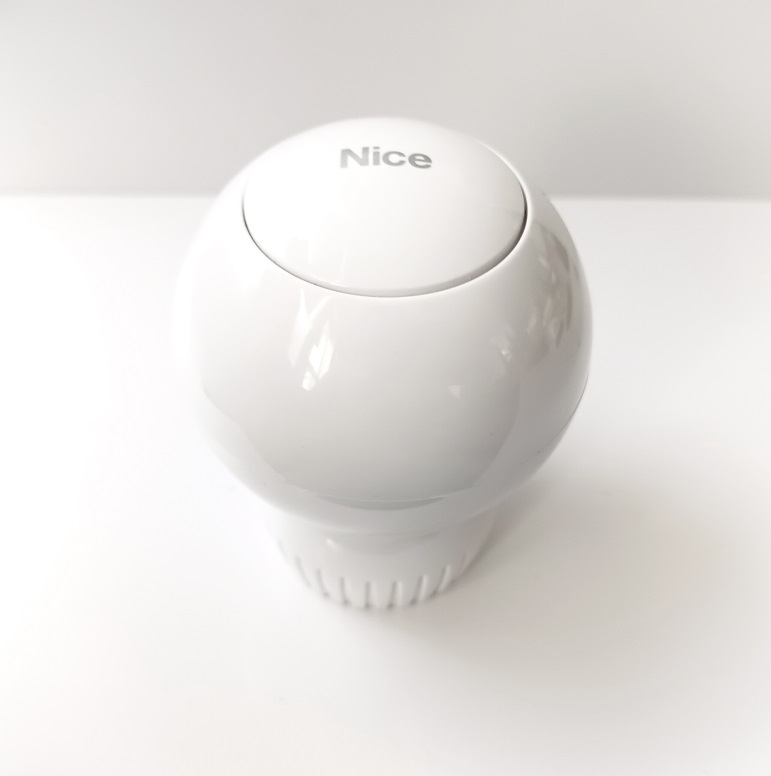
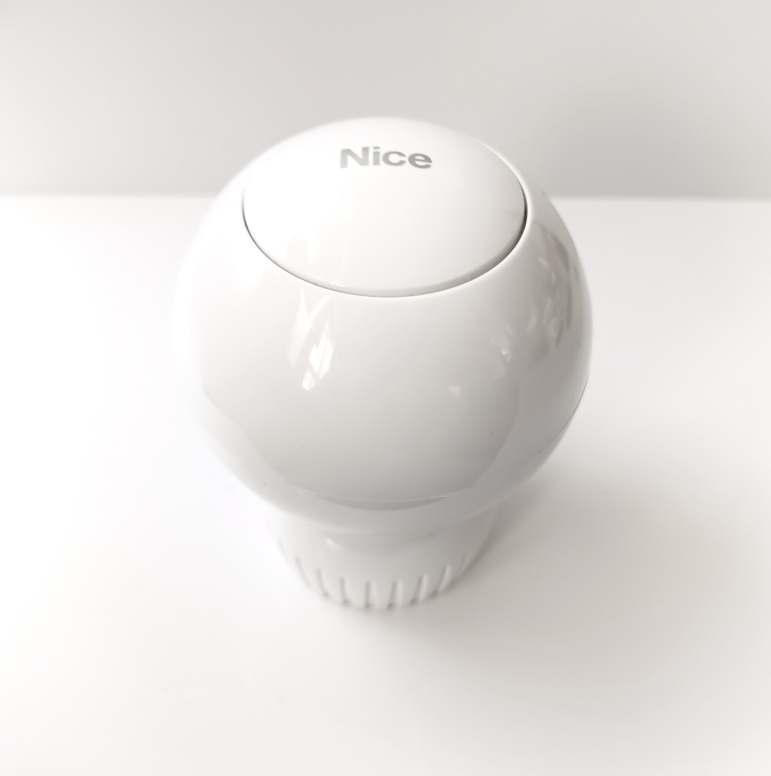
Name | Heat-Control |
|---|
Short Description | Heat Controller is a remotely controlled thermostatic head to control temperature in your room. It measures the temperature and automatically adjust the heat level. |
|---|
Long Description | Heat Controller is a remotely controlled thermostatic head to control temperature in your room. It measures the temperature and automatically adjust the heat level.
It can be mounted without tools on three types of thermostatic radiator valves.
You can create schedules via app to easily manage temperature throughout the week. |
|---|
Brand | Nice |
|---|
Product Identifier | FGT-001 |
|---|
Product Line | Nice Heat-Control |
|---|
OEM Version | HW: 1 FW: 4.09:02.21 |
|---|
Hardware Platform | ZM5101 |
|---|
Z-Wave Version | 6.71.01 |
|---|
Library Type | SLAVE_ENHANCED_232 |
|---|
Device Type | Thermostat - HVAC |
|---|
Role Type | ROLE_TYPE_SLAVE_SLEEPING_LISTENING |
|---|
Manufacturer ID | 0x010F |
|---|
Product Type ID | 0x1301 |
|---|
Product ID | 0x1001 |
|---|
User Icon | 0x1200 |
|---|
Installer Icon | 0x1200 |
|---|
Frequency Plans | EU: 869.85MHz, 868.40MHz |
|---|
Categories | Thermostats, HVAC |
|---|
Countries / Regions | European Union |
|---|
Supported Command Classes | Identifier | Name | Key | Version |
|---|
COMMAND_CLASS_SENSOR_MULTILEVEL_V5 | Sensor Multilevel V5 | 0x31 | 5 | COMMAND_CLASS_POWERLEVEL | Powerlevel | 0x73 | 1 | COMMAND_CLASS_CLOCK | Clock | 0x81 | 1 | COMMAND_CLASS_BATTERY | Battery | 0x80 | 1 | COMMAND_CLASS_APPLICATION_STATUS | Application Status | 0x22 | 1 | COMMAND_CLASS_SCHEDULE | Schedule | 0x53 | 1 | COMMAND_CLASS_BASIC | Basic | 0x20 | 1 | COMMAND_CLASS_CONFIGURATION | Configuration | 0x70 | 1 | COMMAND_CLASS_MULTI_CHANNEL_ASSOCIATION_V3 | Multi Channel Association V3 | 0x8E | 3 | COMMAND_CLASS_SECURITY_2 | Security 2 | 0x9F | 1 | COMMAND_CLASS_CRC_16_ENCAP | CRC-16 Encapsulation | 0x56 | 1 | COMMAND_CLASS_SECURITY | Security 0 | 0x98 | 1 | COMMAND_CLASS_MULTI_CHANNEL_V4 | Multi Channel V4 | 0x60 | 4 | COMMAND_CLASS_THERMOSTAT_MODE_V3 | Thermostat Mode V3 | 0x40 | 3 | COMMAND_CLASS_THERMOSTAT_SETPOINT_V3 | Thermostat Setpoint V3 | 0x43 | 3 | COMMAND_CLASS_TRANSPORT_SERVICE_V2 | Transport Service V2 | 0x55 | 2 | COMMAND_CLASS_VERSION_V2 | Version V2 | 0x86 | 2 | COMMAND_CLASS_DEVICE_RESET_LOCALLY | Device Reset Locally | 0x5A | 1 | COMMAND_CLASS_ZWAVEPLUS_INFO_V2 | Z-Wave Plus Info V2 | 0x5E | 2 | COMMAND_CLASS_ASSOCIATION_V2 | Association V2 | 0x85 | 2 | COMMAND_CLASS_FIRMWARE_UPDATE_MD_V4 | Firmware Update Meta Data V4 | 0x7A | 4 | COMMAND_CLASS_NOTIFICATION_V8 | Notification V8 | 0x71 | 8 | COMMAND_CLASS_SUPERVISION | Supervision | 0x6C | 1 | COMMAND_CLASS_PROTECTION | Protection | 0x75 | 1 | COMMAND_CLASS_MANUFACTURER_SPECIFIC_V2 | Manufacturer Specific V2 | 0x72 | 2 | COMMAND_CLASS_ASSOCIATION_GRP_INFO_V2 | Association Group Information V2 | 0x59 | 2 |
|
|---|
S2 Classes | S2_UNAUTHENTICATED, S2_AUTHENTICATED |
|---|
Documents | Category | Description | File |
|---|
Manual_Primary_Lang | Product Manual | |
|
|---|
Features | Feature | Values |
|---|
Thermostat Modes | Value |
|---|
Heat | Energy Save Heat |
| Thermostat Power Source | | Thermostat HVAC Systems Supported | |
|
|---|
Association Groups | Group Number | Maximum Nodes Supported | End Point ID | Group Name | Profile | Description |
|---|
1 | 1 | 0 | Lifeline | 0x0001 | "Lifeline" reports the device status and allows for assigning single device only (main controller by default). |
|
|---|
Configuration Parameters | Parameter Number | Name | Description | Format | Size | Min Value | Max Value | Default Value | Parameter Values |
|---|
1 | Override Schedule duration | This parameter determines duration of Override Schedule after turning the knob while normal schedule is active
(set by Schedule CC). | 1 | 4 | 10 | 10000 | 240 | From | To | Description |
|---|
10 | 10000 | Override Schedule duration |
| 2 | Additional functions | This parameter allows to enable different additional functions of the device. | 1 | 4 | 1 | 768 | 1 | From | To | Description |
|---|
1 | 768 | Additional functions |
|
|
|---|
Texts | ID | Description | Value |
|---|
8 | Where to find S2 DSK on product | Security DSK 2 - you can find on packing label | 2 | Classic Exclusion | 1. Make sure the device is within the direct range of your Z-Wave controller.
2. Set the main controller into remove mode (see the controller’s manual).
3. Quickly triple click the button on the thermostatic head.
4. The LED ring will start blinking white.
5. Wait for the removing process to end.
6. Successful removing will be confirmed by the Z-Wave controller and red LED colour. | 1 | Classic Inclusion | To add the device to the Z-Wave network manually:
1. Make sure the device is within the direct range of your Z-Wave controller.
2. Set the main controller in (security/non-security) add mode (see the controller’s manual)
3. Quickly triple click the button on the thermostatic head.
4. The LED ring will start blinking white.
5. If you are adding in S2 authenticated mode, type in the device pin code (underlined part of the public key on the label).
6. Wait for the adding process to end.
7. Successful adding will be confirmed by the Z-Wave controller and green LED colour. | 5 | Factory Reset Procedure | To perform factory reset:
1. Press and hold the button.
2. Release the button when you see yellow LED colour.
3. Click the button to confirm the selection.
4. After finishing resetting the device will be put in Standby Mode. Click the button to activate it again. | 4 | Wake-Up Procedure | f you use one of the adapters, double check that it is mounted properly. It should click when putting on the valve, hold tight
after installing and not rotate!
• If the device is installed in vertical position, set bit 5 in parameter 2.
• Do not cover or veil the thermostatic head.
• First charging may take up to 3 hours.
1. Connect the charger to the micro-USB port to charge the device. The LED ring will pulse red if it’s not fully charged; otherwise, it will pulse
green.
If you have the temperature sensor:
• Use a coin to open the battery cover by turning it counter-clockwise.
• Remove the sticker underneath the battery.
• Use a coin to close the battery cover by turning it clockwise.
2. Disconnect the charger when the LED ring pulses green (device fully charged).
3. Dismount your current thermostatic head.
4. Depending on type of your thermostatic valve:
M30 x 1.5
Danfoss RTD-N
Danfoss RA-N
Proceed normally
Use adapter:
Use adapter:
5. Mount the device on the valve and tighten it by turning the cap clockwise.
6. Press and hold the button for at least one second. The LED ring will start blinking blue.
If you have the temperature sensor:
1) Click the button on the temperature sensor now.
2) The LED ring on the thermostatic valve will blink green 5 times if the connection was successful. |
|
|---|
Supported Notification Types | Notification Type | Event / State |
|---|
Power Management | Battery load status: Battery is charging | Power Management | Battery level status: Battery is fully charged | Power Management | Battery level status: Charge battery soon | Power Management | Battery level status: Charge battery now | System | HW status: System hardware failure |
|
|---|
Supported Multilevel Sensors | Multilevel Sensor Type |
|---|
Air temperature |
|
|---|
Supports NWI | Yes |
|---|
Supports Explorer Frames | Yes |
|---|
Is Flirs | Yes |
|---|
Radio Range Z-Wave (m) | 40 |
|---|