| Product Recognition | |
|---|
| Certification Number | ZC10-18046084 |
|---|
| Name | Heating Thermostat |
|---|
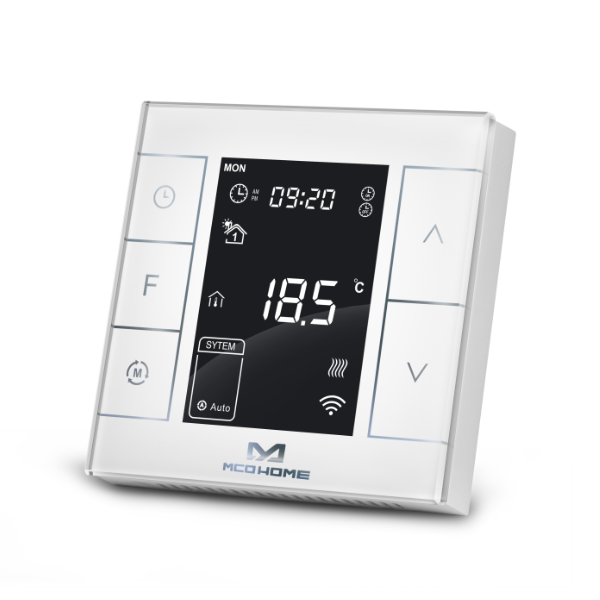
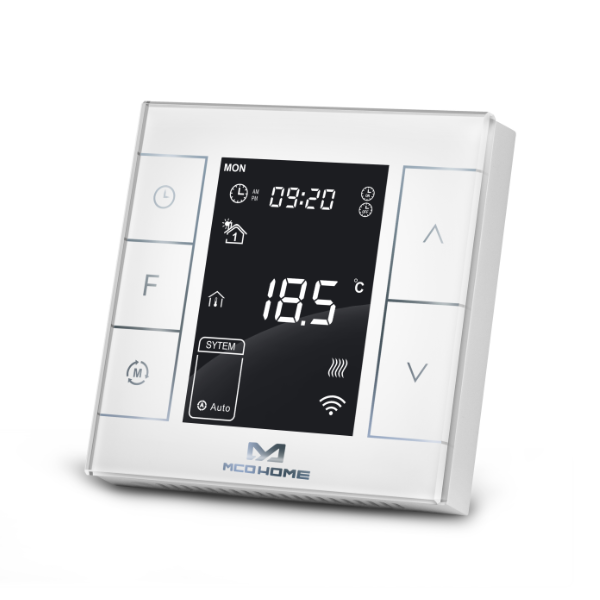
| Short Description | MCOHome Water / Electrical Heating Thermostat MH7H is a Z-Wave Plus enabled device for indoor temperature control. |
|---|
| Long Description | MH7H-WH is mainly applied to control wall mounted boiler, water valve/pump etc. , while MH7H-EH is for electrical heating system.The device is of high reliability and practicability, which can be included and operated in any Z-Wave network with other Z-Wave certified devices from any other manufacturers. All non-battery operated nodes within the network will act as repeaters regardless of vendor to increase reliability of the network.
Features:
Capacitive touch buttons
Tempered glass panel, PC alloy enclosure
Precise temperature calibration function
Attractive appearance
Clear display, easy to operate
Specification:
Power Supply:AC85-260V, 50/60HZ
Output: MH7H-WH ≤5A ; MH7H-EH≤ 16A
Self Consumption:≤1W
External Temp. Sensor(optional): NTC R25℃=15KΩ
B25℃/50℃=3550K
Working Environment:0-50℃; 0-90% RH(Non-
condensation)
Temperature Setting:5-37 ℃(41-99℉)(Adjustable)
Dimension:86* 86*15mm
Hole Pitch:60-61mm |
|---|
| Brand | MCO Home |
|---|
| Product Identifier | MH7H-WH/EH |
|---|
| OEM Version | HW: 255 FW: 3.01 |
|---|
| Hardware Platform | ZM5202 |
|---|
| Z-Wave Version | 6.71.01 |
|---|
| Library Type | SLAVE_ENHANCED_232 |
|---|
| Device Type | Thermostat - HVAC |
|---|
| Role Type | ROLE_TYPE_SLAVE_ALWAYS_ON |
|---|
| Manufacturer ID | 0x015F |
|---|
| Product Type ID | 0x0702 |
|---|
| Product ID | 0x5102 |
|---|
| User Icon | 0x1200 |
|---|
| Installer Icon | 0x1200 |
|---|
| Frequency Plans | EU: 869.85MHz, 868.40MHz |
|---|
| Categories | Thermostats, HVAC |
|---|
| Countries / Regions | European Union |
|---|
| Supported Command Classes | | Identifier | Name | Key | Version |
|---|
| COMMAND_CLASS_FIRMWARE_UPDATE_MD_V4 | Firmware Update Meta-Data V4 | 0x7A | 4 | | COMMAND_CLASS_SENSOR_MULTILEVEL_V5 | Sensor Multilevel V5 | 0x31 | 5 | | COMMAND_CLASS_POWERLEVEL | Powerlevel | 0x73 | 1 | | COMMAND_CLASS_THERMOSTAT_OPERATING_STATE | Thermostat Operating State | 0x42 | 1 | | COMMAND_CLASS_BASIC | Basic | 0x20 | 1 | | COMMAND_CLASS_THERMOSTAT_MODE_V2 | Thermostat Mode V2 | 0x40 | 2 | | COMMAND_CLASS_THERMOSTAT_SETPOINT_V2 | Thermostat Setpoint V2 | 0x43 | 2 | | COMMAND_CLASS_TRANSPORT_SERVICE_V2 | Transport Service V2 | 0x55 | 2 | | COMMAND_CLASS_VERSION_V2 | Version V2 | 0x86 | 2 | | COMMAND_CLASS_ZWAVEPLUS_INFO_V2 | Z-Wave Plus Info V2 | 0x5E | 2 | | COMMAND_CLASS_ASSOCIATION_V2 | Association V2 | 0x85 | 2 | | COMMAND_CLASS_ASSOCIATION_GRP_INFO | Association Group Info | 0x59 | 1 | | COMMAND_CLASS_SECURITY_2 | Security S2 | 0x9F | 1 | | COMMAND_CLASS_SUPERVISION | Supervision | 0x6C | 1 | | COMMAND_CLASS_MANUFACTURER_SPECIFIC_V2 | Manufacturer Specific V2 | 0x72 | 2 |
|
|---|
| S2 Classes | S2_UNAUTHENTICATED |
|---|
| Documents | |
|---|
| Features | | Feature | Values |
|---|
| Thermostat HVAC Systems Supported | | | Thermostat Modes | | Value |
|---|
| Heat | | Energy Save Heat | | Away |
| | Thermostat Power Source | | Value |
|---|
| Mains powered (120V/240V) |
| | Firmware Updatable | | Value |
|---|
| Updatable by Professional/Technician |
| | Switch Load Capacity Current | | | Neutral Wire Required | | | Sensors | | Value |
|---|
| Humidity | | Water Temperature | | Target Temperature |
|
|
|---|
| Association Groups | | Group Number | Maximum Nodes Supported | End Point ID | Description |
|---|
| 1 | 5 | 0 | Z-Wave Plus Lifeline |
|
|---|
| Texts | | ID | Description | Value |
|---|
| 1 | Inclusion | In normal working interface, press & hold S4 to enter interface for adding or removing of Z-Wave network. Before device added into network, “- - -” will display on the screen. Then press S4 once, device will enter learning mode to get a node ID. If adding is succeed, a node ID will display on the screen in a few seconds.
A node ID can always inform us whether the device is in the network or not.
After adding, turn off the device and then turn it on. Now the device is ready to be operated by controller/ gateway in Z-Wave network. | | 2 | Exclusion | In normal working interface, press & hold S4 to enter interface for adding or removing of Z-Wave network. Before device removed from network, a Node ID will display on the screen. Then press S4 once. If removing is succeed, “- - -”will display on the screen in a few seconds.
A node ID can always inform us whether the device is in the network or not.When removed, the device will restore its factory setting. | | 5 | Factory Reset | A parameter P18 in the secret menu can be used to restore factory setting locally. Please use this procedure only when the network primary controller is missing or otherwise inoperable. ; And a parameter FF can be used to restore the factory setting via Z-Wave. |
|
|---|
| Supported Multilevel Sensors | | Multilevel Sensor Type |
|---|
| Humidity | | Water temperature | | Target temperature |
|
|---|
| Supports NWI | Yes |
|---|
| Supports Explorer Frames | Yes |
|---|