Product Recognition | |
|---|
Certification Number | ZC10-20066924 |
|---|
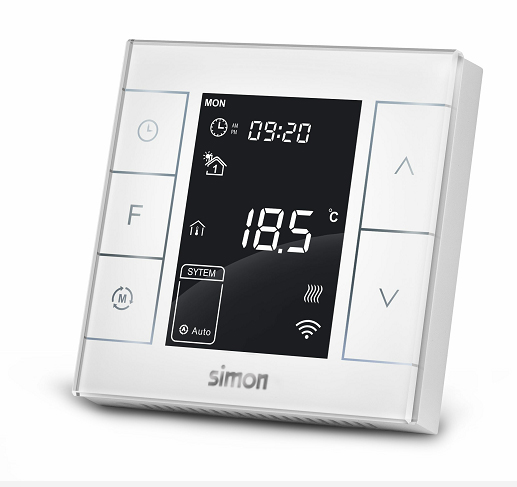
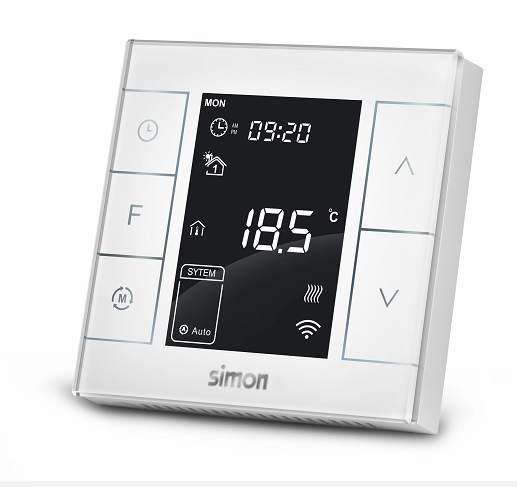
Name | Heating Thermostat |
|---|
Short Description | Simon Water / Electrical Heating Thermostat is a Z-Wave Plus™ enabled device for indoor temperature control |
|---|
Long Description | Simon Water / Electrical Heating Thermostat is a Z-Wave Plus™ enabled device for indoor temperature control. 1000581X-13X is mainly applied to control wall mounted boiler, water valve/pump etc. , while 1000581X-13X is for electrical heating system. The device is of high reliability and practicability, which can be included and operated in any Z-Wave™ network with other Z-Wave™ certified devices from any other manufacturers. All non-battery operated nodes within the network will act as repeaters regardless of vendor to increase reliability of the network |
|---|
Brand | Simon |
|---|
Product Identifier | 1000581X-13X |
|---|
Product Line | Z-wave Thermostat |
|---|
OEM Version | HW: 255 FW: 3.01 |
|---|
Hardware Platform | ZM5202 |
|---|
Z-Wave Version | 6.71.01 |
|---|
Library Type | SLAVE_ENHANCED_232 |
|---|
Device Type | Thermostat - HVAC |
|---|
Role Type | ROLE_TYPE_SLAVE_ALWAYS_ON |
|---|
Manufacturer ID | 0x015F |
|---|
Product Type ID | 0x0702 |
|---|
Product ID | 0x5102 |
|---|
User Icon | 0x1200 |
|---|
Installer Icon | 0x1200 |
|---|
Frequency Plans | US: 916.00MHz, 908.40MHz |
|---|
Categories | Thermostats |
|---|
Countries / Regions | United States of America |
|---|
Supported Command Classes | Identifier | Name | Key | Version |
|---|
COMMAND_CLASS_FIRMWARE_UPDATE_MD_V4 | Firmware Update Meta-Data V4 | 0x7A | 4 | COMMAND_CLASS_SENSOR_MULTILEVEL_V5 | Sensor Multilevel V5 | 0x31 | 5 | COMMAND_CLASS_POWERLEVEL | Powerlevel | 0x73 | 1 | COMMAND_CLASS_THERMOSTAT_OPERATING_STATE | Thermostat Operating State | 0x42 | 1 | COMMAND_CLASS_BASIC | Basic | 0x20 | 1 | COMMAND_CLASS_THERMOSTAT_MODE_V2 | Thermostat Mode V2 | 0x40 | 2 | COMMAND_CLASS_THERMOSTAT_SETPOINT_V2 | Thermostat Setpoint V2 | 0x43 | 2 | COMMAND_CLASS_TRANSPORT_SERVICE_V2 | Transport Service V2 | 0x55 | 2 | COMMAND_CLASS_VERSION_V2 | Version V2 | 0x86 | 2 | COMMAND_CLASS_ZWAVEPLUS_INFO_V2 | Z-Wave Plus Info V2 | 0x5E | 2 | COMMAND_CLASS_ASSOCIATION_V2 | Association V2 | 0x85 | 2 | COMMAND_CLASS_ASSOCIATION_GRP_INFO | Association Group Info | 0x59 | 1 | COMMAND_CLASS_SECURITY_2 | Security S2 | 0x9F | 1 | COMMAND_CLASS_SUPERVISION | Supervision | 0x6C | 1 | COMMAND_CLASS_MANUFACTURER_SPECIFIC_V2 | Manufacturer Specific V2 | 0x72 | 2 |
|
|---|
S2 Classes | S2_UNAUTHENTICATED |
|---|
Documents | Category | Description | File |
|---|
Manual_Primary_Lang | Product Manual | |
|
|---|
Features | Feature | Values |
|---|
Thermostat HVAC Systems Supported | | Thermostat Modes | | Thermostat Power Source | Value |
|---|
Mains powered (120V/240V) |
|
|
|---|
Association Groups | Group Number | Maximum Nodes Supported | End Point ID | Group Name | Profile | Description |
|---|
1 | 1 | 0 | Lifeline | 0x0001 | Thermostat supports 1 association group (0x01), which can include only one Node ID.A gateway is suggested to associate with this group. Then if any changes happen, such as: temperature, working mode, fan state etc., the thermostat will report to this associated device (gateway). Association Group 1 is the Lifeline group. |
|
|---|
Texts | ID | Description | Value |
|---|
1 | Classic Inclusion | In normal working interface, press & hold S4 to enter interface for adding Z-Wave network. Before device added into network, “- - -” will display on the screen. Then press S4 once, device will enter learning mode to get a node ID. If adding is succeed, a node ID will display on the screen in a few seconds. | 2 | Classic Exclusion | In normal working interface, press & hold S4 to enter interface for removing from Z-Wave network. Before device removed from network, node ID will display on the screen. Then press S4 once, device will remove from network. If removing is succeed,“- - -” will display on the screen in a few seconds. | 5 | Factory Reset Procedure | In shutdown state, long press S3+S5 synchronically can enter into secret menu. Press S4 or S5 to enter code 1234. Touch S3 to enter setting interface. Choose P18, change 53 to 55, and press S3 to confirm. |
|
|---|
Supported Notification Types | Notification Type | Event / State |
|---|
Heat Alarm | Heat sensor status: Overheat detected |
|
|---|
Supported Multilevel Sensors | Multilevel Sensor Type |
|---|
Humidity |
|
|---|
Supports NWI | Yes |
|---|
Supports Explorer Frames | Yes |
|---|
Radio Range Z-Wave (m) | 40 |
|---|