
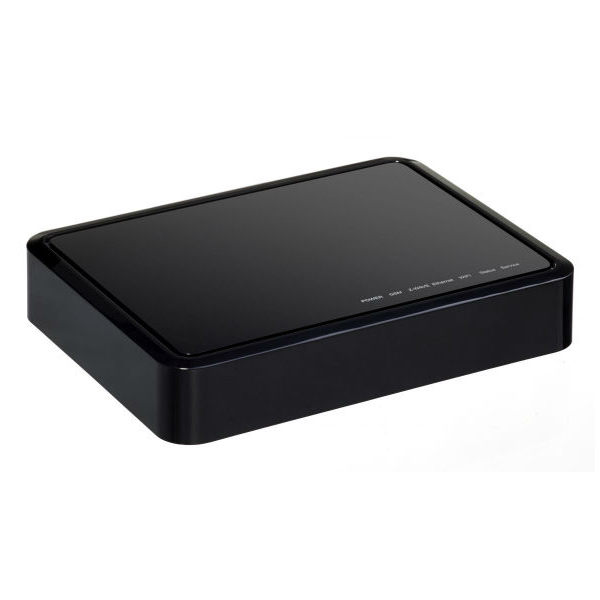
| Product Recognition | |
|---|
| Certification Number | ZC10-14110007 |
|---|
| Name | Homelive Base |
|---|
| Short Description | Orange has developed Homelive, a unique solution that links you to the connected objects in your home, allowing you to manage your appliances remotely. |
|---|
| Long Description | Orange has developed Homelive, a unique solution that links you to the connected objects in your home, allowing you to manage your appliances remotely. Choose from a range of intelligent sensors and connected devices, brought to you by Orange’s partners: weather monitors, thermostats, light switches, sound and movement detectors, and smoke detectors, to name but a few.
The Homelive app lets you control all the connected appliances in your home from one place, accessible from your smartphone or tablet. You can even set up custom alerts, tailored to your needs.
With Homelive, you can configure your house from your smartphone or tablet to suit your daily routine. You can, for example, arrange for the heating to come on automatically depending on the outside temperature, or program the lights to switch on at dusk. |
|---|
| Brand | Homelive |
|---|
| Product Identifier | NA930FR |
|---|
| OEM Version | 33 |
|---|
| Hardware Platform | ZM5202 |
|---|
| Z-Wave Version | 6.51.00 |
|---|
| Library Type | CONTROLLER_STATIC |
|---|
| Device Type | Gateway |
|---|
| Role Type | ROLE_TYPE_CONTROLLER_CENTRAL_STATIC |
|---|
| Manufacturer ID | 0x008C |
|---|
| Product Type ID | 0x0003 |
|---|
| Product ID | 0x0033 |
|---|
| Frequency Plans | EU: 869.85MHz, 868.40MHz |
|---|
| Categories | All Controllers, Gateway Controller |
|---|
| Countries / Regions | European Union |
|---|
| Controlled Command Classes | | Identifier | Name | Key | Version |
|---|
| COMMAND_CLASS_SENSOR_BINARY | Sensor Binary | 0x30 | 1 | | COMMAND_CLASS_SWITCH_MULTILEVEL | Switch Multilevel | 0x26 | 1 | | COMMAND_CLASS_CLIMATE_CONTROL_SCHEDULE | Climate Control Schedule | 0x46 | 1 | | COMMAND_CLASS_DOOR_LOCK | Door Lock | 0x62 | 1 | | COMMAND_CLASS_NODE_NAMING | Node Naming | 0x77 | 1 | | COMMAND_CLASS_THERMOSTAT_FAN_MODE | Thermostat Fan Mode | 0x44 | 1 | | COMMAND_CLASS_USER_CODE | User Code | 0x63 | 1 | | COMMAND_CLASS_MULTI_CHANNEL | Multi-Channel V1 | 0x60 | 0 | | COMMAND_CLASS_ALARM | Alarm | 0x71 | 1 | | COMMAND_CLASS_CONTROLLER_REPLICATION | Controller Replication | 0x21 | 1 | | COMMAND_CLASS_CLOCK | Clock | 0x81 | 1 | | COMMAND_CLASS_BATTERY | Battery | 0x80 | 1 | | COMMAND_CLASS_WAKE_UP | Wake Up | 0x84 | 1 | | COMMAND_CLASS_TIME | Time | 0x8A | 1 | | COMMAND_CLASS_TIME_PARAMETERS | Time Parameters | 0x8B | 1 | | COMMAND_CLASS_THERMOSTAT_OPERATING_STATE | Thermostat Operating State | 0x42 | 1 | | COMMAND_CLASS_THERMOSTAT_MODE | Thermostat Mode | 0x40 | 1 | | COMMAND_CLASS_SENSOR_MULTILEVEL | Sensor Multilevel | 0x31 | 1 | | COMMAND_CLASS_SWITCH_BINARY | Switch Binary | 0x25 | 1 | | COMMAND_CLASS_BASIC | Basic | 0x20 | 1 | | COMMAND_CLASS_CONFIGURATION | Configuration | 0x70 | 1 | | COMMAND_CLASS_CRC_16_ENCAP | CRC16 Encapsulation | 0x56 | 1 | | COMMAND_CLASS_SECURITY | Security S0 | 0x98 | 1 | | COMMAND_CLASS_ZWAVEPLUS_INFO | Z-Wave Plus Info | 0x5E | 1 | | COMMAND_CLASS_THERMOSTAT_SETPOINT | Thermostat Setpoint | 0x43 | 1 | | COMMAND_CLASS_METER | Meter | 0x32 | 1 | | COMMAND_CLASS_MANUFACTURER_SPECIFIC | Manufacturer Specific | 0x72 | 1 | | COMMAND_CLASS_SCHEDULE_ENTRY_LOCK | Schedule Entry Lock | 0x4E | 1 |
|
|---|
| Documents | |
|---|
| Association Groups | | Group Number | Maximum Nodes Supported | End Point ID | Description |
|---|
| 1 | 5 | 0 | Z-Wave Plus Lifeline |
|
|---|
| Texts | | ID | Description | Value |
|---|
| 23 | Controller Inclusion | In order to include another zwave product into the gateway. Access the UI by logging into the home live portal (http://id-rec.orange.fr/auth_user/bin/auth0user.cgi).
Click on the devices tab on the left side of the window.
Click on the ""Add Device"" button on the upper right hand corner.
Select the device you want to add or ""generic Z-Wave Device"" if your device isn't in the list.
Follow the on screen instructions. | | 24 | Controller Exclusion | In order to exclude a Z-Wave product. Access the UI by logging into the home live portal (http://id-rec.orange.fr/auth_user/bin/auth0user.cgi).
Click on the devices tab on the left side of the window.
Click on the right arrow on the device that you want to remove
Click on the delete button at the bottom of the device settings, then ""Exclude"" and follow the on screen instructions | | 5 | Factory Reset | Access the UI by logging into the home live portal (http://id-rec.orange.fr/auth_user/bin/auth0user.cgi).
Click on the Settings Tab on the left side of the screen
Click on the backup tab and then on the ""Reset to Default"" button | | 4 | Device Wake-Up | N/A | | 3 | Learn Mode (adding another controller) | Access the UI by logging into the home live portal (http://id-rec.orange.fr/auth_user/bin/auth0user.cgi).
Click on the Settings Tab on the left side of the screen
Click on Z-Wave Settings and then on the advanced tab
Click on the option to ""Copy Z-Wave network from a Primary Controller"" |
|
|---|
| Supports NWI | Yes |
|---|
| Supports Explorer Frames | Yes |
|---|