| Product Recognition | |
|---|
| Certification Number | ZC10-15050003 |
|---|
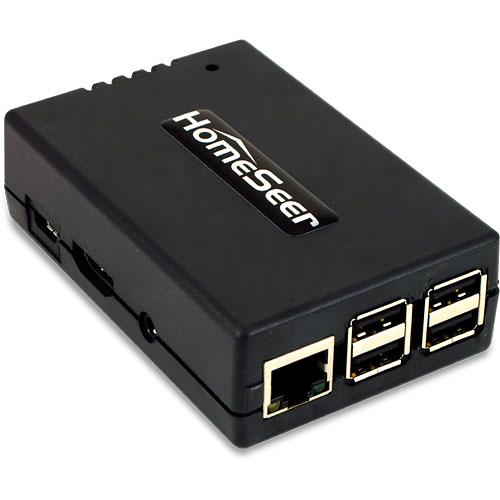
| Name | HomeSeer HomeTroller Zee S2 |
|---|
| Short Description | HomeTroller Zee S2 is the most affordable HomeSeer controller ever. The unit is designed to control light switches, thermostats, door locks, audio / video equipment, cameras, garage doors, water valves, energy monitors and much more. |
|---|
| Long Description | HomeTroller Zee S2 is the most affordable HomeSeer controller ever. The unit is designed to control light switches, thermostats, door locks, audio / video equipment, cameras, garage doors, water valves, energy monitors and much more. Click here to review the complete list of supported technologies. Home owners can access HomeTroller Zee S2 at home or via the cloud with just about any smartphone, tablet or table-top touchscreen. Our FREE standard cloud-based "myHomeSeer Remote" service provides easy remote access without storing your sensitive data in the cloud. With HomeSeer, your intelligence stays at home, ensuring better security and reliability.
Main Features:
- Powerful Home Automation Gateway Controller
- Includes Free myHomeSeer Remote Access Service
- No Monthly Fees
- Supports Z-Wave, Insteon, X10 and much more
- Easy to Set Up
- Includes Powerful Event Engine
- Includes Free Apple and Android Mobile Device Apps
- Supports Voice Control and Voice Programming via Android Mobile Devices
- Supports Spoken Announcements, Alerts and Reminders
- Fully Customizable Email and Text Alerts
- Supports Z-Wave Locks, Thermostats, Lights, Water Valves, Sensors and more. |
|---|
| Brand | HomeSeer |
|---|
| Product Identifier | HT-ZEE-S2 |
|---|
| Hardware Platform | SW |
|---|
| Z-Wave Version | 6.51.06 |
|---|
| Library Type | CONTROLLER_STATIC |
|---|
| Device Type | Central Controller |
|---|
| Role Type | ROLE_TYPE_CONTROLLER_CENTRAL_STATIC |
|---|
| Manufacturer ID | 0x000C |
|---|
| Product Type ID | 0x0001 |
|---|
| Product ID | 0x0003 |
|---|
| Frequency Plans | US: 916.00MHz, 908.40MHz |
|---|
| Categories | All Controllers, Gateway Controller |
|---|
| Countries / Regions | United States of America |
|---|
| Controlled Command Classes | | Identifier | Name | Key | Version |
|---|
| COMMAND_CLASS_ASSOCIATION_GROUP_INFORMATION | Association Group Information V1 | 0x59 | 0 | | COMMAND_CLASS_SCENE_ACTUATOR_CONF | Scene Actuator Conf | 0x2C | 1 | | COMMAND_CLASS_DOOR_LOCK | Door Lock | 0x62 | 1 | | COMMAND_CLASS_NO_OPERATION | No Operation | 0x00 | 1 | | COMMAND_CLASS_NODE_NAMING | Node Naming | 0x77 | 1 | | COMMAND_CLASS_THERMOSTAT_FAN_MODE_V4 | Thermostat Fan Mode V4 | 0x44 | 4 | | COMMAND_CLASS_USER_CODE | User Code | 0x63 | 1 | | COMMAND_CLASS_SWITCH_ALL | Switch All | 0x27 | 1 | | COMMAND_CLASS_CONTROLLER_REPLICATION | Controller Replication | 0x21 | 1 | | COMMAND_CLASS_CLOCK | Clock | 0x81 | 1 | | COMMAND_CLASS_BATTERY | Battery | 0x80 | 1 | | COMMAND_CLASS_TIME_PARAMETERS | Time Parameters | 0x8B | 1 | | COMMAND_CLASS_THERMOSTAT_SETBACK | Thermostat Setback | 0x47 | 1 | | COMMAND_CLASS_THERMOSTAT_OPERATING_STATE | Thermostat Operating State | 0x42 | 1 | | COMMAND_CLASS_SENSOR_MULTILEVEL | Sensor Multilevel | 0x31 | 1 | | COMMAND_CLASS_SWITCH_BINARY | Switch Binary | 0x25 | 1 | | COMMAND_CLASS_BASIC | Basic | 0x20 | 1 | | COMMAND_CLASS_CONFIGURATION | Configuration | 0x70 | 1 | | COMMAND_CLASS_INDICATOR | Indicator | 0x87 | 1 | | COMMAND_CLASS_CRC_16_ENCAP | CRC16 Encapsulation | 0x56 | 1 | | COMMAND_CLASS_SECURITY | Security S0 | 0x98 | 1 | | COMMAND_CLASS_SENSOR_MULTILEVEL_V7 | Sensor Multilevel V7 | 0x31 | 7 | | COMMAND_CLASS_THERMOSTAT_FAN_STATE_V2 | Thermostat Fan State V2 | 0x45 | 2 | | COMMAND_CLASS_THERMOSTAT_MODE_V2 | Thermostat Mode V2 | 0x40 | 2 | | COMMAND_CLASS_THERMOSTAT_SETPOINT_V3 | Thermostat Setpoint V3 | 0x43 | 3 | | COMMAND_CLASS_TIME_V2 | Time V2 | 0x8A | 2 | | COMMAND_CLASS_VERSION_V2 | Version V2 | 0x86 | 2 | | COMMAND_CLASS_WAKE_UP_V2 | Wake Up V2 | 0x84 | 2 | | COMMAND_CLASS_DEVICE_RESET_LOCALLY | Device Reset Locally | 0x5A | 1 | | COMMAND_CLASS_ZWAVEPLUS_INFO_V2 | Z-Wave Plus Info V2 | 0x5E | 2 | | COMMAND_CLASS_BARRIER_OPERATOR | Barrier Operator | 0x66 | 1 | | COMMAND_CLASS_ASSOCIATION_V2 | Association V2 | 0x85 | 2 | | COMMAND_CLASS_MULTI_CHANNEL_V4 | Multi-Channel V4 | 0x60 | 4 | | COMMAND_CLASS_NOTIFICATION_V5 | Notification V5 | 0x71 | 5 | | COMMAND_CLASS_DOOR_LOCK_LOGGING | Door Lock Logging | 0x4C | 1 | | COMMAND_CLASS_MANUFACTURER_SPECIFIC | Manufacturer Specific | 0x72 | 1 | | COMMAND_CLASS_SWITCH_COLOR | Switch Color | 0x33 | 1 | | COMMAND_CLASS_METER_PULSE | Meter Pulse | 0x35 | 1 | | COMMAND_CLASS_PROTECTION | Protection | 0x75 | 1 | | COMMAND_CLASS_SCENE_ACTIVATION | Scene Activation | 0x2B | 1 | | COMMAND_CLASS_SCENE_CONTROLLER_CONF | Scene Controller Conf | 0x2D | 1 | | COMMAND_CLASS_FIRMWARE_UPDATE_MD_V2 | Firmware Update Meta-Data V2 | 0x7A | 2 | | COMMAND_CLASS_METER_V4 | Meter V4 | 0x32 | 4 | | COMMAND_CLASS_MULTI_CHANNEL_ASSOCIATION_V2 | Multi Channel Association V2 | 0x8E | 2 |
|
|---|
| Documents | |
|---|
| Features | | Feature | Values |
|---|
| Gateway Has Preferred Partners | | | Supported Notification Types | | Value |
|---|
| Smoke Alarm | | CO Alarm | | CO2 Alarm | | Heat Alarm | | Water Alarm | | Access Control | | Home Security | | Power Management | | System | | Emergency Alarm | | Clock | | Appliance | | Home Health |
| | Supported Meter Type | | Value |
|---|
| Electric Energy | | Gas | | Water |
| | Sensors | | Value |
|---|
| Motion/No Motion (Binary) | | Air Temperature | | Luminance | | Humidity | | Open/Closed (Binary) | | Smoke Density | | Heat | | Freeze | | Vibration/Shock (Binary) | | General Purpose | | Water Flow | | Carbon Dioxide | | Carbon Monoxide |
| | Z-Wave Scene Type | | Value |
|---|
| Scene & Central Scene |
| | Controller Supports Multiple Networks | | | Controller Supports Multiple Z-Wave Interfaces | |
|
|---|
| Association Groups | | Group Number | Maximum Nodes Supported | End Point ID | Description |
|---|
| 1 | 230 | 0 | Z-Wave Plus Lifeline |
|
|---|
| Texts | | ID | Description | Value |
|---|
| 23 | Controller Inclusion | From the UI, select the Plugins menu, then the Z-Wave Plugin, then choose the Controller Management option. In the list of actions for the Z-Wave interface, choose ""Add/Include a Node"", and follow the on-screen prompts. | | 24 | Controller Exclusion | From the UI, select the Plugins menu, then the Z-Wave Plugin, then choose the Controller Management option. In the list of actions for the Z-Wave interface, choose ""Remove/Exclude a Node"", and follow the on-screen prompts. | | 3 | Learn Mode (adding another controller) | From the UI, select the Plugins menu, then the Z-Wave Plugin, then choose the Controller Management option. In the list of actions for the Z-Wave interface, choose ""Receive Network from Another Controller"", and follow the on-screen prompts. | | 5 | Factory Reset | Please use this procedure only as a last resort as existing nodes in the network will be orphaned and unable to be controlled.
Access the Interfaces page from the UI. Click on the Z-Wave plug-in link on the interfaces page to be taken to the diagnostics page for the plug-in, then press the Factory Reset button at the top of the page. |
|
|---|
| Supported / Controlled Meter Types | | Meter Type | Rate Type | Description |
|---|
| Electric meter | Import | Electric Meter Consumption | | Gas meter | Import | Gas Meter Consumption | | Water meter | Import | Water Meter Consumption |
|
|---|
| Supports NWI | Yes |
|---|
| Supports Explorer Frames | Yes |
|---|