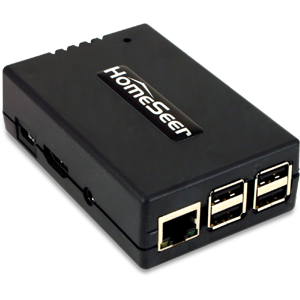
| Product Recognition | |
|---|
| Certification Number | ZC10-15020004 |
|---|
| Name | HomeSeer Z-NET |
|---|
| Short Description | The HomeSeer Z-NET allows for control of Z-Wave over Ethernet connections. |
|---|
| Long Description | Z-NET is a remote network-based Z-Wave interface for use with HomeSeer home automation systems. Since Z-NET is IP-enabled, it may be installed anywhere a network connection is available. Z-NET supports Network Wide Inclusion (NWI) for easy pairing of Z-Wave products. Multiple Z-NETs may be used together with any HomeSeer system for a centrally managed, muti-network installation; ideal for home owners with secondary residences or outbuildings (pool houses, barns, workshops, servants quarters, etc).
Main Features:
* Remote Z-Wave Interface for use with HomeSeer Software and HomeTrollers
* Supports Z-Wave Plus (and older) Products
* Ethernet (and optional WiFi) Connections Allow of Optimal Positioning in Home
* Supports Network Wide Inclusion (NWI) for Easy Product Inclusion
* May be Used with Other Z-NETs in Larger Homes or for Secondary Residences or Outbuildings
* Includes Highly Optimized Antenna for Superior Range and Performance
* Includes Easy to Use Web-Based Management Features
* Provides Easy Upgrade Path from Z-Trollers, Z-Sticks, SmartSticks and Most Other Z-Wave Interfaces
* Case Includes Keyhole slots for wall mounting (with your hardware)
* Optional USB > WiFi adapter is Available |
|---|
| Brand | HomeSeer |
|---|
| Product Identifier | Z-NET |
|---|
| Hardware Platform | ZM5202 |
|---|
| Z-Wave Version | 6.51.06 |
|---|
| Library Type | CONTROLLER_STATIC |
|---|
| Device Type | Central Controller |
|---|
| Role Type | ROLE_TYPE_CONTROLLER_CENTRAL_STATIC |
|---|
| Manufacturer ID | 0x001E |
|---|
| Product Type ID | 0x0005 |
|---|
| Product ID | 0x0002 |
|---|
| Frequency Plans | US: 916.00MHz, 908.40MHz |
|---|
| Categories | All Controllers, Computer Controller Interfaces |
|---|
| Countries / Regions | United States of America |
|---|
| Documents | |
|---|
| Association Groups | | Group Number | Maximum Nodes Supported | End Point ID | Description |
|---|
| 1 | 5 | 0 | Z-Wave Plus Lifeline |
|
|---|
| Texts | | ID | Description | Value |
|---|
| 23 | Controller Inclusion | From the Z-Wave Plug-In menu, choose ""Controller Management"". Under the options for the interface that is using the Z-Net controller, choose ""Add/Include a Node"", and follow the system prompts. | | 24 | Controller Exclusion | From the Z-Wave Plug-In menu, choose ""Controller Management"". Under the options for the interface that is using the Z-Net controller, choose ""Remove/Exclude a Node"", and follow the system prompts. | | 5 | Factory Reset | Please do this only after removing all nodes from the network.
From the Z-Wave Plug-In menu, choose ""Controller Management"". Under the options for the interface that is using the Z-Net controller, choose ""ERASE this Interface and Create A New Network"", and follow the system prompts. | | 3 | Learn Mode (adding another controller) | From the Z-Wave Plug-In menu, choose ""Controller Management"". Under the options for the interface that is using the Z-Net controller, choose ""Receive Network from Another Controller"", and follow the system prompts. |
|
|---|
| Supports NWI | Yes |
|---|
| Supports Explorer Frames | Yes |
|---|