Product Recognition | |
|---|
Certification Number | ZC10-18026020 |
|---|
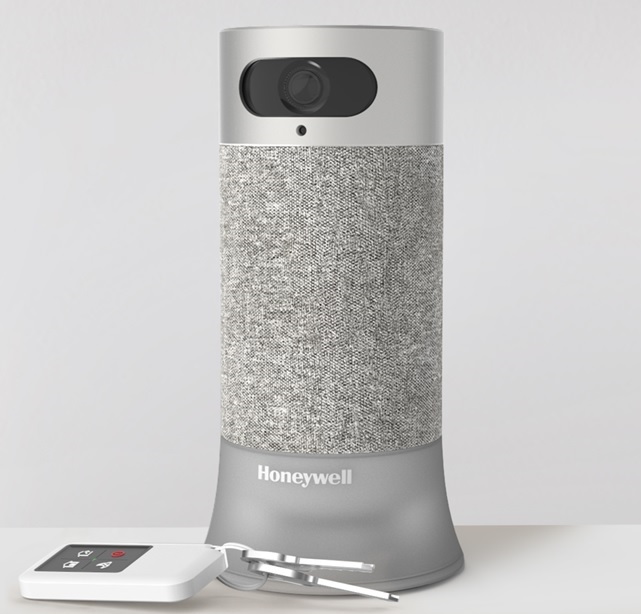
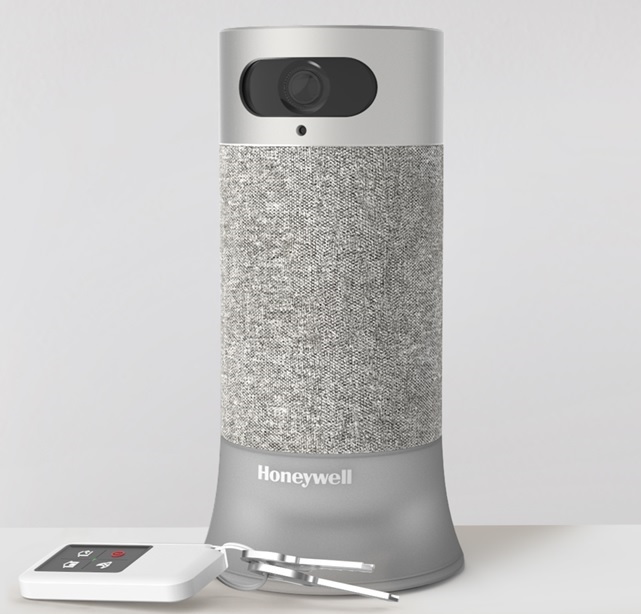
Name | Honeywell Smart Home Security |
|---|
Short Description | Honeywell Smart Home Security Base station |
|---|
Long Description | Honeywell Smart Home Security is a Home Security device. It can help you stay aware of what’s happening at home so you can come and go with confidence.
It’s simple to set up. The Camera Base Station connects to sensors, devices, and services, and comes integrated with Amazon Alexa™ and facial recognition. Whether you rent, own, or relocate regularly, Honeywell Smart Home Security is designed to adapt to your life |
|---|
Brand | Honeywell Home (Resideo) |
|---|
Product Identifier | RCHS5200W,RCHS5230W |
|---|
OEM Version | HW: 1 FW: 4.61:04.00 |
|---|
Hardware Platform | ZM5202 |
|---|
Z-Wave Version | 6.71.01 |
|---|
Library Type | CONTROLLER_STATIC |
|---|
Device Type | Central Controller |
|---|
Role Type | ROLE_TYPE_CONTROLLER_CENTRAL_STATIC |
|---|
Manufacturer ID | 0x0039 |
|---|
Product Type ID | 0x0001 |
|---|
Product ID | 0x0008 |
|---|
User Icon | 0x0100 |
|---|
Installer Icon | 0x0100 |
|---|
Frequency Plans | US: 916.00MHz, 908.40MHz |
|---|
Categories | Security Systems |
|---|
Countries / Regions | United States of America |
|---|
Supported Command Classes | Identifier | Name | Key | Version |
|---|
COMMAND_CLASS_POWERLEVEL | Powerlevel | 0x73 | 1 | COMMAND_CLASS_INCLUSION_CONTROLLER | Inclusion Controller | 0x74 | 1 | COMMAND_CLASS_APPLICATION_STATUS | Application Status | 0x22 | 1 | COMMAND_CLASS_CRC_16_ENCAP | CRC16 Encapsulation | 0x56 | 1 | COMMAND_CLASS_SECURITY | Security S0 | 0x98 | 1 | COMMAND_CLASS_TRANSPORT_SERVICE_V2 | Transport Service V2 | 0x55 | 2 | COMMAND_CLASS_VERSION_V2 | Version V2 | 0x86 | 2 | COMMAND_CLASS_DEVICE_RESET_LOCALLY | Device Reset Locally | 0x5A | 1 | COMMAND_CLASS_ZWAVEPLUS_INFO_V2 | Z-Wave Plus Info V2 | 0x5E | 2 | COMMAND_CLASS_ASSOCIATION_V2 | Association V2 | 0x85 | 2 | COMMAND_CLASS_ASSOCIATION_GRP_INFO | Association Group Info | 0x59 | 1 | COMMAND_CLASS_SECURITY_2 | Security S2 | 0x9F | 1 | COMMAND_CLASS_MANUFACTURER_SPECIFIC | Manufacturer Specific | 0x72 | 1 | COMMAND_CLASS_SUPERVISION | Supervision | 0x6C | 1 |
|
|---|
Controlled Command Classes | Identifier | Name | Key | Version |
|---|
COMMAND_CLASS_SWITCH_MULTILEVEL | Switch Multilevel | 0x26 | 1 | COMMAND_CLASS_MULTI_CHANNEL_ASSOCIATION_V3 | Multi-Channel Association V3 | 0x8E | 3 | COMMAND_CLASS_CLOCK | Clock | 0x81 | 1 | COMMAND_CLASS_SWITCH_BINARY | Switch Binary | 0x25 | 1 | COMMAND_CLASS_BASIC | Basic | 0x20 | 1 | COMMAND_CLASS_CRC_16_ENCAP | CRC16 Encapsulation | 0x56 | 1 | COMMAND_CLASS_SECURITY | Security S0 | 0x98 | 1 | COMMAND_CLASS_WAKE_UP_V2 | Wake Up V2 | 0x84 | 2 | COMMAND_CLASS_ASSOCIATION_V2 | Association V2 | 0x85 | 2 | COMMAND_CLASS_ASSOCIATION_GRP_INFO | Association Group Info | 0x59 | 1 | COMMAND_CLASS_MULTI_CHANNEL_V4 | Multi-Channel V4 | 0x60 | 4 | COMMAND_CLASS_SECURITY_2 | Security S2 | 0x9F | 1 | COMMAND_CLASS_MANUFACTURER_SPECIFIC | Manufacturer Specific | 0x72 | 1 |
|
|---|
S2 Classes | S2_UNAUTHENTICATED, S2_AUTHENTICATED, S2_ACCESS_CONTROL |
|---|
Documents | Category | Description | File |
|---|
Manual_Primary_Lang | Product or Owner's Manual | |
|
|---|
Features | Feature | Values |
|---|
Switch Load Capacity Current | | Color | | IP (Ingress Protection) Rated | | Battery Quantity | | Communications Connections | Value |
|---|
Ethernet (Wireless/WiFi) | Bluetooth |
| Communications Protocol | | Firmware Updatable | Value |
|---|
Updatable by Manufacturer |
| Neutral Wire Required | | Sensors | |
|
|---|
Association Groups | Group Number | Maximum Nodes Supported | End Point ID | Description |
|---|
1 | 1 | 0 | Z-Wave Plus Lifeline |
|
|---|
Texts | ID | Description | Value |
|---|
5 | Factory Reset | On the Z-Wave Device Management screen, press Z-Wave Utilities. Z-Wave Utilities screen appears, Press Controller Factory Reset. Please use this procedure only when the network primary controller is missing or otherwise inoperable. | 1 | Inclusion | On the Z-Wave Device Management screen, press Z-Wave Utilities. Z-Wave Utilities screen appears, Press General Device Inclusion. | 2 | Exclusion | On the Z-Wave Device Management screen, press Z-Wave Utilities. Z-Wave Utilities screen appears, Press General Device Exclusion. | 3 | Learn Mode (adding another controller) | On the Z-Wave Device Management screen, press Z-Wave Utilities. Z-Wave Utilities screen appears, Press Learn. |
|
|---|
Supports NWI | Yes |
|---|
Supports Explorer Frames | Yes |
|---|
Radio Range Z-Wave (m) | 40 |
|---|