Product Recognition | |
|---|
Certification Number | ZC10-17045555 |
|---|
Name | iCPE |
|---|
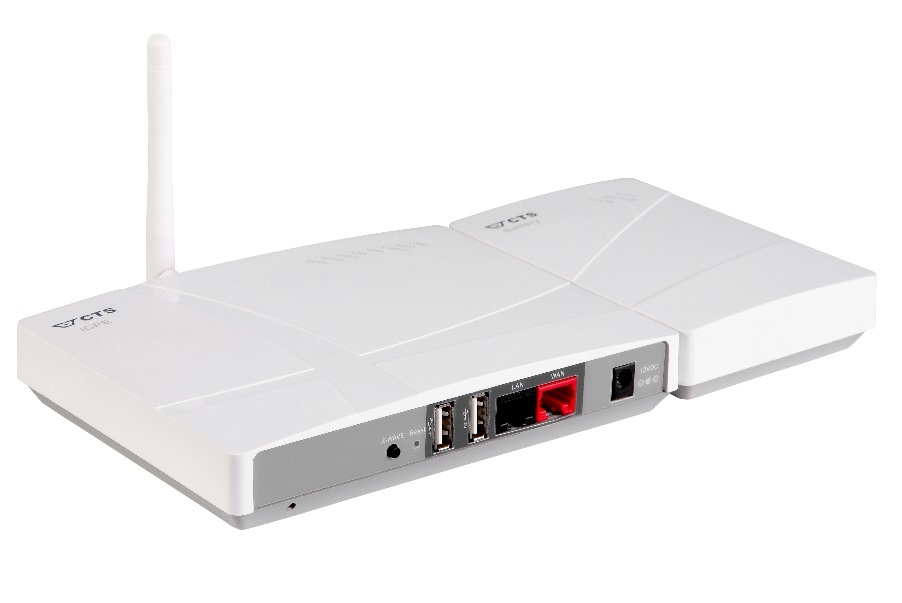
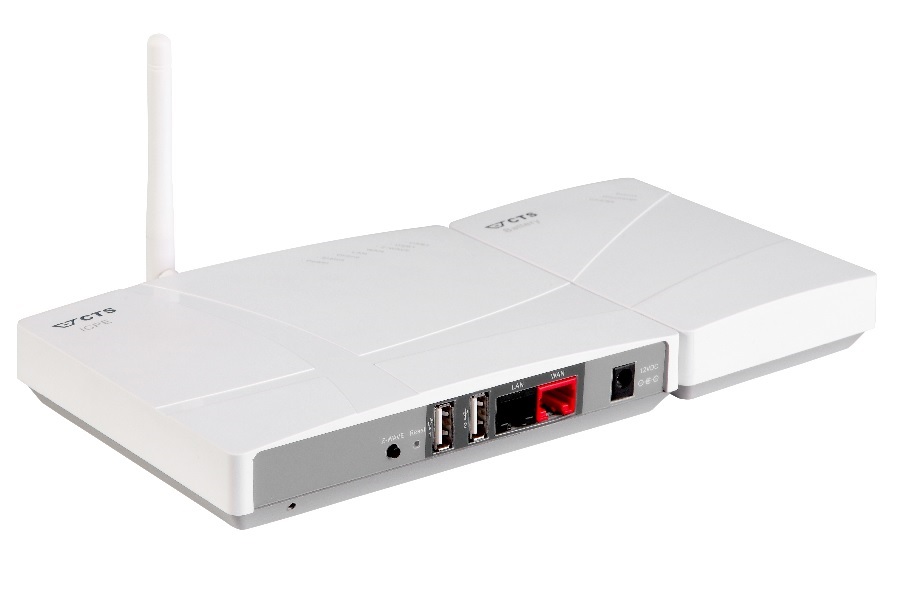
Short Description | The CTS-iCPE is an open, professional, secure and high-quality Gateway with full Z-Wave controller functionality supporting multi-service networks for carrier class IoT services. |
|---|
Long Description | The CTS-iCPE is a Gateway Controller. It is based on a managed layer-2 switch with full Z-Wave controller functionality added. As such it is unique at launch.
The CTS-iCPE is positioned as an open, secure and high quality product.
It is meant to be used as a professional and operationally secure gateway for carrier class IoT services.
This CTS-iCPE is ideally positioned to support open multi-service networks and providers.
Typical services address eHealth/Homecare, Real estate, Individual metering, Sustainability/Eco systems, Security as well as Home automation and Smart home solutions.
The CTS-iCPE operates with any and all Z-Wave sensors and actuators available.
However, this will not be enough for creating a winning value proposition. The true value will be delivered to the market based on so-called open service platforms. Service Mediators using such open platforms have started to enter the market with scalable delivery of innovative applications and operational services to the end-users.
A summary of the necessary layers towards full market solutions:
• Gateway: Professional and secure CTS-iCPE
• Secure Z-Wave sensors and actuators
• Open multi-service solution platforms
• Independent Communication operators
• Easy integration for delivery from service specific operational market players (i.e. Security companies; eHealth solutions, Utility Co’s etc.)
All basic functions for proper use of the CTS-iCPE are handled in the basic User Manual. More in-depth instructions for service platform owners and service mediators can be obtained at: cts_fae@ctsystem.com |
|---|
Brand | CTS |
|---|
Product Identifier | iCPE |
|---|
OEM Version | HW: 4 FW: 4.45:02.58:100.03:01.00 |
|---|
Hardware Platform | ZM5202 |
|---|
Z-Wave Version | 6.51.10 |
|---|
Library Type | CONTROLLER_BRIDGE |
|---|
Device Type | Central Controller |
|---|
Role Type | ROLE_TYPE_CONTROLLER_CENTRAL_STATIC |
|---|
Manufacturer ID | 0x0285 |
|---|
Product Type ID | 0x0201 |
|---|
Product ID | 0x0001 |
|---|
User Icon | 0x0100 |
|---|
Installer Icon | 0x0100 |
|---|
Frequency Plans | US: 916.00MHz, 908.40MHz |
|---|
Categories | All Controllers, Gateway Controller |
|---|
Countries / Regions | United States of America |
|---|
Supported Command Classes | Identifier | Name | Key | Version |
|---|
COMMAND_CLASS_NETWORK_MANAGEMENT_INCLUSION | Network Management Inclusion | 0x34 | 1 | COMMAND_CLASS_POWERLEVEL | Powerlevel | 0x73 | 1 | COMMAND_CLASS_NETWORK_MANAGEMENT_INSTALLATION_MAINTENANCE | Network Management Installation and Maintenance | 0x67 | 1 | COMMAND_CLASS_NETWORK_MANAGEMENT_PROXY | Network Management Proxy | 0x52 | 1 | COMMAND_CLASS_APPLICATION_STATUS | Application Status | 0x22 | 1 | COMMAND_CLASS_CRC_16_ENCAP | CRC16 Encapsulation | 0x56 | 1 | COMMAND_CLASS_SECURITY | Security S0 | 0x98 | 1 | COMMAND_CLASS_VERSION_V2 | Version V2 | 0x86 | 2 | COMMAND_CLASS_ZIP_V2 | Z/IP V2 | 0x23 | 2 | COMMAND_CLASS_DEVICE_RESET_LOCALLY | Device Reset Locally | 0x5A | 1 | COMMAND_CLASS_ZWAVEPLUS_INFO_V2 | Z-Wave Plus Info V2 | 0x5E | 2 | COMMAND_CLASS_ASSOCIATION_V2 | Association V2 | 0x85 | 2 | COMMAND_CLASS_ASSOCIATION_GRP_INFO | Association Group Info | 0x59 | 1 | COMMAND_CLASS_ZIP_GATEWAY | Z/IP Gateway | 0x5F | 1 | COMMAND_CLASS_MANUFACTURER_SPECIFIC_V2 | Manufacturer Specific V2 | 0x72 | 2 | COMMAND_CLASS_NETWORK_MANAGEMENT_BASIC | Network Management Basic | 0x4D | 1 |
|
|---|
Controlled Command Classes | Identifier | Name | Key | Version |
|---|
COMMAND_CLASS_NOTIFICATION_V7 | Notification V7 | 0x71 | 7 | COMMAND_CLASS_DOOR_LOCK | Door Lock | 0x62 | 1 | COMMAND_CLASS_POWERLEVEL | Powerlevel | 0x73 | 1 | COMMAND_CLASS_USER_CODE | User Code | 0x63 | 1 | COMMAND_CLASS_BATTERY | Battery | 0x80 | 1 | COMMAND_CLASS_THERMOSTAT_MODE | Thermostat Mode | 0x40 | 1 | COMMAND_CLASS_SWITCH_BINARY | Switch Binary | 0x25 | 1 | COMMAND_CLASS_BASIC | Basic | 0x20 | 1 | COMMAND_CLASS_CONFIGURATION | Configuration | 0x70 | 1 | COMMAND_CLASS_CRC_16_ENCAP | CRC16 Encapsulation | 0x56 | 1 | COMMAND_CLASS_SECURITY | Security S0 | 0x98 | 1 | COMMAND_CLASS_VERSION_V2 | Version V2 | 0x86 | 2 | COMMAND_CLASS_WAKE_UP_V2 | Wake Up V2 | 0x84 | 2 | COMMAND_CLASS_ZWAVEPLUS_INFO_V2 | Z-Wave Plus Info V2 | 0x5E | 2 | COMMAND_CLASS_SWITCH_MULTILEVEL_V3 | Switch Multilevel V3 | 0x26 | 3 | COMMAND_CLASS_ASSOCIATION_V2 | Association V2 | 0x85 | 2 | COMMAND_CLASS_METER_V3 | Meter V3 | 0x32 | 3 | COMMAND_CLASS_SENSOR_MULTILEVEL_V9 | Sensor Multilevel V9 | 0x31 | 9 | COMMAND_CLASS_ASSOCIATION_GRP_INFO | Association Group Info | 0x59 | 1 | COMMAND_CLASS_THERMOSTAT_SETPOINT | Thermostat Setpoint | 0x43 | 1 | COMMAND_CLASS_MULTI_CHANNEL_V3 | Multi-Channel V3 | 0x60 | 3 | COMMAND_CLASS_MANUFACTURER_SPECIFIC_V2 | Manufacturer Specific V2 | 0x72 | 2 | COMMAND_CLASS_MULTI_CHANNEL_ASSOCIATION_V2 | Multi Channel Association V2 | 0x8E | 2 | COMMAND_CLASS_MULTI_CMD | Multi-Command | 0x8F | 1 |
|
|---|
Documents | Category | Description | File |
|---|
Manual_Primary_Lang | Product or Owner's Manual | |
|
|---|
Features | Feature | Values |
|---|
Battery Quantity | | Battery Type | | Communications Protocol | | Firmware Updatable | Value |
|---|
Updatable by Professional/Technician |
| Color | | Switch Load Capacity Watts | | Communications Connections | Value |
|---|
Ethernet (Wired) | USB (Universal Serial Bus) |
| Supported Notification Types | Value |
|---|
Smoke Alarm | CO Alarm | CO2 Alarm | Heat Alarm | Water Alarm | Home Security | System | Clock | Appliance |
| Loads Controlled | | Sensors | Value |
|---|
Motion/No Motion (Binary) | Air Temperature | Luminance | Moisture | Humidity | Open/Closed (Binary) | Smoke Density | Heat | Freeze | Vibration/Shock (Binary) | Ultraviolet Index | General Purpose | Power | Velocity | Direction | Atmospheric Pressure | Barometric Pressure | Solar Radiation | Dew Point | Rain Rate | Tide Level | Weight | Voltage | Current | Air Flow | Tank Capacity | Distance | Rotation | Water Temperature | Soil Temperature | Seismic Intensity | Seismic Magnitude | Loudness | Time | Water Flow | Electrical Resistivity | Electrical Conductivity | Carbon Dioxide | Carbon Monoxide |
|
|
|---|
Association Groups | Group Number | Maximum Nodes Supported | End Point ID | Description |
|---|
1 | 1 | 0 | Z-Wave Plus Lifeline |
|
|---|
Texts | ID | Description | Value |
|---|
6 | Additional Special Features | The Z-Wave network configuration incorporates functions for backup, restoration and save.
Z-Wave module firmware upgrade is supported. | 24 | Controller Exclusion | There are two ways to exclude Z-Wave sensors.
- The first is to click the ""Remove Node"" button on the WEB page.
- The other way is to click the Z-Wave push button.
The user can use the Z-Wave mode button on the front panel of the CTS-iCPE to include or exclude Z-Wave sensors.
The default setting is in Normal mode.
The mode is switched by pressing the button.
When pressing the Z-Wave button once, it switches to the Include mode.
When pressed again, it switches to the Exclude mode.
Finally, during the Exclude mode, when the button is pressed again it will switch back to the Normal mode. | 23 | Controller Inclusion | There are two ways to include Z-Wave sensors.
- The first is to click the ""Add Node"" button on the WEB page.
- The other way is to click the Z-Wave push button.
The user can use the Z-Wave mode button on the front panel of the CTS-iCPE to include or exclude Z-Wave sensors.
The default setting is in Normal mode.
The mode is switched by pressing the button:
When pressing the Z-Wave button once, it switches to the Include mode.
When pressed again, it switches to the Exclude mode.
Finally, during the Exclude mode, when the button is pressed again it will switch back to the Normal mode. | 3 | Learn Mode (adding another controller) | The user can click the ""Initiate"" button on the WEB page to accept inclusion, exclusion or replication requests from other controllers.
The controller turns into “Learn Mode”. The Learn Mode will time out after 60 seconds.
The Learn Mode stops when the controller is included, excluded or replicated successfully.
The process of Learn Mode can be manually stopped using the “Abort” button.
Pressing the “Abort” button during the communication process, will cause the Z-Wave system to restart, which approximately takes 150 seconds. | 5 | Factory Reset | The user can click the ""Reset"" button on the WEB page to return the controller to factory settings.
Note:
All connections with included devices and all configurations and settings will be lost.
It takes approximately 90 seconds to finish the process.
If this controller is the primary controller for your network, resetting it will result in the nodes in your network being orphaned and it will be necessary after the reset to exclude and re-include all of the nodes in the network. If this controller is being used as a secondary controller in the network, use this procedure to reset this controller only in the event that the network primary controller is missing or otherwise inoperable. |
|
|---|
Supports NWI | Yes |
|---|
Supports Explorer Frames | Yes |
|---|