Product Recognition | |
|---|
Certification Number | ZC10-19126823 |
|---|
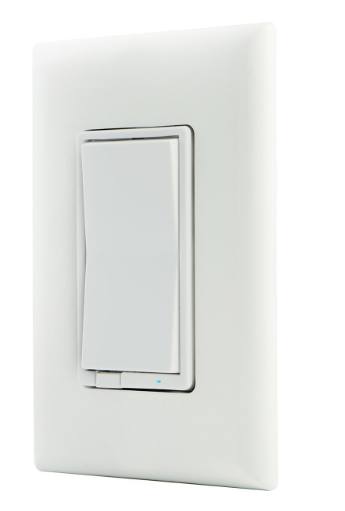
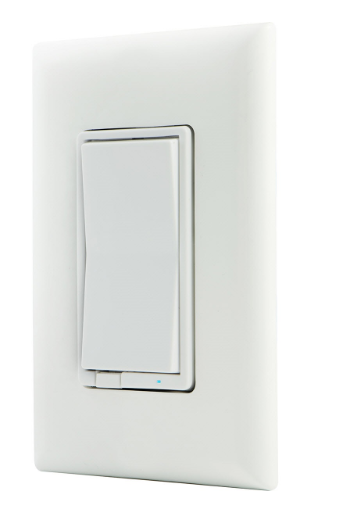
Name | In-Wall Smart Dimmer |
|---|
Short Description | Transform any home into a smart home with the Honeywell In-Wall Smart Dimmer. |
|---|
Long Description | Transform any home into a smart home with the Honeywell In-Wall Smart Dimmer. The In-Wall Smart Dimmer can easily replace any standard in-wall switch and remotely controls a light in your home. Your home will be equipped with ultimate flexibility with the Honeywell Z-Wave Smart Dimmer, capable of being used by itself or with up to four add-on switches. Screw terminal installation provides improved space efficiency when replacing existing switches and the integrated LED indicator light allows you to easily locate the switch in a dark room. The Honeywell Z-Wave In-Wall Smart Dimmer is compatible with any Z-Wave certified gateway, providing access to many popular home automation systems. Take control of your home lighting with Honeywell Z-Wave Smart Lighting Controls! |
|---|
Brand | Honeywell |
|---|
Product Identifier | 39458/ZW3005 |
|---|
Product Line | Honeywell Smart Switch Lighting Controls |
|---|
OEM Version | HW: 255 FW: 5.26 |
|---|
Hardware Platform | ZM5202 |
|---|
Z-Wave Version | 6.51.08 |
|---|
Library Type | SLAVE_ENHANCED_232 |
|---|
Device Type | Light Dimmer Switch |
|---|
Role Type | ROLE_TYPE_SLAVE_ALWAYS_ON |
|---|
Manufacturer ID | 0x0039 |
|---|
Product Type ID | 0x4944 |
|---|
Product ID | 0x3038 |
|---|
User Icon | 0x0600 |
|---|
Installer Icon | 0x0600 |
|---|
Frequency Plans | US: 916.00MHz, 908.40MHz |
|---|
Categories | Hospitality, All Lighting Devices, Dimming Lighting Devices, On/Off Switches/Devices, Lighting Accessories |
|---|
Countries / Regions | United States of America |
|---|
Supported Command Classes | Identifier | Name | Key | Version |
|---|
COMMAND_CLASS_SCENE_ACTUATOR_CONF | Scene Actuator Conf | 0x2C | 1 | COMMAND_CLASS_POWERLEVEL | Powerlevel | 0x73 | 1 | COMMAND_CLASS_SWITCH_ALL | Switch All | 0x27 | 1 | COMMAND_CLASS_BASIC | Basic | 0x20 | 1 | COMMAND_CLASS_CONFIGURATION | Configuration | 0x70 | 1 | COMMAND_CLASS_CRC_16_ENCAP | CRC16 Encapsulation | 0x56 | 1 | COMMAND_CLASS_SWITCH_MULTILEVEL_V2 | Switch Multilevel V2 | 0x26 | 2 | COMMAND_CLASS_VERSION_V2 | Version V2 | 0x86 | 2 | COMMAND_CLASS_DEVICE_RESET_LOCALLY | Device Reset Locally | 0x5A | 1 | COMMAND_CLASS_ZWAVEPLUS_INFO_V2 | Z-Wave Plus Info V2 | 0x5E | 2 | COMMAND_CLASS_ASSOCIATION_V2 | Association V2 | 0x85 | 2 | COMMAND_CLASS_ASSOCIATION_GRP_INFO | Association Group Info | 0x59 | 1 | COMMAND_CLASS_SCENE_ACTIVATION | Scene Activation | 0x2B | 1 | COMMAND_CLASS_FIRMWARE_UPDATE_MD_V2 | Firmware Update Meta-Data V2 | 0x7A | 2 | COMMAND_CLASS_MANUFACTURER_SPECIFIC_V2 | Manufacturer Specific V2 | 0x72 | 2 |
|
|---|
Controlled Command Classes | Identifier | Name | Key | Version |
|---|
COMMAND_CLASS_BASIC | Basic | 0x20 | 1 |
|
|---|
Documents | Category | Description | File |
|---|
Manual_Primary_Lang | Product Manual | |
|
|---|
Features | Feature | Values |
|---|
Firmware Updatable | Value |
|---|
Updatable by Consumer by RF |
| Neutral Wire Required | |
|
|---|
Association Groups | Group Number | Maximum Nodes Supported | End Point ID | Group Name | Description |
|---|
3 | 5 | 0 | Double Press | Association Group 3 supports Basic Set and is controlled by double pressing the button | 2 | 5 | 0 | Single Press | Association Group 2 supports Basic Set and is controlled by single pressing the button | 1 | 5 | 0 | Lifeline | Supports Device Reset Locally and receives unsolicited status updates. |
|
|---|
Configuration Parameters | Parameter Number | Name | Description | Format | Size | Min Value | Max Value | Default Value | Parameter Values |
|---|
7 | Dim Rate Adjustments | Dim Rate Adjustments when receiving Z-Wave dim command | 0 | 1 | -1 | -1 | 1 | From | To | Description |
|---|
1 | 99 | number of steps or levels |
| 8 | Dim Rate Adjustments | Dim Rate Adjustments when receiving a Z-Wave dim command | 0 | 2 | -1 | -1 | 3 | From | To | Description |
|---|
1 | 255 | timing of steps |
| 3 | LED Light | When shipped from the factory, the LED is set to turn ON when the connected light is turned OFF. This is the default setting and can be changed if your primary controller supports the node configuration function. To make the LED turn ON when the light is turned ON, change parameter 3’s value to “1”. To turn the LED OFF at all times, change parameter 3’s value to 2. | 0 | 1 | -1 | -1 | 0 | From | To | Description |
|---|
0 | 0 | Default | 1 | 1 | LED ON when load is ON | 2 | 2 | LED always OFF |
| 4 | Invert Switch | If the switch is accidentally installed upside down with “On” at the bottom and “Off” at the top, the default On/Off rocker settings can be reversed by changing parameter 4’s value to “1”. | 0 | 1 | -1 | -1 | 0 | From | To | Description |
|---|
0 | 0 | Default | 1 | 1 | Invert Switch |
| 9 | Dim Rate Adjustments | Dime Rate Adjustments when manually controlled dimming | 0 | 1 | -1 | -1 | 1 | From | To | Description |
|---|
1 | 99 | number of steps or levels |
| 10 | Dim Rate Adjustments | Dim Rate Adjustments when manually controlling dimming | 0 | 2 | -1 | -1 | 3 | From | To | Description |
|---|
1 | 255 | timing of steps |
| 11 | Dim Rate Adjustments | Dim Rate Adjustments when receiving an All-On or All-Off command | 0 | 1 | -1 | -1 | 1 | From | To | Description |
|---|
1 | 99 | number of steps or levels |
|
|
|---|
Texts | ID | Description | Value |
|---|
2 | Classic Exclusion | 1. Follow the instructions for your Z-Wave certified controller to remove a device from the Z-Wave network.
2. Once the controller is ready to remove your device, press and release the top or bottom of the smart dimmer (rocker) to remove it from the network. | 5 | Factory Reset Procedure | Quickly press ON (top) button 3 times then immediately press the OFF (bottom) button 3 times. The LED will flash ON/OFF 5 times when completed successfully.
Note: This should only be used in the event your network’s primary controller is missing or otherwise inoperable. | 1 | Classic Inclusion | 1. Follow the instructions for your Z-Wave certified controller to add a device to the Z-Wave network.
2. Once the controller is ready to add your device, press and release the top or bottom of the smart dimmer
rocker). Repeat as necessary to add the dimmer to the network. |
|
|---|
Supports NWI | Yes |
|---|
Supports Explorer Frames | Yes |
|---|
Radio Range Z-Wave (m) | 40 |
|---|