Product Recognition | |
|---|
Certification Number | ZC10-21107056 |
|---|
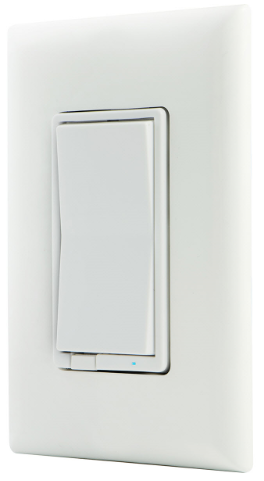
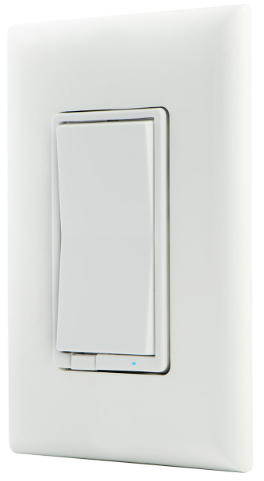
Name | In-Wall Smart Dimmer |
|---|
Short Description | Z-Wave Plus™ In-Wall Smart Dimmer replaces existing light switch and allows remote control from any Z-Wave™ certified hub. |
|---|
Long Description | Z-Wave Plus™ In-Wall Smart Dimmer replaces existing light switch and allows remote control from any Z-Wave™ certified hub. |
|---|
Brand | iDevices |
|---|
Product Identifier | 61303/ZW3010 |
|---|
Product Line | Wireless Lighting Controls |
|---|
OEM Version | HW: 255 FW: 5.55 |
|---|
Hardware Platform | ZM5202 |
|---|
Z-Wave Version | 6.81.03 |
|---|
Library Type | SLAVE_ENHANCED_232 |
|---|
Device Type | Light Dimmer Switch |
|---|
Role Type | ROLE_TYPE_SLAVE_ALWAYS_ON |
|---|
Manufacturer ID | 0x0458 |
|---|
Product Type ID | 0x4944 |
|---|
Product ID | 0x3236 |
|---|
User Icon | 0x0600 |
|---|
Installer Icon | 0x0604 |
|---|
Frequency Plans | US: 916.00MHz, 908.40MHz |
|---|
Categories | All Lighting Devices, Dimming Lighting Devices, Lighting Accessories |
|---|
Countries / Regions | United States of America |
|---|
Supported Command Classes | Identifier | Name | Key | Version |
|---|
COMMAND_CLASS_CONFIGURATION_V4 | Configuration V4 | 0x70 | 4 | COMMAND_CLASS_FIRMWARE_UPDATE_MD_V4 | Firmware Update Meta-Data V4 | 0x7A | 4 | COMMAND_CLASS_POWERLEVEL | Powerlevel | 0x73 | 1 | COMMAND_CLASS_APPLICATION_STATUS | Application Status | 0x22 | 1 | COMMAND_CLASS_TRANSPORT_SERVICE_V2 | Transport Service V2 | 0x55 | 2 | COMMAND_CLASS_DEVICE_RESET_LOCALLY | Device Reset Locally | 0x5A | 1 | COMMAND_CLASS_ZWAVEPLUS_INFO_V2 | Z-Wave Plus Info V2 | 0x5E | 2 | COMMAND_CLASS_ASSOCIATION_V2 | Association V2 | 0x85 | 2 | COMMAND_CLASS_ASSOCIATION_GRP_INFO | Association Group Info | 0x59 | 1 | COMMAND_CLASS_SWITCH_MULTILEVEL_V4 | Switch Multilevel V4 | 0x26 | 4 | COMMAND_CLASS_BASIC_V2 | Basic V2 | 0x20 | 2 | COMMAND_CLASS_SECURITY_2 | Security S2 | 0x9F | 1 | COMMAND_CLASS_VERSION_V3 | Version V3 | 0x86 | 3 | COMMAND_CLASS_CENTRAL_SCENE_V3 | Central Scene V3 | 0x5B | 3 | COMMAND_CLASS_SUPERVISION | Supervision | 0x6C | 1 | COMMAND_CLASS_MANUFACTURER_SPECIFIC_V2 | Manufacturer Specific V2 | 0x72 | 2 |
|
|---|
Controlled Command Classes | Identifier | Name | Key | Version |
|---|
COMMAND_CLASS_BASIC_V2 | Basic V2 | 0x20 | 2 |
|
|---|
S2 Classes | S2_UNAUTHENTICATED, S2_AUTHENTICATED |
|---|
Documents | Category | Description | File |
|---|
Manual_Primary_Lang | Product Manual | |
|
|---|
Features | Feature | Values |
|---|
Electric Load Type | Value |
|---|
Incandescent | Dimmable LED |
| Firmware Updatable | Value |
|---|
Updatable by Consumer by RF |
| Neutral Wire Required | | Switch Load Capacity Watts | | Switch Type | Value |
|---|
Decorator Paddle Push with Indicator |
| Z-Wave Scene Type | Value |
|---|
Scene & Central Scene |
|
|
|---|
Association Groups | Group Number | Maximum Nodes Supported | End Point ID | Group Name | Description |
|---|
3 | 5 | 0 | Double Press | Association Group 3 supports Basic Set and is controlled by double pressing the button | 1 | 5 | 0 | Lifeline | Association Group 1 (Lifeline) supports Device Reset Locally and receives unsolicited status updates. | 2 | 5 | 0 | Single Press | Association Group 2 supports Basic Set and is controlled by single pressing the button. |
|
|---|
Configuration Parameters | Parameter Number | Name | Description | Format | Read-only | Size | Min Value | Max Value | Default Value | Parameter Values |
|---|
3 | LED Indication | LED Indication | 1 | Yes | 1 | 0 | 3 | 0 | From | To | Description |
|---|
0 | 0 | Device is ON, LED is OFF; device is Off, LED is ON | 1 | 1 | Device is ON, LED is ON; device is Off, LED is OFF | 2 | 2 | LED always OFF | 3 | 3 | LED always ON |
| 31 | Maximum Brightness Threshold | Maximum Brightness Threshold | 1 | Yes | 1 | 1 | 99 | 0 | From | To | Description |
|---|
1 | 99 | Set the maximum brightness threshold when manually or remotely controlled |
| 6 | Dim Up/Down Rate | Dim Up/Down Rate | 1 | Yes | 1 | 0 | 1 | 0 | From | To | Description |
|---|
0 | 0 | Dim up/down the light to the specified level quickly by command except value 0 and FF | 1 | 1 | Dim up/down the light to the specified level slowly by command except value 0 and FF |
|
|
|---|
Texts | ID | Description | Value |
|---|
8 | Where to find S2 DSK on product | Page 1 Section 4.
NOTE: SmartStart enabled products can be added into a Z-Wave network
by scanning the QR code on the product with a controller providing
SmartStart inclusion. No further action is required and the SmartStart
product will be added automatically within | 1 | Classic Inclusion | Adding your device to a Z-Wave network
1. Follow the instructions for your Z-Wave certified controller to
add a device to the Z-Wave network.
2. Once the controller is ready to add your device, press
and release the top or bottom of the wireless smart dimmer
(rocker). | 2 | Classic Exclusion | To remove and reset the device
1. Follow the instructions for your Z-Wave certified controller to
remove a device from the Z-Wave network.
2. Once the controller is ready to remove your device, press
and release the top or bottom of the wireless smart dimmer
(rocker). | 5 | Factory Reset Procedure | 1. Quickly press ON (top) button three times then immediately
press the OFF (bottom) button three times. The LED will flash
ON/OFF five times when completed successfully.
Note: This should only be used if your network’s primary
controller is missing or otherwise inoperable. |
|
|---|
Supports NWI | Yes |
|---|
Supports Explorer Frames | Yes |
|---|
Supports SmartStart | Yes |
|---|
Radio Range Z-Wave (m) | 40 |
|---|